Ragdoll Revolver
Ragdoll Revolver

Ragdoll Revolver

Action

| Appodeal Accelerator Labs

Play on PC with BlueStacks or from our cloud

  • Overview
  • Game Features
  • How to Play

Page Modified On: October 30, 2026

Play Ragdoll Revolver on PC or Mac

Ragdoll Revolver brings the Action genre to life, and throws up exciting challenges for gamers. Developed by Appodeal Accelerator Labs, this Android game is best experienced on BlueStacks, the World’s #1 app player for PC and Mac users.

About the Game

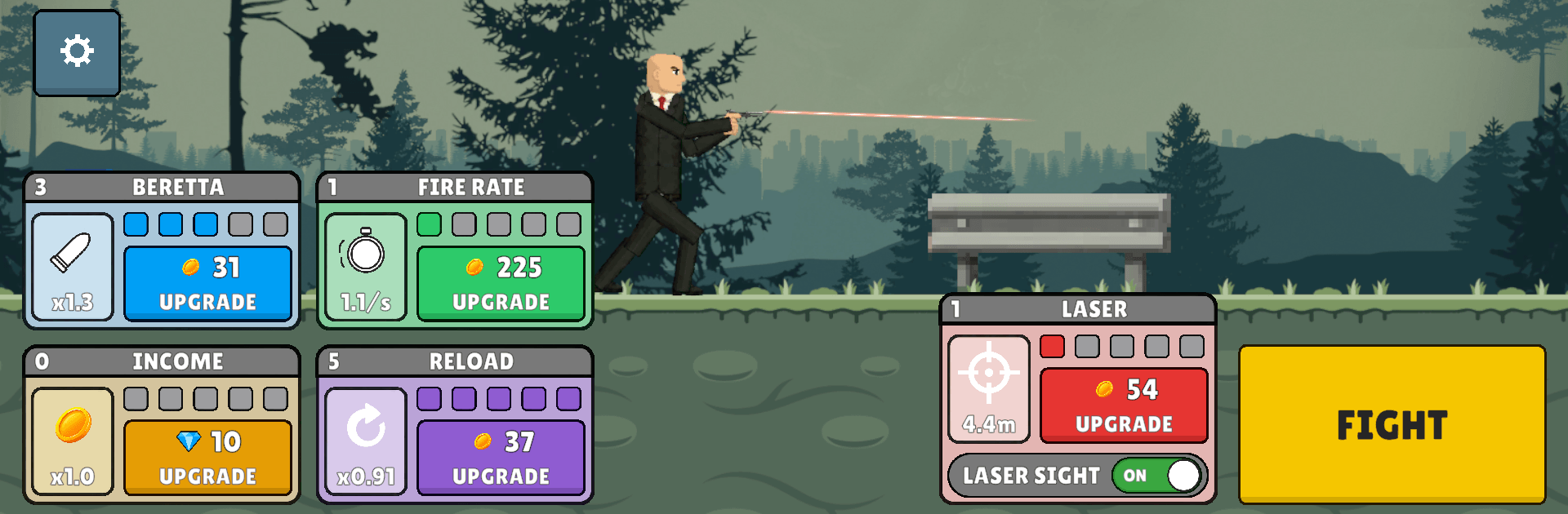
Ragdoll Revolver keeps things lean and focused: point, shoot, and try not to blink while chaos unfolds. This Action shooter strips controls down to simple aim-and-flick, then lets floppy physics do the rest as enemies tumble down an endless road. Want smooth aim on a bigger screen? It plays nicely on BlueStacks, too.

Game Features

  • Thumb-Aim Simplicity: Slide to line up your shot while the weapon fires on its own, so it’s all about timing and angles.
  • Physics-Driven Chaos: Every enemy is a true ragdoll, meaning blasts shove, flip, and domino them into each other in unpredictable ways.
  • High-Stakes Multipliers: String tight, precise hits to ramp a score multiplier and pile up coins; miss once and the streak snaps.
  • Ten Guns, Ten Personalities: Climb from a trusty Beretta to the MAC-10, MP5, M870, AK-47, M4A1, relentless AA-12, and long shots with Dragunov and AWP.
  • Tune Your Arsenal: Upgrade damage, fire rate, and reload speed on each weapon to sharpen your edge and match your rhythm.
  • 30 Stages, 5 Backdrops: March through neon nights, crumbling blocks at dusk, rain-lashed forests, pink-sky desert roads, and icy mountain passes as runs get tougher.
  • A Dozen Foes, Dozens of Tactics: Face shufflers and sprinters, mohawked punks, axe bruisers, armed gunners, a bullet sponge “tank,” a katana-wielding oddball, and even an alien.
  • Sandbox Mayhem: Turn off goals and play with the toys—spawn hordes, toggle low gravity or slow motion, and fling ragdolls via a launch plate, updraft column, and winch.
  • Dress the Protagonist: Rock the black suit and red tie, switch to a bomber jacket, or go full black with long hair—skins bought with the coins you actually earn.

BlueStacks gives you more room to focus on the game and less time adjusting around mobile limitations.


Game Features

Enhancements

  • Macros
  • Multi Instance
  • Multi Instance Sync
  • Eco Mode
  • Enhancements
Macros

Macros

Skip the boring parts of a game. Play Ragdoll Revolver with Macros and get the edge. Simply record a sequence of commands and execute them at any moment.
Multi Instance

Multi Instance

Why limit to one game on your phone when you can play many on your PC? Open multiple instances of Ragdoll Revolver at once with Multi-Instance. Leverage the power of different accounts by doing more.
Multi Instance Sync

Multi Instance Sync

Get the best out of Ragdoll Revolver with Multi-Instance Sync. Play the game from different accounts and build your own empire. Use Multi-instance sync to repeat the action in the main BlueStacks instance on all other instances.
Eco Mode

Eco Mode

Find the rarest heroes by making multiple summons in Ragdoll Revolver. And while you are at it, reduce your PC’s resource consumption with the Eco Mode. Farm efficiently. Get the best results.
Read More

How to Download and Play Ragdoll Revolver on PC or Mac

  • Download and install BlueStacks on your PC or Mac

  • Complete Google sign-in to access the Play Store, or do it later

  • Look for Ragdoll Revolver in the search bar at the top right corner

  • Click to install Ragdoll Revolver from the search results

  • Complete Google sign-in (if you skipped step 2) to install Ragdoll Revolver

  • Click the Ragdoll Revolver icon on the home screen to start playing

video
Watch Video

Minimum System Requirements

With BlueStacks 5, you can get started on a PC that fulfills the following requirements.

  • Operating System

    Microsoft Windows 7 or above, macOS 11 (Big Sur) or above

  • Processor

    Intel, AMD or Apple Silicon Processor

  • RAM

    at least 4GB

  • HDD

    10GB Free Disk Space

Note:

* You must be an Administrator on your PC. Up to date graphics drivers from Microsoft or the chipset vendor.

Ragdoll Revolver - FAQs

  • How to play Ragdoll Revolver on Windows PC & Mac?

    Play Ragdoll Revolver on your PC or Mac by following these simple steps.

    • Click on 'Play Ragdoll Revolver on PC’ to download BlueStacks
    • Install it and log-in to Google Play Store
    • Launch and play the game.
  • Why is BlueStacks the fastest and safest platform to play games on PC?

    BlueStacks respects your privacy and is always safe and secure to use. It does not carry any malware, spyware, or any sort of additional software that could harm your PC.

    It is engineered to optimize speed and performance for a seamless gaming experience.

  • What are Ragdoll Revolver PC requirements?

    Minimum requirement to run Ragdoll Revolver on your PC

    • OS: Microsoft Windows 7 or above MacOS 11 (Big Sur) or above
    • Processor: Intel, AMD or Apple Silicon Processor
    • RAM: Your PC must have at least 4GB of RAM. (Note that having 4GB or more disk space is not a substitute for RAM)
    • HDD: 10GB Free Disk Space.
    • You must be an Administrator on your PC.