Sandbox World - 3D mechanics

Sandbox World - 3D mechanics

Action

| XMAKE

Play on PC with BlueStacks or from our cloud

  • Overview
  • Game Features
  • How to Play

Page Modified On: November 10, 2025

Play Sandbox World - 3D mechanics on PC or Mac

Explore a whole new adventure with Sandbox World – 3D mechanics, a Action game created by XMAKE. Experience great gameplay with BlueStacks, the most popular gaming platform to play Android games on your PC or Mac.

About the Game

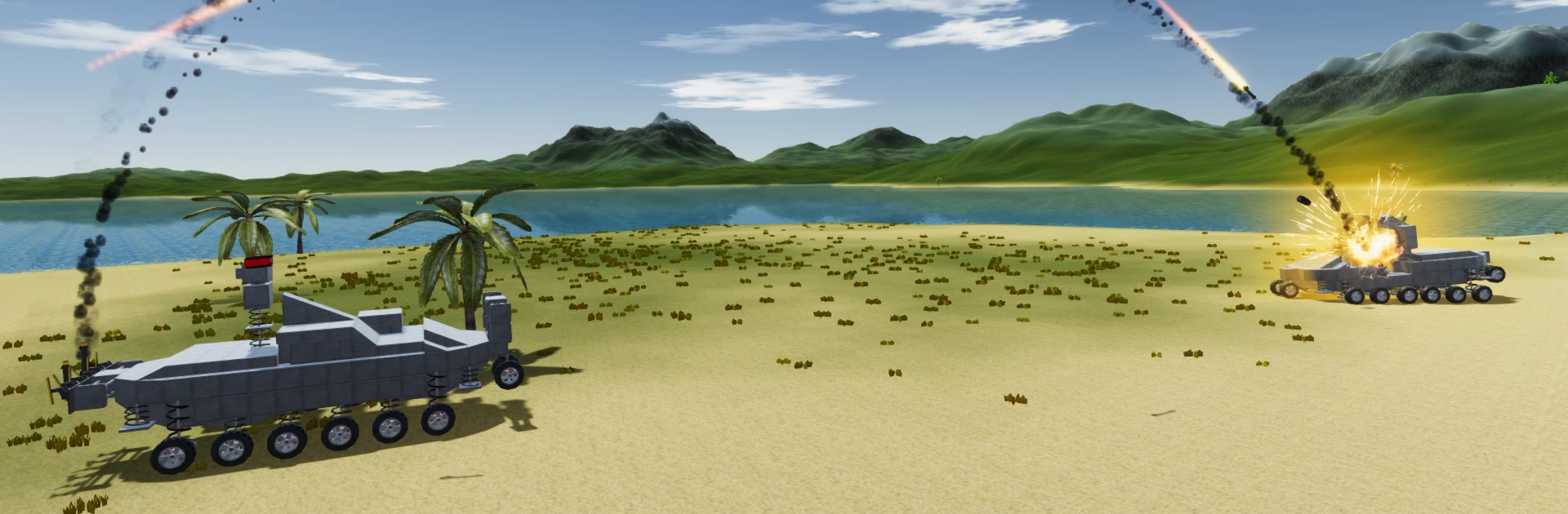
Sandbox World – 3D mechanics is an Action sandbox from XMAKE where building cool machines is only half the fun—the other half is watching them roar to life. Assemble tanks, planes, ships, or utterly weird contraptions, then roll into chaotic battles to see what your engineering can actually survive. Want a bigger view? It also plays great on PC with BlueStacks.

Game Features

  • Build anything, your way: Snap together custom vehicles and structures piece by piece, from compact racers to lumbering fortresses. If you can picture it, you can probably build it.
  • 60+ parts to tinker with: Mix wheels, treads, hover modules, thrusters, and rocket engines. Add structural blocks, pivots, and more to dial in the handling and look.
  • Real mechanical feel: Weight, balance, and placement matter. Tweaking a single part can turn a wobbly heap into a steady beast—or the other way around.
  • Hefty firepower options: Outfit your builds with machine guns, naval cannons, and rocket launchers. Create focused sniper rigs or rolling barrages that blanket the map.
  • Multiplayer mayhem: Test your creations against other players across varied modes. It’s the ultimate stress test—win or lose, you’ll come back with ideas to improve.
  • Protect the vital bits: Reinforce engines, ammo, and control cores to shrug off different projectile types. Smart armor layouts often beat brute force.
  • Share and try community builds: Publish your machines to the in-game gallery, browse what others have made, download favorites, and leave ratings.
  • PC-friendly controls: Prefer keyboard and mouse? Fire up Sandbox World – 3D mechanics on BlueStacks and enjoy crisp controls and a broader perspective while you build and battle.

Ready to top the leaderboard? We bet you do. Let precise controls and sharp visuals optimized on BlueStacks lead you to victory.


Game Features

Enhancements

  • Macros
  • Multi Instance
  • Multi Instance Sync
  • Eco Mode
  • Enhancements
Macros

Macros

Skip the boring parts of a game. Play Sandbox World - 3D mechanics with Macros and get the edge. Simply record a sequence of commands and execute them at any moment.
Multi Instance

Multi Instance

Why limit to one game on your phone when you can play many on your PC? Open multiple instances of Sandbox World - 3D mechanics at once with Multi-Instance. Leverage the power of different accounts by doing more.
Multi Instance Sync

Multi Instance Sync

Get the best out of Sandbox World - 3D mechanics with Multi-Instance Sync. Play the game from different accounts and build your own empire. Use Multi-instance sync to repeat the action in the main BlueStacks instance on all other instances.
Eco Mode

Eco Mode

Find the rarest heroes by making multiple summons in Sandbox World - 3D mechanics. And while you are at it, reduce your PC’s resource consumption with the Eco Mode. Farm efficiently. Get the best results.
Read More

How to Download and Play Sandbox World - 3D mechanics on PC or Mac

  • Download and install BlueStacks on your PC or Mac

  • Complete Google sign-in to access the Play Store, or do it later

  • Look for Sandbox World - 3D mechanics in the search bar at the top right corner

  • Click to install Sandbox World - 3D mechanics from the search results

  • Complete Google sign-in (if you skipped step 2) to install Sandbox World - 3D mechanics

  • Click the Sandbox World - 3D mechanics icon on the home screen to start playing

video
Watch Video

Minimum System Requirements

With BlueStacks 5, you can get started on a PC that fulfills the following requirements.

  • Operating System

    Microsoft Windows 7 or above, macOS 11 (Big Sur) or above

  • Processor

    Intel, AMD or Apple Silicon Processor

  • RAM

    at least 4GB

  • HDD

    10GB Free Disk Space

Note:

* You must be an Administrator on your PC. Up to date graphics drivers from Microsoft or the chipset vendor.

Sandbox World - 3D mechanics - FAQs

  • How to play Sandbox World - 3D mechanics on Windows PC & Mac?

    Play Sandbox World - 3D mechanics on your PC or Mac by following these simple steps.

    • Click on 'Play Sandbox World - 3D mechanics on PC’ to download BlueStacks
    • Install it and log-in to Google Play Store
    • Launch and play the game.
  • Why is BlueStacks the fastest and safest platform to play games on PC?

    BlueStacks respects your privacy and is always safe and secure to use. It does not carry any malware, spyware, or any sort of additional software that could harm your PC.

    It is engineered to optimize speed and performance for a seamless gaming experience.

  • What are Sandbox World - 3D mechanics PC requirements?

    Minimum requirement to run Sandbox World - 3D mechanics on your PC

    • OS: Microsoft Windows 7 or above MacOS 11 (Big Sur) or above
    • Processor: Intel, AMD or Apple Silicon Processor
    • RAM: Your PC must have at least 4GB of RAM. (Note that having 4GB or more disk space is not a substitute for RAM)
    • HDD: 10GB Free Disk Space.
    • You must be an Administrator on your PC.