Space Rangers Survivor

Space Rangers Survivor

Action

| Go Dreams

Play on PC with BlueStacks or from our cloud

  • Overview
  • Game Features
  • How to Play

Page Modified On: September 18, 2026

Play Space Rangers Survivor on PC or Mac

Play Space Rangers Survivor by Go Dreams on PC or Mac with BlueStacks. Use a bigger screen, mouse and keyboard controls, and smoother performance while you play.

About the Game

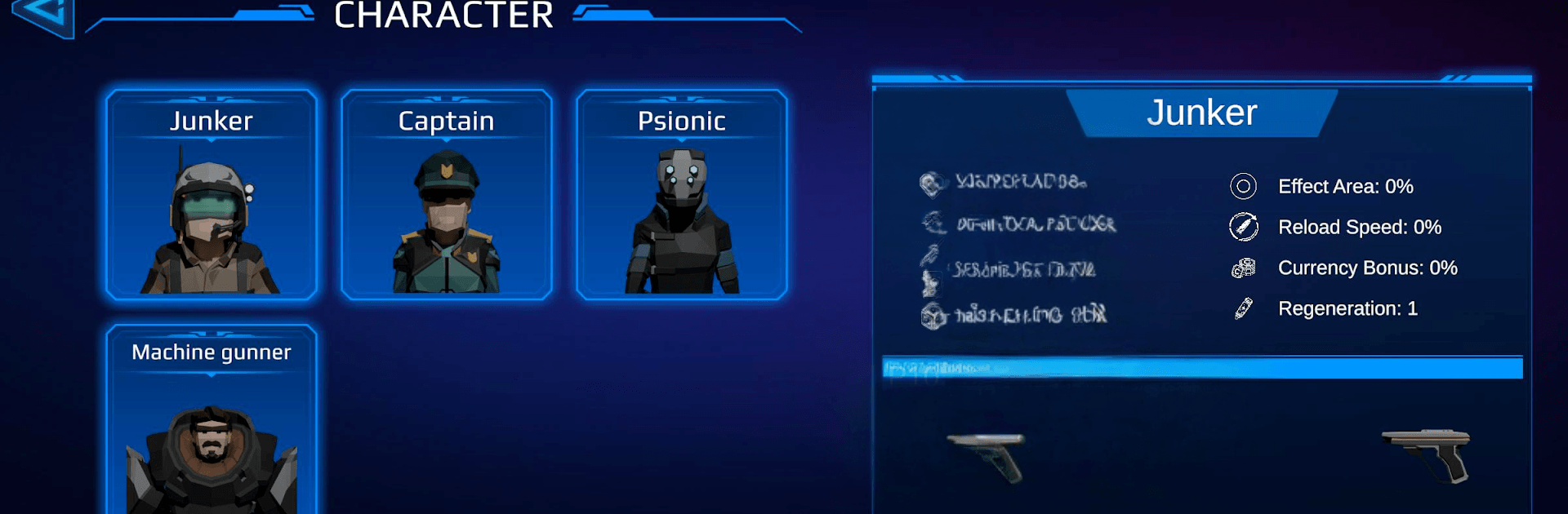
Space Rangers Survivor is an Action roguelite where you guide one of four tough-as-nails rangers through relentless top-down battles against alien swarms. Every run is a quick, high-stakes scramble to stay alive, stack clever upgrades, and push just a bit farther than last time. Want smoother performance on a bigger display? It plays nicely on BlueStacks.

Game Features

  • Four distinct heroes: Pick from a squad of specialists, each with their own combat feel, perks, and upgrade paths—find a favorite or swap depending on the challenge.
  • Pick-up-and-play combat: Simple, responsive controls make it easy to jump in, while tight movement and smart dodging keep the pressure real.
  • Swarming enemy types: Expect speedy critters, chunky bruisers, and unpredictable monsters that surround, rush, and punish bad positioning.
  • Maps that change the fight: Move through varied sci‑fi arenas with choke points and open zones that totally shift your approach from one run to the next.
  • Build-as-you-go power: Snag upgrades mid-run, stack wild synergies, and craft a loadout that turns a close call into a screen-clearing moment.
  • Big, noisy arsenal: From classic pistols and shotguns to beam cannons and miniguns, mix weapons to match your playstyle—and crank them up with mods.
  • Top-down chaos that feels fair: Enemies hit hard but telegraph their moves, rewarding clean footwork, kiting, and smart target priority.
  • Strong replay loop: Different heroes, random upgrade paths, and evolving enemy waves keep each attempt fresh and “one more try”-worthy.
  • Progress that sticks: Unlock new gear and options over time, opening fresh builds and strategies without overcomplicating the basics.

Get ready for a buttery smooth, high-performance gaming action only on BlueStacks.

Game Features

Enhancements

  • Macros
  • Multi Instance
  • Multi Instance Sync
  • Eco Mode
  • Enhancements
Macros

Macros

Skip the boring parts of a game. Play Space Rangers Survivor with Macros and get the edge. Simply record a sequence of commands and execute them at any moment.
Multi Instance

Multi Instance

Why limit to one game on your phone when you can play many on your PC? Open multiple instances of Space Rangers Survivor at once with Multi-Instance. Leverage the power of different accounts by doing more.
Multi Instance Sync

Multi Instance Sync

Get the best out of Space Rangers Survivor with Multi-Instance Sync. Play the game from different accounts and build your own empire. Use Multi-instance sync to repeat the action in the main BlueStacks instance on all other instances.
Eco Mode

Eco Mode

Find the rarest heroes by making multiple summons in Space Rangers Survivor. And while you are at it, reduce your PC’s resource consumption with the Eco Mode. Farm efficiently. Get the best results.
Read More

How to Download and Play Space Rangers Survivor on PC or Mac

  • Download and install BlueStacks on your PC or Mac

  • Complete Google sign-in to access the Play Store, or do it later

  • Look for Space Rangers Survivor in the search bar at the top right corner

  • Click to install Space Rangers Survivor from the search results

  • Complete Google sign-in (if you skipped step 2) to install Space Rangers Survivor

  • Click the Space Rangers Survivor icon on the home screen to start playing

video
Watch Video

Minimum System Requirements

With BlueStacks 5, you can get started on a PC that fulfills the following requirements.

  • Operating System

    Microsoft Windows 7 or above, macOS 11 (Big Sur) or above

  • Processor

    Intel, AMD or Apple Silicon Processor

  • RAM

    at least 4GB

  • HDD

    10GB Free Disk Space

Note:

* You must be an Administrator on your PC. Up to date graphics drivers from Microsoft or the chipset vendor.

Space Rangers Survivor - FAQs

  • How to play Space Rangers Survivor on Windows PC & Mac?

    Play Space Rangers Survivor on your PC or Mac by following these simple steps.

    • Click on 'Play Space Rangers Survivor on PC’ to download BlueStacks
    • Install it and log-in to Google Play Store
    • Launch and play the game.
  • Why is BlueStacks the fastest and safest platform to play games on PC?

    BlueStacks respects your privacy and is always safe and secure to use. It does not carry any malware, spyware, or any sort of additional software that could harm your PC.

    It is engineered to optimize speed and performance for a seamless gaming experience.

  • What are Space Rangers Survivor PC requirements?

    Minimum requirement to run Space Rangers Survivor on your PC

    • OS: Microsoft Windows 7 or above MacOS 11 (Big Sur) or above
    • Processor: Intel, AMD or Apple Silicon Processor
    • RAM: Your PC must have at least 4GB of RAM. (Note that having 4GB or more disk space is not a substitute for RAM)
    • HDD: 10GB Free Disk Space.
    • You must be an Administrator on your PC.