Super Hero
Super Hero

Super Hero

Action

| Game Pickle

Play on PC with BlueStacks or from our cloud

  • Overview
  • Game Features
  • How to Play

Page Modified On: January 02, 2026

Play Super Hero on PC or Mac

Explore a whole new adventure with Super Hero, a Action game created by Game Pickle. Experience great gameplay with BlueStacks, the most popular gaming platform to play Android games on your PC or Mac.

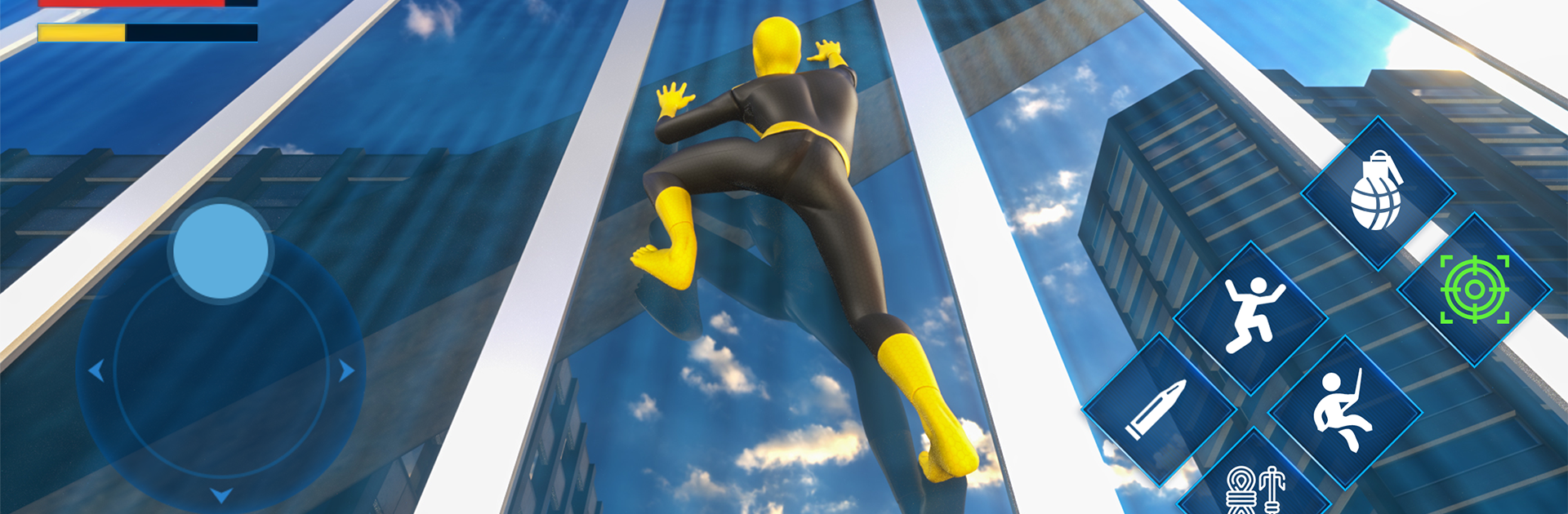
Super Hero is a city sandbox about being a masked do-gooder who beats down street gangs and flies across rooftops with a slick rope swing. The whole thing is third person with a fast camera, and the movement is the star. Swing between high-rises, run along walls, chain a big super jump into a glide, then drop into a fight and throw hands. Combat mixes simple melee strings and dodges with a few ranged tools, so there is room to pick targets or go full crowd control. The swing has weight to it, so momentum matters, and the city is tall enough that it actually feels worth climbing. There are story missions and small side jobs popping up around the map, car chases to shut down, thug nests to clear, and collectibles tucked along ledges. Progress feeds into unlocking new powers, gadgets, and suit styles, and there is a decent range of skins to mess with, plus a few vehicles if someone prefers wheels over cables.

Enemy types push different reactions, from bat-wielding brawlers to rifle guys and chunky enforcers, and arenas have bits you can break or toss around. Health and stamina are managed through pickups and short recovery, so fights rarely drag but still punish mistakes. It looks clean, the audio goes big on heroic stings, and the controls are simple. On PC with BlueStacks, keymapping helps a ton with swinging and camera control, which makes gliding into a brawl feel alot tighter than on a touchscreen. It is light RPG and action shooter blended together, easy to pick up, with that satisfying loop of spotting trouble, zipping over, and shutting it down.

Slay your opponents with your epic moves. Play it your way on BlueStacks and dominate the battlefield.


Game Features

Enhancements

  • Macros
  • Multi Instance
  • Multi Instance Sync
  • Eco Mode
  • Enhancements
Macros

Macros

Skip the boring parts of a game. Play Super Hero with Macros and get the edge. Simply record a sequence of commands and execute them at any moment.
Multi Instance

Multi Instance

Why limit to one game on your phone when you can play many on your PC? Open multiple instances of Super Hero at once with Multi-Instance. Leverage the power of different accounts by doing more.
Multi Instance Sync

Multi Instance Sync

Get the best out of Super Hero with Multi-Instance Sync. Play the game from different accounts and build your own empire. Use Multi-instance sync to repeat the action in the main BlueStacks instance on all other instances.
Eco Mode

Eco Mode

Find the rarest heroes by making multiple summons in Super Hero. And while you are at it, reduce your PC’s resource consumption with the Eco Mode. Farm efficiently. Get the best results.
Read More

How to Download and Play Super Hero on PC or Mac

  • Download and install BlueStacks on your PC or Mac

  • Complete Google sign-in to access the Play Store, or do it later

  • Look for Super Hero in the search bar at the top right corner

  • Click to install Super Hero from the search results

  • Complete Google sign-in (if you skipped step 2) to install Super Hero

  • Click the Super Hero icon on the home screen to start playing

video
Watch Video

Minimum System Requirements

With BlueStacks 5, you can get started on a PC that fulfills the following requirements.

  • Operating System

    Microsoft Windows 7 or above, macOS 11 (Big Sur) or above

  • Processor

    Intel, AMD or Apple Silicon Processor

  • RAM

    at least 4GB

  • HDD

    10GB Free Disk Space

Note:

* You must be an Administrator on your PC. Up to date graphics drivers from Microsoft or the chipset vendor.

Super Hero - FAQs

  • How to play Super Hero on Windows PC & Mac?

    Play Super Hero on your PC or Mac by following these simple steps.

    • Click on 'Play Super Hero on PC’ to download BlueStacks
    • Install it and log-in to Google Play Store
    • Launch and play the game.
  • Why is BlueStacks the fastest and safest platform to play games on PC?

    BlueStacks respects your privacy and is always safe and secure to use. It does not carry any malware, spyware, or any sort of additional software that could harm your PC.

    It is engineered to optimize speed and performance for a seamless gaming experience.

  • What are Super Hero PC requirements?

    Minimum requirement to run Super Hero on your PC

    • OS: Microsoft Windows 7 or above MacOS 11 (Big Sur) or above
    • Processor: Intel, AMD or Apple Silicon Processor
    • RAM: Your PC must have at least 4GB of RAM. (Note that having 4GB or more disk space is not a substitute for RAM)
    • HDD: 10GB Free Disk Space.
    • You must be an Administrator on your PC.