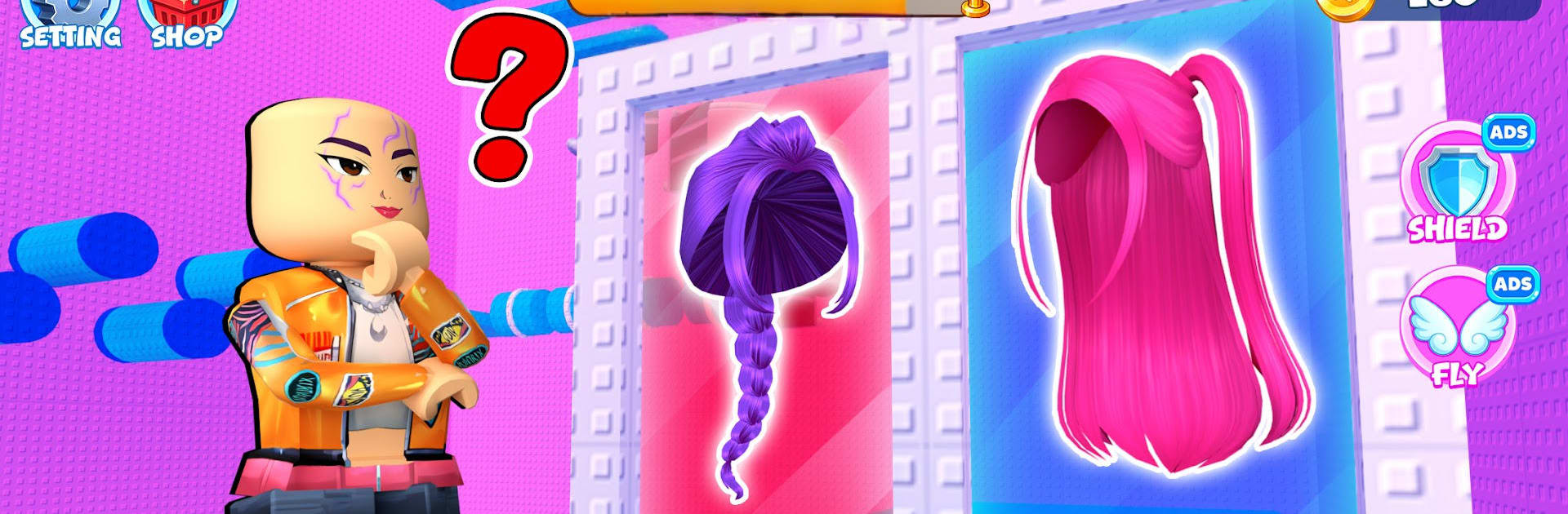
Would U Rather: Fashion Tower

Would U Rather: Fashion Tower

Action

| Hutan

Play on PC with BlueStacks or from our cloud

  • Overview
  • Game Features
  • How to Play

Page Modified On: July 06, 2026

Play Would U Rather: Fashion Tower on PC or Mac

Play Would U Rather: Fashion Tower by Hutan on PC or Mac with BlueStacks. Use a bigger screen, mouse and keyboard controls, and smoother performance while you play.

About the Game

Would U Rather: Fashion Tower turns quick “this or that?” choices into a stylish climb packed with surprises. It’s a snappy Action take on dressing up—each floor asks you to pick between two options, and your look evolves in real time. Expect fast decisions, colorful stages, and a big reveal at the top that shows exactly where your taste led you.

Game Features

  • Pick-or-Pass Decisions: Every floor presents two fashion picks—hair, outfits, shoes, or accessories. Your gut call shapes your style and your path upward.
  • Build a Dream Closet: Collect fresh hairstyles, statement outfits, sleek shoes, and must-have accessories as you go, then mix them however you like.
  • Colorful Tower Stages: Climb through bright, themed levels that keep changing the vibe, tossing in fun twists and little surprises.
  • Mix, Match, Repeat: Experiment to find bold combos, clean minimal fits, or anything in between. There’s real freedom to play with your aesthetic.
  • Smooth, Simple Controls: Quick taps and clean feedback make runs feel breezy. Great for short breaks or a longer session when you’re hunting the perfect look.
  • Endless Style Combos: With so many pieces to pair, no two final reveals feel the same—try new routes to see wildly different outcomes.
  • Looks Great on BlueStacks: Prefer a bigger screen? The crisp controls and steady performance carry over nicely when you play on BlueStacks.

Ready to top the leaderboard? We bet you do. Let precise controls and sharp visuals optimized on BlueStacks lead you to victory.


Game Features

Enhancements

  • Macros
  • Multi Instance
  • Multi Instance Sync
  • Eco Mode
  • Enhancements
Macros

Macros

Skip the boring parts of a game. Play Would U Rather: Fashion Tower with Macros and get the edge. Simply record a sequence of commands and execute them at any moment.
Multi Instance

Multi Instance

Why limit to one game on your phone when you can play many on your PC? Open multiple instances of Would U Rather: Fashion Tower at once with Multi-Instance. Leverage the power of different accounts by doing more.
Multi Instance Sync

Multi Instance Sync

Get the best out of Would U Rather: Fashion Tower with Multi-Instance Sync. Play the game from different accounts and build your own empire. Use Multi-instance sync to repeat the action in the main BlueStacks instance on all other instances.
Eco Mode

Eco Mode

Find the rarest heroes by making multiple summons in Would U Rather: Fashion Tower. And while you are at it, reduce your PC’s resource consumption with the Eco Mode. Farm efficiently. Get the best results.
Read More

How to Download and Play Would U Rather: Fashion Tower on PC or Mac

  • Download and install BlueStacks on your PC or Mac

  • Complete Google sign-in to access the Play Store, or do it later

  • Look for Would U Rather: Fashion Tower in the search bar at the top right corner

  • Click to install Would U Rather: Fashion Tower from the search results

  • Complete Google sign-in (if you skipped step 2) to install Would U Rather: Fashion Tower

  • Click the Would U Rather: Fashion Tower icon on the home screen to start playing

video
Watch Video

Minimum System Requirements

With BlueStacks 5, you can get started on a PC that fulfills the following requirements.

  • Operating System

    Microsoft Windows 7 or above, macOS 11 (Big Sur) or above

  • Processor

    Intel, AMD or Apple Silicon Processor

  • RAM

    at least 4GB

  • HDD

    10GB Free Disk Space

Note:

* You must be an Administrator on your PC. Up to date graphics drivers from Microsoft or the chipset vendor.

Would U Rather: Fashion Tower - FAQs

  • How to play Would U Rather: Fashion Tower on Windows PC & Mac?

    Play Would U Rather: Fashion Tower on your PC or Mac by following these simple steps.

    • Click on 'Play Would U Rather: Fashion Tower on PC’ to download BlueStacks
    • Install it and log-in to Google Play Store
    • Launch and play the game.
  • Why is BlueStacks the fastest and safest platform to play games on PC?

    BlueStacks respects your privacy and is always safe and secure to use. It does not carry any malware, spyware, or any sort of additional software that could harm your PC.

    It is engineered to optimize speed and performance for a seamless gaming experience.

  • What are Would U Rather: Fashion Tower PC requirements?

    Minimum requirement to run Would U Rather: Fashion Tower on your PC

    • OS: Microsoft Windows 7 or above MacOS 11 (Big Sur) or above
    • Processor: Intel, AMD or Apple Silicon Processor
    • RAM: Your PC must have at least 4GB of RAM. (Note that having 4GB or more disk space is not a substitute for RAM)
    • HDD: 10GB Free Disk Space.
    • You must be an Administrator on your PC.