Build Animal Zoo
Build Animal Zoo

Build Animal Zoo

Adventure

| Koci Game

Play on PC with BlueStacks or from our cloud

  • Overview
  • Game Features
  • How to Play

Page Modified On: April 07, 2026

Play Build Animal Zoo on PC or Mac

Step into the World of Build Animal Zoo, a thrilling Adventure game from the house of Koci Game. Play this Android game on BlueStacks App Player and experience immersive gaming on PC or Mac.

About the Game

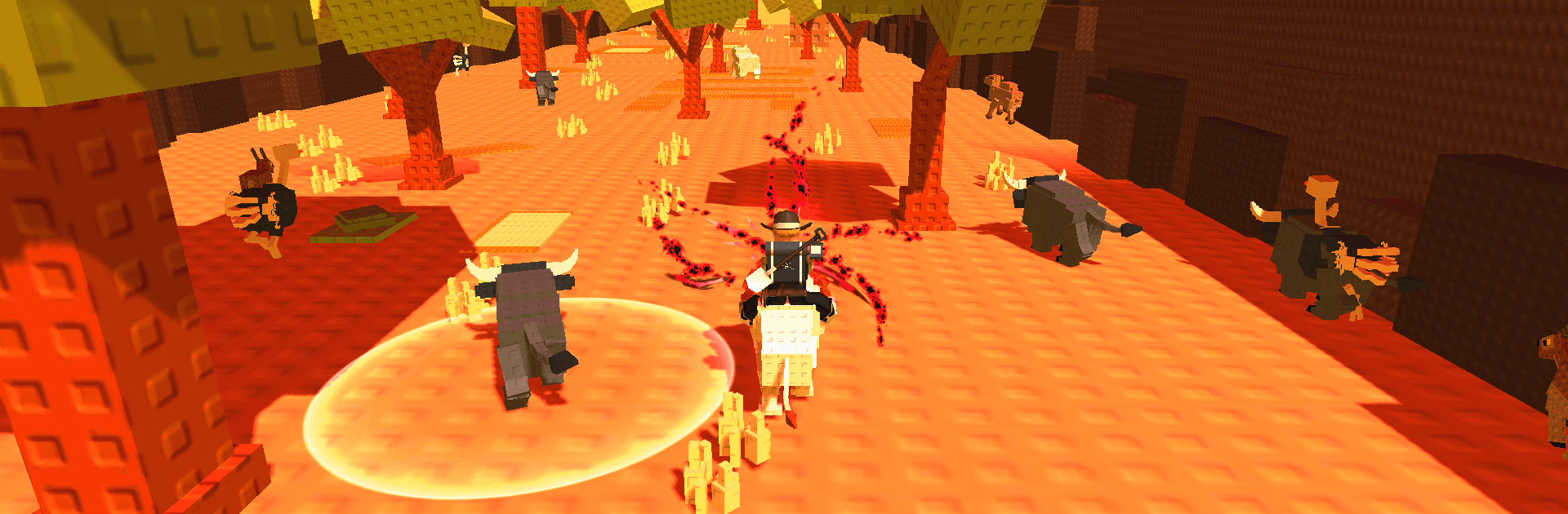
Build Animal Zoo is an Adventure game from Koci Game that mixes cowboy flavor with playful obstacle runs and hands-on zoo building. One minute you’re swinging a lasso to calm a stubborn mustang, the next you’re hopping across moving platforms to unlock a new habitat. It’s easy to pick up on your phone and feels extra smooth on a bigger screen with BlueStacks.

Game Features

  • Rope, Ride, Raise: Learn the lasso, round up wild critters, and turn them into dependable companions. Each animal handles a little differently, so figuring out who’s best for hauling, sprinting, or scouting is half the fun.

  • Your Zoo, Your Style: Shape a lively space that blends habitats and farm plots. Place paths, decorate enclosures, and watch the place go from dusty outpost to a bustling attraction.

  • Obby-Style Challenges: Jump, dodge, and time your moves through colorful obstacle runs that test reflexes. Clear tricky sections to snag rare resources and unlock special areas.

  • Open-Range Exploration: Roam deserts, groves, and wide-open plains dotted with secrets. Hidden nooks, shortcut trails, and mysterious doors reward a curious wanderer.

  • Personality-Packed Animals: From skittish speedsters to calm powerhouses, creatures come with quirks and perks. Build a team that suits how you like to explore and build.

  • Progress That Feels Good: Gather materials, expand pens, and upgrade tools. Each improvement opens fresh routes, tougher courses, and room for bigger, braver beasts.

  • Smooth Controls Anywhere: Simple taps for throws and jumps make it approachable, while precise inputs on BlueStacks help nail those tight landings and perfect lasso arcs.

Get ready for a buttery smooth, high-performance gaming action only on BlueStacks.

Game Features

Enhancements

  • Macros
  • Multi Instance
  • Multi Instance Sync
  • Script
  • Enhancements
Macros

Macros

Automate the predictable in Build Animal Zoo and transform your gameplay with Macros. Get access to inventive Macros in the BlueStacks Macro Community
Multi Instance

Multi Instance

Play Build Animal Zoo on one window. And chat with your friend on the other. Press CTRL + Shift + 8 to open the Multi-Instance Manager. And start creating fresh instances or clone an existing one.
Multi Instance Sync

Multi Instance Sync

Play Build Animal Zoo with the power of Multi-Instance Sync. Replicate what you are doing on the main instance on all other instances. Level up faster, play more.
Script

Script

Script your way to gaming glory in Build Animal Zoo with BlueStacks Script. Write and run a set of commands to automate repeated tasks. Trigger the command by assigning it to any key.
Read More

How to Download and Play Build Animal Zoo on PC or Mac

  • Download and install BlueStacks on your PC or Mac

  • Complete Google sign-in to access the Play Store, or do it later

  • Look for Build Animal Zoo in the search bar at the top right corner

  • Click to install Build Animal Zoo from the search results

  • Complete Google sign-in (if you skipped step 2) to install Build Animal Zoo

  • Click the Build Animal Zoo icon on the home screen to start playing

video
Watch Video

Minimum System Requirements

With BlueStacks 5, you can get started on a PC that fulfills the following requirements.

  • Operating System

    Microsoft Windows 7 or above, macOS 11 (Big Sur) or above

  • Processor

    Intel, AMD or Apple Silicon Processor

  • RAM

    at least 4GB

  • HDD

    10GB Free Disk Space

Note:

* You must be an Administrator on your PC. Up to date graphics drivers from Microsoft or the chipset vendor.

Build Animal Zoo - FAQs

  • How to play Build Animal Zoo on Windows PC & Mac?

    Play Build Animal Zoo on your PC or Mac by following these simple steps.

    • Click on 'Play Build Animal Zoo on PC’ to download BlueStacks
    • Install it and log-in to Google Play Store
    • Launch and play the game.
  • Why is BlueStacks the fastest and safest platform to play games on PC?

    BlueStacks respects your privacy and is always safe and secure to use. It does not carry any malware, spyware, or any sort of additional software that could harm your PC.

    It is engineered to optimize speed and performance for a seamless gaming experience.

  • What are Build Animal Zoo PC requirements?

    Minimum requirement to run Build Animal Zoo on your PC

    • OS: Microsoft Windows 7 or above MacOS 11 (Big Sur) or above
    • Processor: Intel, AMD or Apple Silicon Processor
    • RAM: Your PC must have at least 4GB of RAM. (Note that having 4GB or more disk space is not a substitute for RAM)
    • HDD: 10GB Free Disk Space.
    • You must be an Administrator on your PC.