Escape Verity: Horror House

Escape Verity: Horror House

Adventure

| Elyplay

Play on PC with BlueStacks or from our cloud

  • Overview
  • Game Features
  • How to Play

Page Modified On: October 12, 2026

Play Escape Verity: Horror House on PC or Mac

Escape Verity: Horror House brings the Adventure genre to life, and throws up exciting challenges for gamers. Developed by Elyplay, this Android game is best experienced on BlueStacks, the World’s #1 app player for PC and Mac users.

About the Game

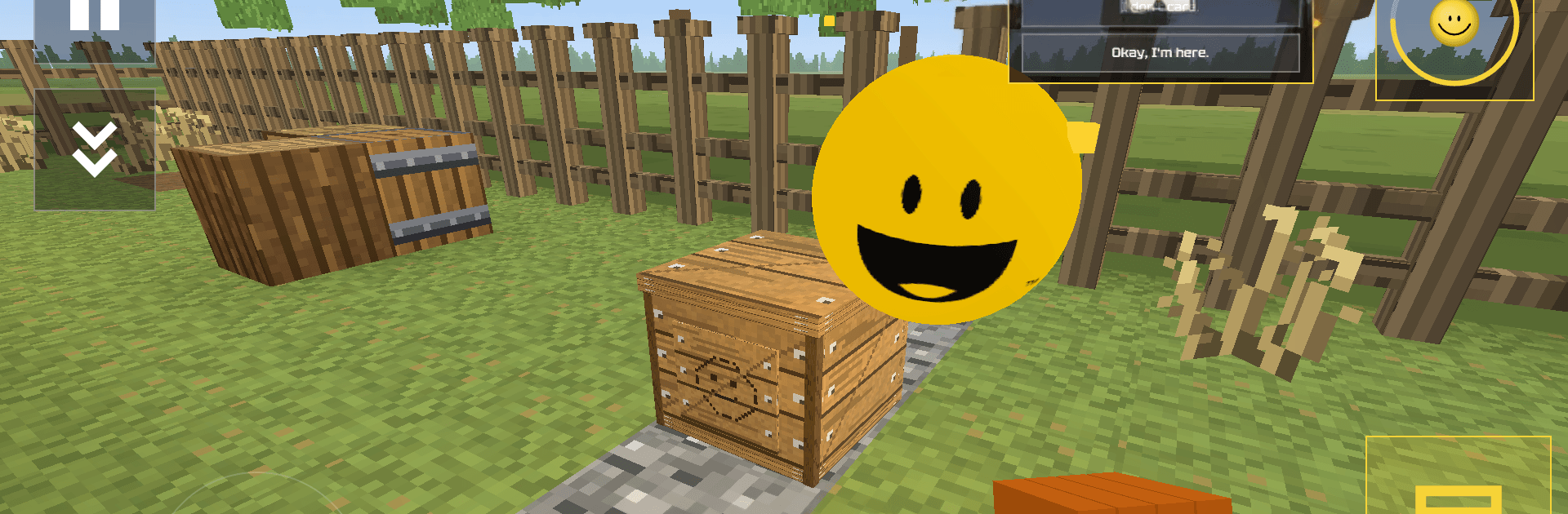
Escape Verity: Horror House is a tense first-person staycation you definitely didn’t ask for. A cheerful, floating “helper” named Verity moves in on day one, and he never stops talking—or watching. It’s an Adventure that blends stealth, scavenging, and nerve-wracking choices across five days you’re desperate to survive. Prefer a desk setup? It plays comfortably on BlueStacks too.

Game Features

  • Five days, one house: Wake up in the same room each morning as Verity shifts from friendly to possessive to downright hostile; sleeping by choice is usually safer than getting caught.
  • Four exits that reshuffle: Piece together different escape plans—unlock the gate, restart a dusty mine cart, cobble a rooftop glider, or light a yard beacon—while key parts change spots between runs.
  • Help with a catch: Ask Verity for directions and he’ll “help,” but each tip drags him closer; by later days his guidance bends, then breaks, until the answers barely make sense.
  • Hide and misdirect, never fight: You can’t hurt him—only stall or outsmart him with quick flashes, sticky slows, a music box lure, and closets to squeeze into; yes, he checks closets.
  • Three ways out (or not): Walk yourself out, bring someone in, or keep him content for all five days and accept what that means.
  • Don’t Blink mode: Your torch is the only thing that holds him still; the battery doubles as your ticking clock—keep the beam on him or pay for it.
  • The Knocking mode: Sit in the hall after dark and choose, knock by knock—open the door, or refuse; sometimes it’s him, sometimes it only sounds like him.
  • Doors mode: Sprint through a buried lab, one numbered door at a time; each threat telegraphs itself a heartbeat before it strikes—how far can you push it?
  • Beyond mode: Slip behind a wrong wall into looping yellow rooms and buzzing lights; track codes, follow the hum, and find a way back.
  • The Nest mode: Forage by day, defend by night; more of him descends from the attic each evening, and your lamp needs to burn longer to hold the line.
  • Quick runs, lasting tension: Sessions run 3–10 minutes, each with its own record and daily seed, so the layout and pacing keep shifting.
  • Fully voiced, fully offline: Verity talks—guiding, counting down, and critiquing—in 13 languages, with no account required.
  • Built for focus: Six modes in one install, playable offline, simple two-thumb controls, and light on gore—the fear is the feeling of being watched.

Get ready for a buttery smooth, high-performance gaming action only on BlueStacks.

Game Features

Enhancements

  • Macros
  • Multi Instance
  • Multi Instance Sync
  • Script
  • Enhancements
Macros

Macros

Automate the predictable in Escape Verity: Horror House and transform your gameplay with Macros. Get access to inventive Macros in the BlueStacks Macro Community
Multi Instance

Multi Instance

Play Escape Verity: Horror House on one window. And chat with your friend on the other. Press CTRL + Shift + 8 to open the Multi-Instance Manager. And start creating fresh instances or clone an existing one.
Multi Instance Sync

Multi Instance Sync

Play Escape Verity: Horror House with the power of Multi-Instance Sync. Replicate what you are doing on the main instance on all other instances. Level up faster, play more.
Script

Script

Script your way to gaming glory in Escape Verity: Horror House with BlueStacks Script. Write and run a set of commands to automate repeated tasks. Trigger the command by assigning it to any key.
Read More

How to Download and Play Escape Verity: Horror House on PC or Mac

  • Download and install BlueStacks on your PC or Mac

  • Complete Google sign-in to access the Play Store, or do it later

  • Look for Escape Verity: Horror House in the search bar at the top right corner

  • Click to install Escape Verity: Horror House from the search results

  • Complete Google sign-in (if you skipped step 2) to install Escape Verity: Horror House

  • Click the Escape Verity: Horror House icon on the home screen to start playing

video
Watch Video

Minimum System Requirements

With BlueStacks 5, you can get started on a PC that fulfills the following requirements.

  • Operating System

    Microsoft Windows 7 or above, macOS 11 (Big Sur) or above

  • Processor

    Intel, AMD or Apple Silicon Processor

  • RAM

    at least 4GB

  • HDD

    10GB Free Disk Space

Note:

* You must be an Administrator on your PC. Up to date graphics drivers from Microsoft or the chipset vendor.

Escape Verity: Horror House - FAQs

  • How to play Escape Verity: Horror House on Windows PC & Mac?

    Play Escape Verity: Horror House on your PC or Mac by following these simple steps.

    • Click on 'Play Escape Verity: Horror House on PC’ to download BlueStacks
    • Install it and log-in to Google Play Store
    • Launch and play the game.
  • Why is BlueStacks the fastest and safest platform to play games on PC?

    BlueStacks respects your privacy and is always safe and secure to use. It does not carry any malware, spyware, or any sort of additional software that could harm your PC.

    It is engineered to optimize speed and performance for a seamless gaming experience.

  • What are Escape Verity: Horror House PC requirements?

    Minimum requirement to run Escape Verity: Horror House on your PC

    • OS: Microsoft Windows 7 or above MacOS 11 (Big Sur) or above
    • Processor: Intel, AMD or Apple Silicon Processor
    • RAM: Your PC must have at least 4GB of RAM. (Note that having 4GB or more disk space is not a substitute for RAM)
    • HDD: 10GB Free Disk Space.
    • You must be an Administrator on your PC.