I am Raccoon
I am Raccoon

I am Raccoon

Adventure

| Game Finale

Play on PC with BlueStacks or from our cloud

  • Overview
  • Game Features
  • How to Play

Page Modified On: April 13, 2026

Play I am Raccoon on PC or Mac

Join millions to experience I am Raccoon, an exciting Adventure game from Game Finale. With BlueStacks App Player, you are always a step ahead of your opponent, ready to outplay them with faster gameplay and better control with the mouse and keyboard on your PC or Mac.

About the Game

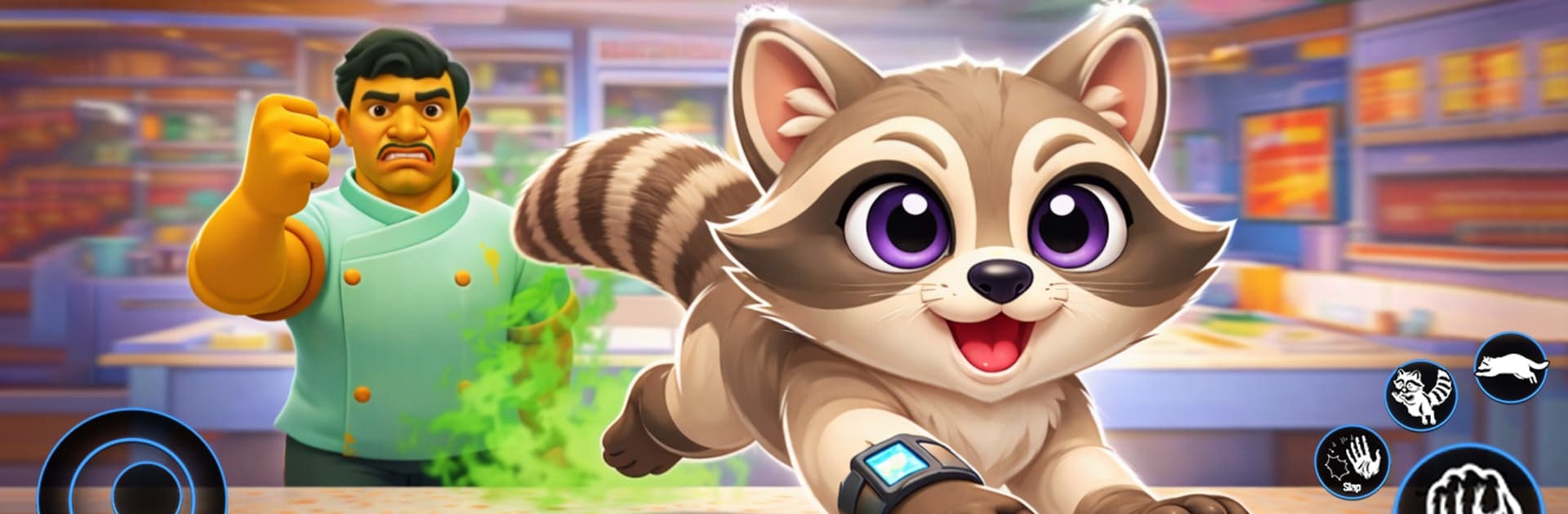
I am Raccoon is a cheeky Adventure from Game Finale where you play a crafty little trash panda with big prank energy. Slip through neighborhoods, swipe snacks, and stir up harmless chaos while staying one paw ahead of suspicious humans. It’s part stealth, part sandbox mischief, with plenty of funny moments waiting in every corner.

Game Features

  • Sneaky Prank Play: Outsmart people, nab food, topple clutter, and vanish before anyone figures out what happened. It’s all about timing, distraction, and quick exits.
  • Open, Playful Spaces: Roam streets, parks, backyards, and cozy homes, each packed with different routes, shortcuts, and vantage points to set up the perfect gag.
  • Interactive World: Fiddle with tons of objects—rustle bags, bump into boxes, scatter goodies—and watch how the environment and bystanders respond in goofy ways.
  • Easy, Smooth Controls: Run, jump, sneak, and interact with simple inputs and snappy movement that make pulling pranks feel natural from the first minute.
  • Hiding Spots and Secret Paths: Duck into bushes, slip behind fences, or weave through alleys to lose your pursuers and set up your next move.
  • Reactive Reactions: Every prank sparks fresh responses, so repeat runs don’t feel the same; try new angles, timing, and escape routes.
  • Play Your Way: Go full stealth or lean into noisy chaos—the game supports quick laughs, creative setups, and that “one more try” itch.
  • For Fans of Casual Mischief: Perfect if you enjoy prank games, animal simulator fun, or a funny adventure with open-world casual gameplay vibes.
  • PC-Friendly Option: Prefer a bigger view and comfy controls? You can also play on your PC with BlueStacks.

Make your gaming sessions memorable with precise controls that give you an edge in close combats and visuals that pop up, bringing every character to life.


Game Features

Enhancements

  • Macros
  • Multi Instance
  • Multi Instance Sync
  • Script
  • Enhancements
Macros

Macros

Automate the predictable in I am Raccoon and transform your gameplay with Macros. Get access to inventive Macros in the BlueStacks Macro Community
Multi Instance

Multi Instance

Play I am Raccoon on one window. And chat with your friend on the other. Press CTRL + Shift + 8 to open the Multi-Instance Manager. And start creating fresh instances or clone an existing one.
Multi Instance Sync

Multi Instance Sync

Play I am Raccoon with the power of Multi-Instance Sync. Replicate what you are doing on the main instance on all other instances. Level up faster, play more.
Script

Script

Script your way to gaming glory in I am Raccoon with BlueStacks Script. Write and run a set of commands to automate repeated tasks. Trigger the command by assigning it to any key.
Read More

How to Download and Play I am Raccoon on PC or Mac

  • Download and install BlueStacks on your PC or Mac

  • Complete Google sign-in to access the Play Store, or do it later

  • Look for I am Raccoon in the search bar at the top right corner

  • Click to install I am Raccoon from the search results

  • Complete Google sign-in (if you skipped step 2) to install I am Raccoon

  • Click the I am Raccoon icon on the home screen to start playing

video
Watch Video

Minimum System Requirements

With BlueStacks 5, you can get started on a PC that fulfills the following requirements.

  • Operating System

    Microsoft Windows 7 or above, macOS 11 (Big Sur) or above

  • Processor

    Intel, AMD or Apple Silicon Processor

  • RAM

    at least 4GB

  • HDD

    10GB Free Disk Space

Note:

* You must be an Administrator on your PC. Up to date graphics drivers from Microsoft or the chipset vendor.

I am Raccoon - FAQs

  • How to play I am Raccoon on Windows PC & Mac?

    Play I am Raccoon on your PC or Mac by following these simple steps.

    • Click on 'Play I am Raccoon on PC’ to download BlueStacks
    • Install it and log-in to Google Play Store
    • Launch and play the game.
  • Why is BlueStacks the fastest and safest platform to play games on PC?

    BlueStacks respects your privacy and is always safe and secure to use. It does not carry any malware, spyware, or any sort of additional software that could harm your PC.

    It is engineered to optimize speed and performance for a seamless gaming experience.

  • What are I am Raccoon PC requirements?

    Minimum requirement to run I am Raccoon on your PC

    • OS: Microsoft Windows 7 or above MacOS 11 (Big Sur) or above
    • Processor: Intel, AMD or Apple Silicon Processor
    • RAM: Your PC must have at least 4GB of RAM. (Note that having 4GB or more disk space is not a substitute for RAM)
    • HDD: 10GB Free Disk Space.
    • You must be an Administrator on your PC.