Last Survivor: Zombie Survival

Last Survivor: Zombie Survival

Adventure

| Gem Jam

Play on PC with BlueStacks or from our cloud

  • Overview
  • Game Features
  • How to Play

Page Modified On: August 15, 2026

Play Last Survivor: Zombie Survival on PC or Mac

Last Survivor: Zombie Survival brings the Adventure genre to life, and throws up exciting challenges for gamers. Developed by Gem Jam, this Android game is best experienced on BlueStacks, the World’s #1 app player for PC and Mac users.

About the Game

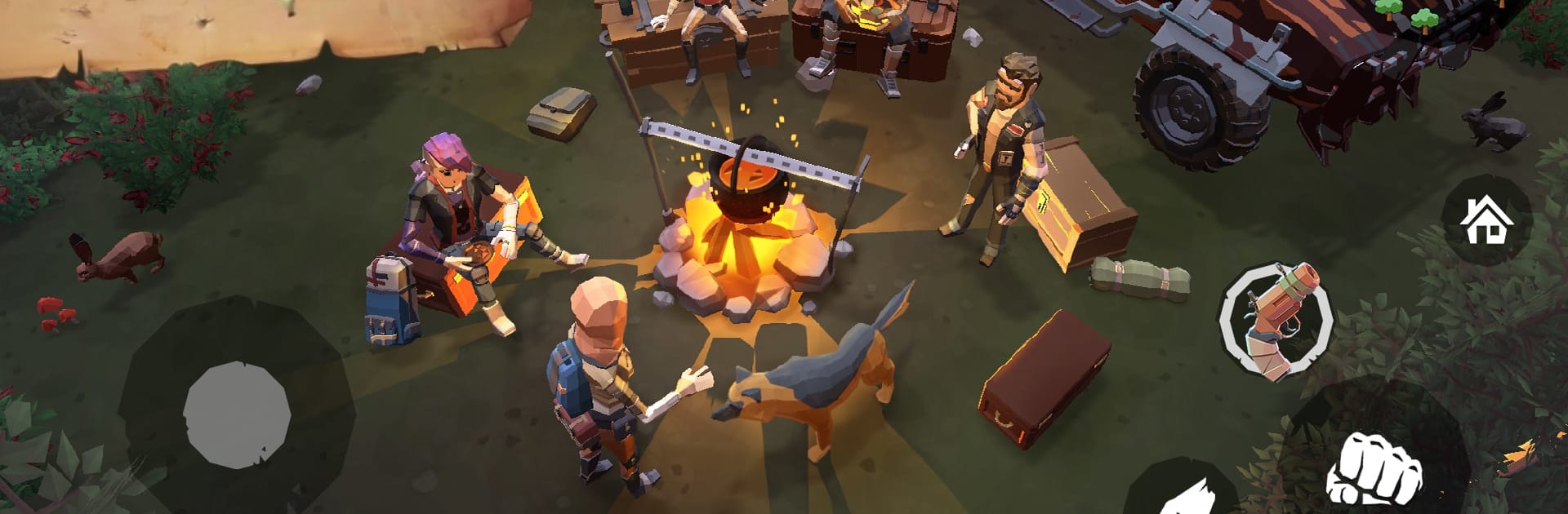
Last Survivor: Zombie Survival drops you into the aftermath with nothing but scraps, grit, and a stubborn will to keep breathing. This is an Adventure about day-to-day survival—build a defensible shelter, scavenge risky ruins, and choose when to brawl or slip past the horde. You can also play on PC with BlueStacks for a bigger view and crisp controls.

Game Features

  • Build a Safe Haven: Start small and turn your rickety shack into a real base. Gather wood, metal, and parts to reinforce walls, craft workbenches, and set traps that keep the night a little quieter.

  • Evolve Your Survivor: Shape your playstyle with gear and upgrades. Go stealthy with silent tools or charge in with heavier weapons—either way, your choices decide how far you make it.

  • Hunt, Forage, Survive: Food, water, and materials don’t just appear. Track wildlife, harvest resources, and manage your pack space so you don’t return empty-handed.

  • High-Stakes Loot Runs: The best gear hides in the worst places—abandoned towns, creaking factories, and deep woods. Expect tight hallways, sudden ambushes, and big rewards if you keep your nerve.

  • Wheels That Matter: Rebuild a busted ride piece by piece. Once it’s roadworthy, it opens up long-range trips—and doubles as a blunt solution when the road fills with the wrong crowd.

  • Unscripted Encounters: Other survivors want the same loot you do. Some are helpful, others are opportunists, and a few are flat-out dangerous. Stay sharp.

  • Gritty World, Strong Atmosphere: From wind-swept streets to eerie forests, detailed locations and punchy audio pull you into the ruins. A grounded storyline nudges you forward without getting in the way of survival.

Start your journey now. Download the game on BlueStacks, invite your friends, and march on a new adventure.


Game Features

Enhancements

  • Macros
  • Multi Instance
  • Multi Instance Sync
  • Script
  • Enhancements
Macros

Macros

Automate the predictable in Last Survivor: Zombie Survival and transform your gameplay with Macros. Get access to inventive Macros in the BlueStacks Macro Community
Multi Instance

Multi Instance

Play Last Survivor: Zombie Survival on one window. And chat with your friend on the other. Press CTRL + Shift + 8 to open the Multi-Instance Manager. And start creating fresh instances or clone an existing one.
Multi Instance Sync

Multi Instance Sync

Play Last Survivor: Zombie Survival with the power of Multi-Instance Sync. Replicate what you are doing on the main instance on all other instances. Level up faster, play more.
Script

Script

Script your way to gaming glory in Last Survivor: Zombie Survival with BlueStacks Script. Write and run a set of commands to automate repeated tasks. Trigger the command by assigning it to any key.
Read More

How to Download and Play Last Survivor: Zombie Survival on PC or Mac

  • Download and install BlueStacks on your PC or Mac

  • Complete Google sign-in to access the Play Store, or do it later

  • Look for Last Survivor: Zombie Survival in the search bar at the top right corner

  • Click to install Last Survivor: Zombie Survival from the search results

  • Complete Google sign-in (if you skipped step 2) to install Last Survivor: Zombie Survival

  • Click the Last Survivor: Zombie Survival icon on the home screen to start playing

video
Watch Video

Minimum System Requirements

With BlueStacks 5, you can get started on a PC that fulfills the following requirements.

  • Operating System

    Microsoft Windows 7 or above, macOS 11 (Big Sur) or above

  • Processor

    Intel, AMD or Apple Silicon Processor

  • RAM

    at least 4GB

  • HDD

    10GB Free Disk Space

Note:

* You must be an Administrator on your PC. Up to date graphics drivers from Microsoft or the chipset vendor.

Last Survivor: Zombie Survival - FAQs

  • How to play Last Survivor: Zombie Survival on Windows PC & Mac?

    Play Last Survivor: Zombie Survival on your PC or Mac by following these simple steps.

    • Click on 'Play Last Survivor: Zombie Survival on PC’ to download BlueStacks
    • Install it and log-in to Google Play Store
    • Launch and play the game.
  • Why is BlueStacks the fastest and safest platform to play games on PC?

    BlueStacks respects your privacy and is always safe and secure to use. It does not carry any malware, spyware, or any sort of additional software that could harm your PC.

    It is engineered to optimize speed and performance for a seamless gaming experience.

  • What are Last Survivor: Zombie Survival PC requirements?

    Minimum requirement to run Last Survivor: Zombie Survival on your PC

    • OS: Microsoft Windows 7 or above MacOS 11 (Big Sur) or above
    • Processor: Intel, AMD or Apple Silicon Processor
    • RAM: Your PC must have at least 4GB of RAM. (Note that having 4GB or more disk space is not a substitute for RAM)
    • HDD: 10GB Free Disk Space.
    • You must be an Administrator on your PC.