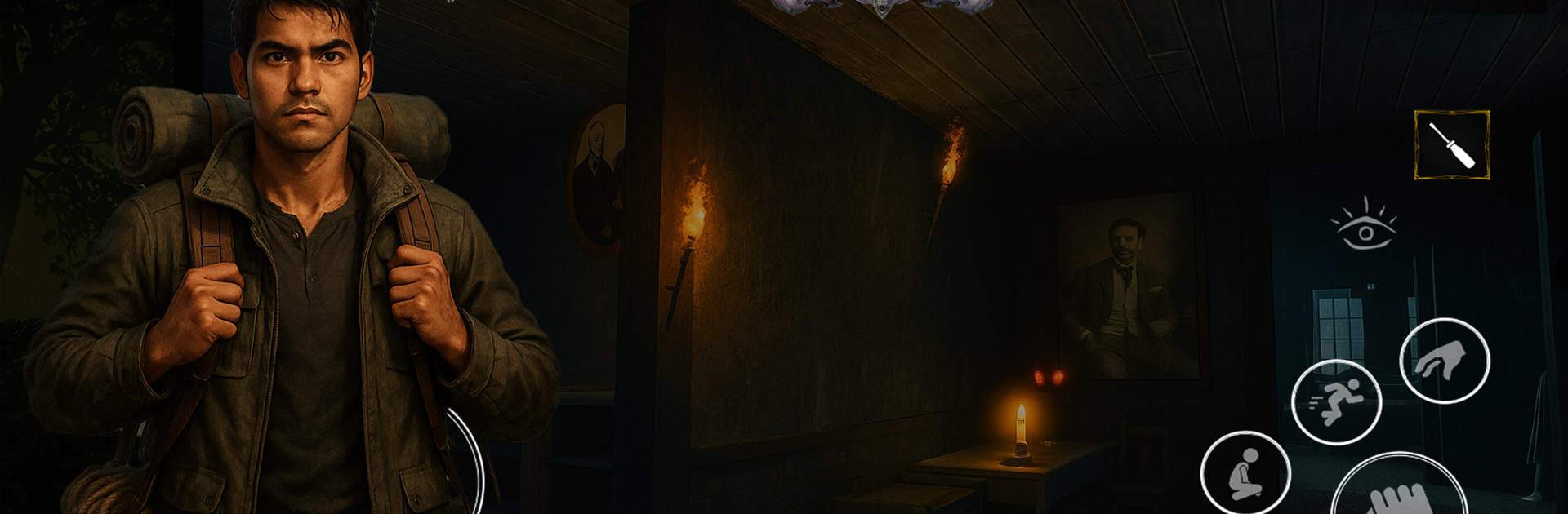
Walawwa - The Cursed Mansion

Walawwa - The Cursed Mansion

Adventure

| IGames Studio LK

Play on PC with BlueStacks or from our cloud

  • Overview
  • Game Features
  • How to Play

Page Modified On: December 26, 2025

Play Walawwa - The Cursed Mansion on PC or Mac

Explore a whole new adventure with Walawwa – The Cursed Mansion, a Adventure game created by IGames Studio LK. Experience great gameplay with BlueStacks, the most popular gaming platform to play Android games on your PC or Mac.

Walawwa is a slow, spooky survival horror set in a traditional Sri Lankan mansion, the kind that feels old the second the door shuts behind the player. It leans hard into exploration and patient sneaking, with rooms that feel lived in and wrong at the same time. There are 13 distinct spaces to pick through, from an abandoned ritual chamber to tight attic stairs, and every spot hides a memory or an object that hints at what happened in this place. The spirits are not just random jump scares either. The Hammer Ghost stalks like a real threat, the Cobra Guardian has a curse to figure out, and each apparition has its own story that slowly connects. Staying alive means being quiet, watching patterns, and using whatever is in the environment without making a scene.

The puzzles push players to read notes, chase down keys and clues, and hunt for an amulet that can decide how things end. Nothing is handed over, so progress feels earned, sometimes a bit stubborn, but fair. Sound design does a lot here, with creaks, distant knocks, and that heavy silence that makes every hallway tense. The Sri Lankan folklore and architecture give it a different flavor from the usual haunted house, more cultural texture and less cliché. On PC with BlueStacks, keyboard movement and mouse look help with stealth and inspecting items, and the bigger screen makes the dim corners and tiny details easier to catch without squinting.

Get ready for a buttery smooth, high-performance gaming action only on BlueStacks.

Game Features

Enhancements

  • Macros
  • Multi Instance
  • Multi Instance Sync
  • Script
  • Enhancements
Macros

Macros

Automate the predictable in Walawwa - The Cursed Mansion and transform your gameplay with Macros. Get access to inventive Macros in the BlueStacks Macro Community
Multi Instance

Multi Instance

Play Walawwa - The Cursed Mansion on one window. And chat with your friend on the other. Press CTRL + Shift + 8 to open the Multi-Instance Manager. And start creating fresh instances or clone an existing one.
Multi Instance Sync

Multi Instance Sync

Play Walawwa - The Cursed Mansion with the power of Multi-Instance Sync. Replicate what you are doing on the main instance on all other instances. Level up faster, play more.
Script

Script

Script your way to gaming glory in Walawwa - The Cursed Mansion with BlueStacks Script. Write and run a set of commands to automate repeated tasks. Trigger the command by assigning it to any key.
Read More

How to Download and Play Walawwa - The Cursed Mansion on PC or Mac

  • Download and install BlueStacks on your PC or Mac

  • Complete Google sign-in to access the Play Store, or do it later

  • Look for Walawwa - The Cursed Mansion in the search bar at the top right corner

  • Click to install Walawwa - The Cursed Mansion from the search results

  • Complete Google sign-in (if you skipped step 2) to install Walawwa - The Cursed Mansion

  • Click the Walawwa - The Cursed Mansion icon on the home screen to start playing

video
Watch Video

Minimum System Requirements

With BlueStacks 5, you can get started on a PC that fulfills the following requirements.

  • Operating System

    Microsoft Windows 7 or above, macOS 11 (Big Sur) or above

  • Processor

    Intel, AMD or Apple Silicon Processor

  • RAM

    at least 4GB

  • HDD

    10GB Free Disk Space

Note:

* You must be an Administrator on your PC. Up to date graphics drivers from Microsoft or the chipset vendor.

Walawwa - The Cursed Mansion - FAQs

  • How to play Walawwa - The Cursed Mansion on Windows PC & Mac?

    Play Walawwa - The Cursed Mansion on your PC or Mac by following these simple steps.

    • Click on 'Play Walawwa - The Cursed Mansion on PC’ to download BlueStacks
    • Install it and log-in to Google Play Store
    • Launch and play the game.
  • Why is BlueStacks the fastest and safest platform to play games on PC?

    BlueStacks respects your privacy and is always safe and secure to use. It does not carry any malware, spyware, or any sort of additional software that could harm your PC.

    It is engineered to optimize speed and performance for a seamless gaming experience.

  • What are Walawwa - The Cursed Mansion PC requirements?

    Minimum requirement to run Walawwa - The Cursed Mansion on your PC

    • OS: Microsoft Windows 7 or above MacOS 11 (Big Sur) or above
    • Processor: Intel, AMD or Apple Silicon Processor
    • RAM: Your PC must have at least 4GB of RAM. (Note that having 4GB or more disk space is not a substitute for RAM)
    • HDD: 10GB Free Disk Space.
    • You must be an Administrator on your PC.