Archmage
Archmage

Archmage

Arcade

| SMK Soft LLC

Play on PC with BlueStacks or from our cloud

  • Overview
  • Game Features
  • How to Play

Page Modified On: January 06, 2026

Play Archmage on PC or Mac

From the innovators and creators at SMK Soft LLC, Archmage is another fun addition to the World of Arcade games. Go beyond your mobile screen and play it bigger and better on your PC or Mac. An immersive experience awaits you.

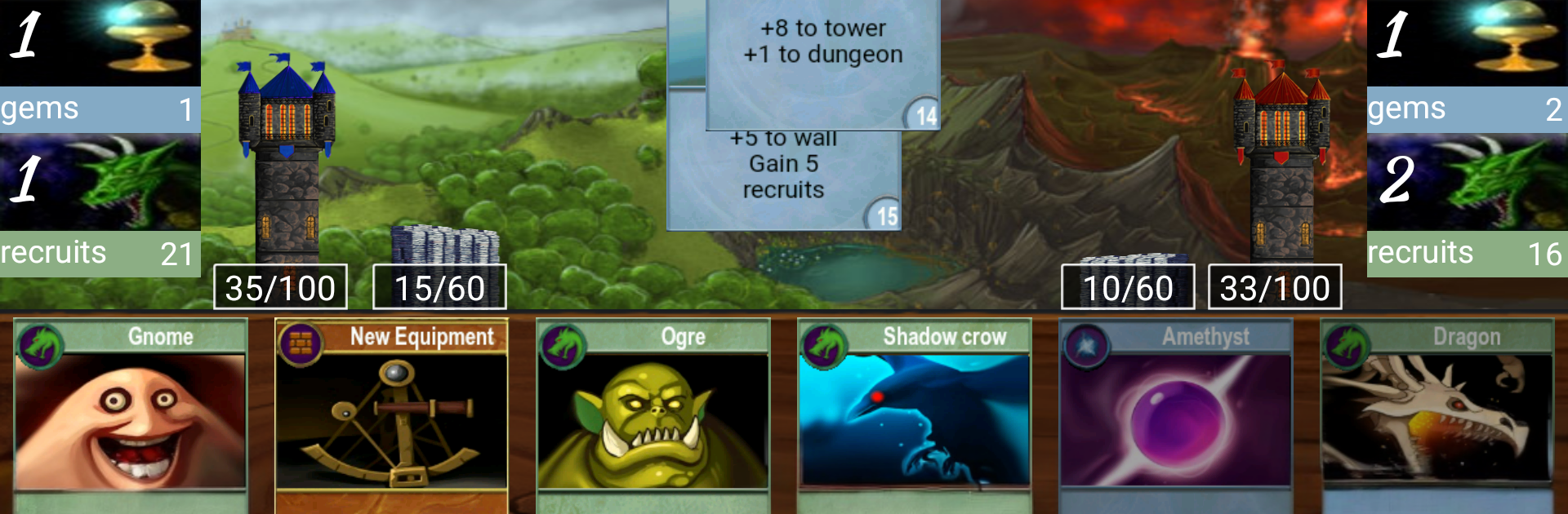
Archmage is a straight-up fantasy card battler where two mages take turns trying to outthink each other. It has that trading card feel, with a big pool of more than 200 cards, so there is always another combo to try. The match flow is simple but sharp. You look at your hand, drag a card up to play it, or pull it down to ditch it and cycle. On PC with BlueStacks, that drag feels clean with the mouse, and it helps avoid those oops moments where a swipe goes the wrong way on a phone. No busy screens or fluff, just snappy turns and a lot of little choices that add up.

The cards lean into classic fantasy stuff like spells, creatures, and nasty tricks, and the balance pushes you to plan a few turns ahead. The AI is actually competent, so solo runs are not a pushover, and multiplayer is there when it is time to mind-game a real person. Deck building is the hook. You keep tweaking, shuffling in new pieces, trimming the junk, and suddenly a strategy clicks and starts rolling. It runs smooth on most hardware and does not get fussy about specs, which suits a game that is more about brains than flash. If someone likes methodical, turn-based card play that rewards patience and smart discards, this scratches that itch nicely.

Make your gaming sessions memorable with precise controls that give you an edge in close combats and visuals that pop up, bringing every character to life.


Game Features

Enhancements

  • Macros
  • Multi Instance
  • Multi Instance Sync
  • Script
  • Enhancements
Macros

Macros

Automate the predictable in Archmage and transform your gameplay with Macros. Get access to inventive Macros in the BlueStacks Macro Community
Multi Instance

Multi Instance

Play Archmage on one window. And chat with your friend on the other. Press CTRL + Shift + 8 to open the Multi-Instance Manager. And start creating fresh instances or clone an existing one.
Multi Instance Sync

Multi Instance Sync

Play Archmage with the power of Multi-Instance Sync. Replicate what you are doing on the main instance on all other instances. Level up faster, play more.
Script

Script

Script your way to gaming glory in Archmage with BlueStacks Script. Write and run a set of commands to automate repeated tasks. Trigger the command by assigning it to any key.
Read More

How to Download and Play Archmage on PC or Mac

  • Download and install BlueStacks on your PC or Mac

  • Complete Google sign-in to access the Play Store, or do it later

  • Look for Archmage in the search bar at the top right corner

  • Click to install Archmage from the search results

  • Complete Google sign-in (if you skipped step 2) to install Archmage

  • Click the Archmage icon on the home screen to start playing

video
Watch Video

Minimum System Requirements

With BlueStacks 5, you can get started on a PC that fulfills the following requirements.

  • Operating System

    Microsoft Windows 7 or above, macOS 11 (Big Sur) or above

  • Processor

    Intel, AMD or Apple Silicon Processor

  • RAM

    at least 4GB

  • HDD

    10GB Free Disk Space

Note:

* You must be an Administrator on your PC. Up to date graphics drivers from Microsoft or the chipset vendor.

Archmage - FAQs

  • How to play Archmage on Windows PC & Mac?

    Play Archmage on your PC or Mac by following these simple steps.

    • Click on 'Play Archmage on PC’ to download BlueStacks
    • Install it and log-in to Google Play Store
    • Launch and play the game.
  • Why is BlueStacks the fastest and safest platform to play games on PC?

    BlueStacks respects your privacy and is always safe and secure to use. It does not carry any malware, spyware, or any sort of additional software that could harm your PC.

    It is engineered to optimize speed and performance for a seamless gaming experience.

  • What are Archmage PC requirements?

    Minimum requirement to run Archmage on your PC

    • OS: Microsoft Windows 7 or above MacOS 11 (Big Sur) or above
    • Processor: Intel, AMD or Apple Silicon Processor
    • RAM: Your PC must have at least 4GB of RAM. (Note that having 4GB or more disk space is not a substitute for RAM)
    • HDD: 10GB Free Disk Space.
    • You must be an Administrator on your PC.