Chroma Strike: Color Knife

Chroma Strike: Color Knife

Arcade

| Orelia

Play on PC with BlueStacks or from our cloud

  • Overview
  • Game Features
  • How to Play

Page Modified On: October 30, 2026

Play Chroma Strike: Color Knife on PC or Mac

Play Chroma Strike: Color Knife by Orelia on PC or Mac with BlueStacks. Use a bigger screen, mouse and keyboard controls, and smoother performance while you play.

About the Game

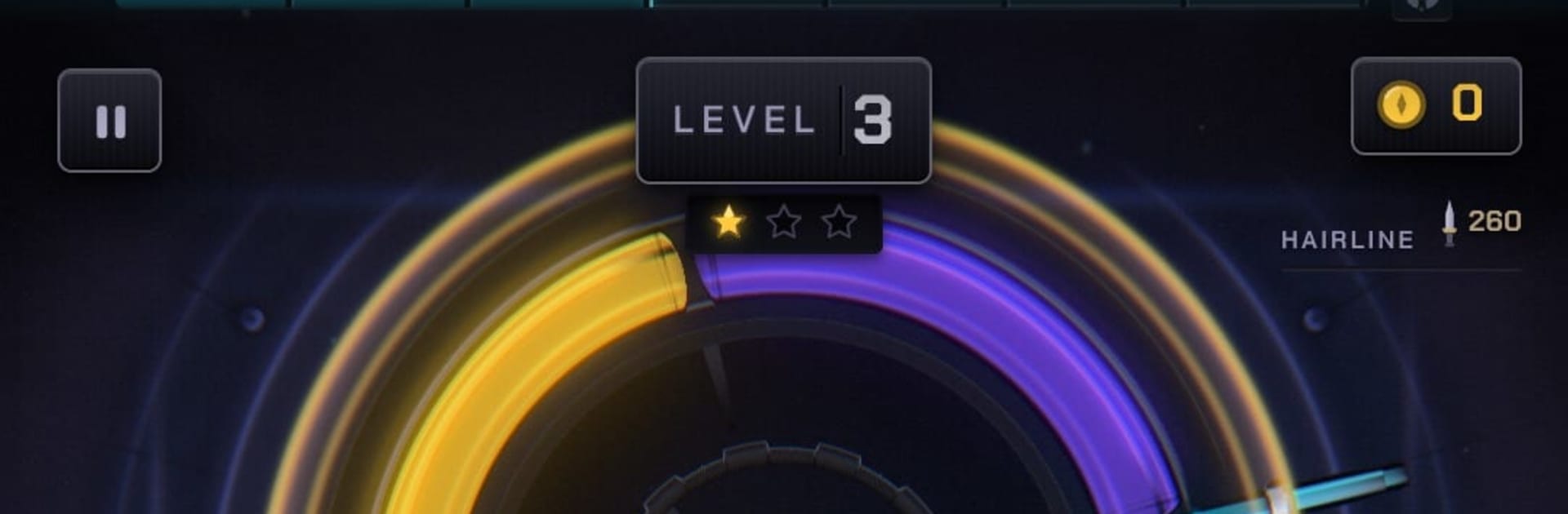
Chroma Strike: Color Knife is a quick, clean Arcade challenge built around a single idea: match your color and stick the landing. A neon ring spins, your knife flashes its hue, and you’ve got a split-second window to nail the right slice—while every knife you’ve already landed keeps spinning there, tightening the space for your next throw. It’s crisp, tense, and super replayable, whether you’re chasing perfect shots or checking out its alternate modes. It even feels great with simple taps or mapped keys on BlueStacks.

Game Features

  • Match-and-throw core: Toss a color-coded knife into the matching arc on a rotating ring, then deal with the mess you just created—every successful stick stays in play, squeezing your next shot.
  • Four twists on the same rule: Unlock the NEON ARCADE with modes like COLOR FLAP (thread gates of your hue), COLOR DROP (hit the right platform or miss entirely), COLOR BOUNCE (only touch tiles that match), and COLOR GATES (run the lane in your color).
  • Shifting arenas that change timing: PRISM, LATTICE, and APEX swap the playfield’s shape—circle, pentagon, and square—so angles, corners, and speed cues all mess with your rhythm in different ways.
  • Perfects, combos, and stars: Hit the dead center for a Perfect, chain them to ramp the audio and score, and chase three-star clears where the last star actually makes you sweat.
  • Customize your look: Earn new knives, trails, and impact effects with coins or achievement payouts—no energy bars, no timers, no sitting around.
  • One-thumb precision: Tap to throw, that’s it—simple to learn, sneaky to master, and satisfying with quick clicks or key mapping on BlueStacks.

Start your journey now. Download the game on BlueStacks, invite your friends, and march on a new adventure.


Game Features

Enhancements

  • Macros
  • Multi Instance
  • Multi Instance Sync
  • Script
  • Enhancements
Macros

Macros

Automate the predictable in Chroma Strike: Color Knife and transform your gameplay with Macros. Get access to inventive Macros in the BlueStacks Macro Community
Multi Instance

Multi Instance

Play Chroma Strike: Color Knife on one window. And chat with your friend on the other. Press CTRL + Shift + 8 to open the Multi-Instance Manager. And start creating fresh instances or clone an existing one.
Multi Instance Sync

Multi Instance Sync

Play Chroma Strike: Color Knife with the power of Multi-Instance Sync. Replicate what you are doing on the main instance on all other instances. Level up faster, play more.
Script

Script

Script your way to gaming glory in Chroma Strike: Color Knife with BlueStacks Script. Write and run a set of commands to automate repeated tasks. Trigger the command by assigning it to any key.
Read More

How to Download and Play Chroma Strike: Color Knife on PC or Mac

  • Download and install BlueStacks on your PC or Mac

  • Complete Google sign-in to access the Play Store, or do it later

  • Look for Chroma Strike: Color Knife in the search bar at the top right corner

  • Click to install Chroma Strike: Color Knife from the search results

  • Complete Google sign-in (if you skipped step 2) to install Chroma Strike: Color Knife

  • Click the Chroma Strike: Color Knife icon on the home screen to start playing

video
Watch Video

Minimum System Requirements

With BlueStacks 5, you can get started on a PC that fulfills the following requirements.

  • Operating System

    Microsoft Windows 7 or above, macOS 11 (Big Sur) or above

  • Processor

    Intel, AMD or Apple Silicon Processor

  • RAM

    at least 4GB

  • HDD

    10GB Free Disk Space

Note:

* You must be an Administrator on your PC. Up to date graphics drivers from Microsoft or the chipset vendor.

Chroma Strike: Color Knife - FAQs

  • How to play Chroma Strike: Color Knife on Windows PC & Mac?

    Play Chroma Strike: Color Knife on your PC or Mac by following these simple steps.

    • Click on 'Play Chroma Strike: Color Knife on PC’ to download BlueStacks
    • Install it and log-in to Google Play Store
    • Launch and play the game.
  • Why is BlueStacks the fastest and safest platform to play games on PC?

    BlueStacks respects your privacy and is always safe and secure to use. It does not carry any malware, spyware, or any sort of additional software that could harm your PC.

    It is engineered to optimize speed and performance for a seamless gaming experience.

  • What are Chroma Strike: Color Knife PC requirements?

    Minimum requirement to run Chroma Strike: Color Knife on your PC

    • OS: Microsoft Windows 7 or above MacOS 11 (Big Sur) or above
    • Processor: Intel, AMD or Apple Silicon Processor
    • RAM: Your PC must have at least 4GB of RAM. (Note that having 4GB or more disk space is not a substitute for RAM)
    • HDD: 10GB Free Disk Space.
    • You must be an Administrator on your PC.