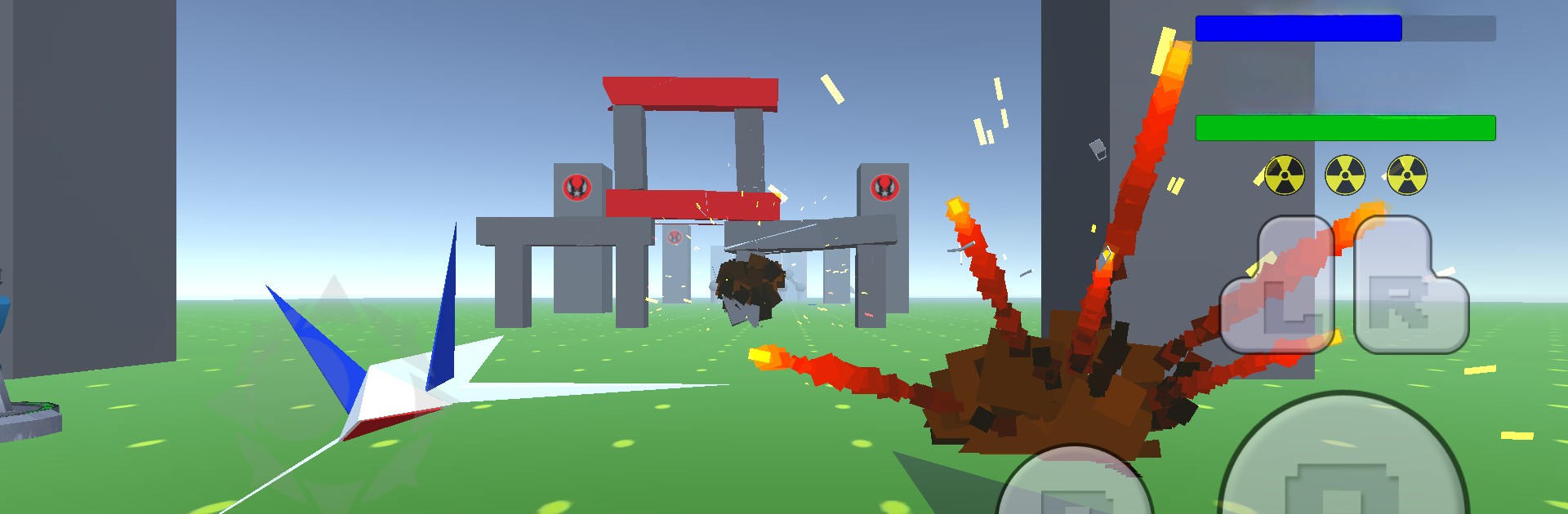
Fox Wing
Fox Wing

Fox Wing

Arcade

| In The Game

Play on PC with BlueStacks or from our cloud

  • Overview
  • Game Features
  • How to Play

Page Modified On: June 13, 2025

Play Fox Wing on PC or Mac

From the innovators and creators at In The Game, Fox Wing is another fun addition to the World of Arcade games. Go beyond your mobile screen and play it bigger and better on your PC or Mac. An immersive experience awaits you.

About the Game

Remember those classic arcade shooters that had you glued to the screen for hours? Fox Wing brings all that nostalgia into a modern package. You’re at the helm of a zippy starship, dodging enemy blasts, collecting sweet power-ups, and blasting your way through wave after wave of action-packed levels. Whether you’re after that old-school thrill or you’re just looking for an adrenaline hit, this one’s sure to scratch that itch.

Game Features

  • Smooth, Fast-Paced Shooting
    Jump right into non-stop arcade action. You’ll be weaving through enemy fire, launching awesome laser attacks, and dropping bombs that clear the screen in a pinch.

  • Tons of Upgrades
    Snag shields, weapon boosts, and special power-ups mid-mission. They’ll help you keep your ship intact and pack more punch as missions get trickier.

  • Classic Boss Battles
    Get ready for some seriously epic showdowns. Giant, screen-filling bosses stand between you and victory—knock them down to advance.

  • Multiple Worlds & Missions
    Every level brings a new landscape and a fresh set of challenges. From meteor fields to strange alien bases, you never know what’s coming next.

  • 90s Retro Vibes
    Bright, nostalgic visuals and throwback sound effects hit that arcade sweet spot. It feels like a love letter to the golden age of shooters.

  • Secret Stages
    Think you’ve seen it all? There are hidden levels tucked away for sharp-eyed pilots who like to explore every corner.

  • Responsive Controls
    Maneuver your Fox Wing ship with ease thanks to responsive controls that just feel right—especially if you hop onto BlueStacks.

  • Bombs, Lasers & More
    Your arsenal’s loaded. Blast enemies with lasers or drop bombs for that extra bit of flair—sometimes you’ve gotta make a mess to survive.

Get ready for a buttery smooth, high-performance gaming action only on BlueStacks.

Game Features

Enhancements

  • Macros
  • Multi Instance
  • Multi Instance Sync
  • Script
  • Enhancements
Macros

Macros

Automate the predictable in Fox Wing and transform your gameplay with Macros. Get access to inventive Macros in the BlueStacks Macro Community
Multi Instance

Multi Instance

Play Fox Wing on one window. And chat with your friend on the other. Press CTRL + Shift + 8 to open the Multi-Instance Manager. And start creating fresh instances or clone an existing one.
Multi Instance Sync

Multi Instance Sync

Play Fox Wing with the power of Multi-Instance Sync. Replicate what you are doing on the main instance on all other instances. Level up faster, play more.
Script

Script

Script your way to gaming glory in Fox Wing with BlueStacks Script. Write and run a set of commands to automate repeated tasks. Trigger the command by assigning it to any key.
Read More

How to Download and Play Fox Wing on PC or Mac

  • Download and install BlueStacks on your PC or Mac

  • Complete Google sign-in to access the Play Store, or do it later

  • Look for Fox Wing in the search bar at the top right corner

  • Click to install Fox Wing from the search results

  • Complete Google sign-in (if you skipped step 2) to install Fox Wing

  • Click the Fox Wing icon on the home screen to start playing

video
Watch Video

Minimum System Requirements

With BlueStacks 5, you can get started on a PC that fulfills the following requirements.

  • Operating System

    Microsoft Windows 7 or above, macOS 11 (Big Sur) or above

  • Processor

    Intel, AMD or Apple Silicon Processor

  • RAM

    at least 4GB

  • HDD

    10GB Free Disk Space

Note:

* You must be an Administrator on your PC. Up to date graphics drivers from Microsoft or the chipset vendor.

Fox Wing - FAQs

  • How to play Fox Wing on Windows PC & Mac?

    Play Fox Wing on your PC or Mac by following these simple steps.

    • Click on 'Play Fox Wing on PC’ to download BlueStacks
    • Install it and log-in to Google Play Store
    • Launch and play the game.
  • Why is BlueStacks the fastest and safest platform to play games on PC?

    BlueStacks respects your privacy and is always safe and secure to use. It does not carry any malware, spyware, or any sort of additional software that could harm your PC.

    It is engineered to optimize speed and performance for a seamless gaming experience.

  • What are Fox Wing PC requirements?

    Minimum requirement to run Fox Wing on your PC

    • OS: Microsoft Windows 7 or above MacOS 11 (Big Sur) or above
    • Processor: Intel, AMD or Apple Silicon Processor
    • RAM: Your PC must have at least 4GB of RAM. (Note that having 4GB or more disk space is not a substitute for RAM)
    • HDD: 10GB Free Disk Space.
    • You must be an Administrator on your PC.