Horror School: Granny Teacher

Horror School: Granny Teacher

Arcade

| Ururur

Play on PC with BlueStacks or from our cloud

  • Overview
  • Game Features
  • How to Play

Page Modified On: October 21, 2026

Play Horror School: Granny Teacher on PC or Mac

Step into the World of Horror School: Granny Teacher, a thrilling Arcade game from the house of Ururur. Play this Android game on BlueStacks App Player and experience immersive gaming on PC or Mac.

About the Game
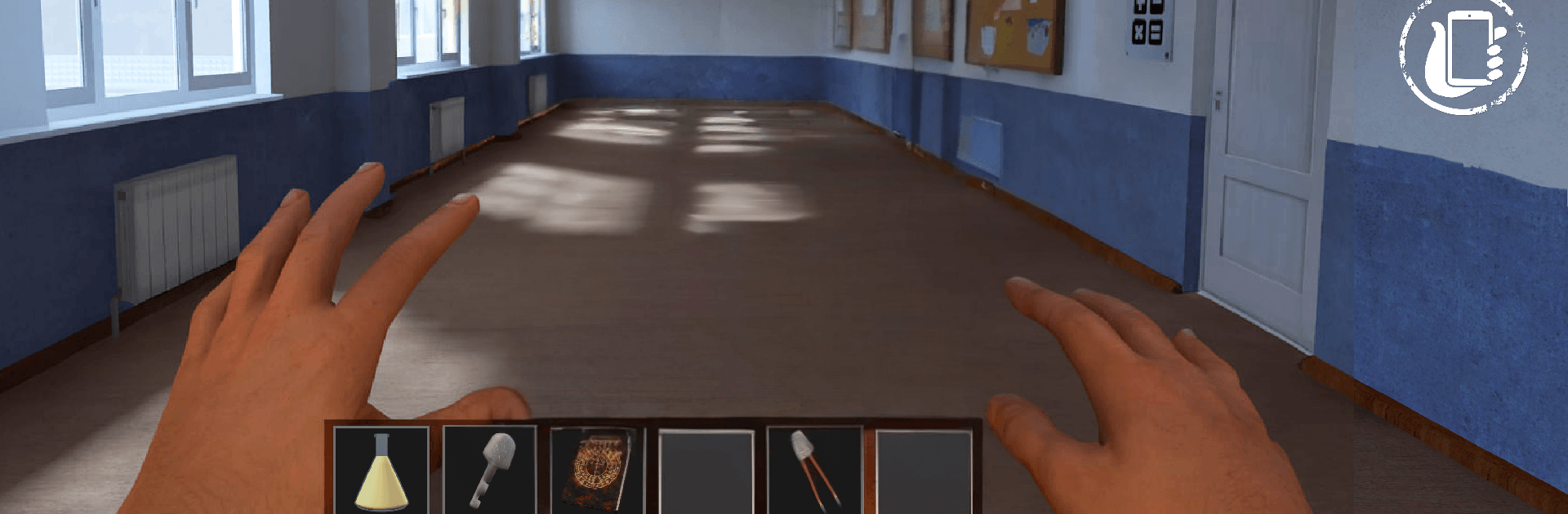
Horror School: Granny Teacher drops you into a school stuck between one bell and the next, where the halls are frozen but something old and watchful still roams. This Arcade scare-fest blends exploration, stealth, and quick decision-making with a clever twist: reality doesn’t always show itself unless you look the right way. Want a steadier grip when things get tense? It feels great on PC with BlueStacks, too.

Game Features
– Frozen Bell Hour: Time has stalled across classrooms and corridors, leaving everyone motionless—except you—so every footstep and creak feels extra loud.
– The Watching Presence: A relentless figure stalks the halls, drawing closer if you hesitate; flickering lights, heavy breaths, and warped reflections are your warning signs to move.
– Camera Sight: Use your device’s camera to uncover messages, hidden doors, and symbols that don’t appear to the naked eye—some secrets help, others lure you in.
– Choice-Driven Paths: Your actions shape the ending; sneak, sprint, investigate, or ignore—each decision nudges you toward escape, disappearance, or something stranger.
– Stealth and Sprint: Crouch behind desks, slip through labs, and bolt down stairwells when the air turns cold and the walls start whispering.
– Puzzle Threads: Piece together clues from chalk-smeared boards, coded notes, and eerie markings to unlock shortcuts and safer routes.
– Tension You Can Hear: Subtle audio cues—distant knocks, rattling vents, a hush that suddenly dies—signal changes in danger and guide your next move; headphones recommended.
– Replay-Friendly Design: Optional routes, missable clues, and branching outcomes reward curiosity, making each run through the dark hallways feel different.

BlueStacks gives you more room to focus on the game and less time adjusting around mobile limitations.


Game Features

Enhancements

  • Macros
  • Multi Instance
  • Multi Instance Sync
  • Script
  • Enhancements
Macros

Macros

Automate the predictable in Horror School: Granny Teacher and transform your gameplay with Macros. Get access to inventive Macros in the BlueStacks Macro Community
Multi Instance

Multi Instance

Play Horror School: Granny Teacher on one window. And chat with your friend on the other. Press CTRL + Shift + 8 to open the Multi-Instance Manager. And start creating fresh instances or clone an existing one.
Multi Instance Sync

Multi Instance Sync

Play Horror School: Granny Teacher with the power of Multi-Instance Sync. Replicate what you are doing on the main instance on all other instances. Level up faster, play more.
Script

Script

Script your way to gaming glory in Horror School: Granny Teacher with BlueStacks Script. Write and run a set of commands to automate repeated tasks. Trigger the command by assigning it to any key.
Read More

How to Download and Play Horror School: Granny Teacher on PC or Mac

  • Download and install BlueStacks on your PC or Mac

  • Complete Google sign-in to access the Play Store, or do it later

  • Look for Horror School: Granny Teacher in the search bar at the top right corner

  • Click to install Horror School: Granny Teacher from the search results

  • Complete Google sign-in (if you skipped step 2) to install Horror School: Granny Teacher

  • Click the Horror School: Granny Teacher icon on the home screen to start playing

video
Watch Video

Minimum System Requirements

With BlueStacks 5, you can get started on a PC that fulfills the following requirements.

  • Operating System

    Microsoft Windows 7 or above, macOS 11 (Big Sur) or above

  • Processor

    Intel, AMD or Apple Silicon Processor

  • RAM

    at least 4GB

  • HDD

    10GB Free Disk Space

Note:

* You must be an Administrator on your PC. Up to date graphics drivers from Microsoft or the chipset vendor.

Horror School: Granny Teacher - FAQs

  • How to play Horror School: Granny Teacher on Windows PC & Mac?

    Play Horror School: Granny Teacher on your PC or Mac by following these simple steps.

    • Click on 'Play Horror School: Granny Teacher on PC’ to download BlueStacks
    • Install it and log-in to Google Play Store
    • Launch and play the game.
  • Why is BlueStacks the fastest and safest platform to play games on PC?

    BlueStacks respects your privacy and is always safe and secure to use. It does not carry any malware, spyware, or any sort of additional software that could harm your PC.

    It is engineered to optimize speed and performance for a seamless gaming experience.

  • What are Horror School: Granny Teacher PC requirements?

    Minimum requirement to run Horror School: Granny Teacher on your PC

    • OS: Microsoft Windows 7 or above MacOS 11 (Big Sur) or above
    • Processor: Intel, AMD or Apple Silicon Processor
    • RAM: Your PC must have at least 4GB of RAM. (Note that having 4GB or more disk space is not a substitute for RAM)
    • HDD: 10GB Free Disk Space.
    • You must be an Administrator on your PC.