Play With Me - 2 Player Games

Play With Me - 2 Player Games

Arcade

| ggy games

Play on PC with BlueStacks or from our cloud

  • Overview
  • Game Features
  • How to Play

Page Modified On: September 05, 2025

Play Play With Me - 2 Player Games on PC or Mac

Play With Me – 2 Player Games brings the Arcade genre to life, and throws up exciting challenges for gamers. Developed by ggy games, this Android game is best experienced on BlueStacks, the World’s #1 app player for PC and Mac users.

About the Game

Play With Me – 2 Player Games is a fast, friendly Arcade collection from ggy games where quick reflexes and tiny victories feel huge. It’s built for couch competition on a single phone or tablet, but you can hop in solo when no one’s around. Short rounds, simple controls, and a bunch of mini-games keep the “okay, one more” cycle going.

Game Features

  • Same-Device Showdowns: Share one screen and challenge a friend without setup drama. Perfect for quick breaks, family nights, or that “loser does the dishes” moment.
  • Quick, One-Button Controls: Every mini-game uses super simple inputs, so anyone can jump in within seconds—no learning curve required.
  • Offline Friendly: No connection? No problem. Everything runs smoothly without internet.
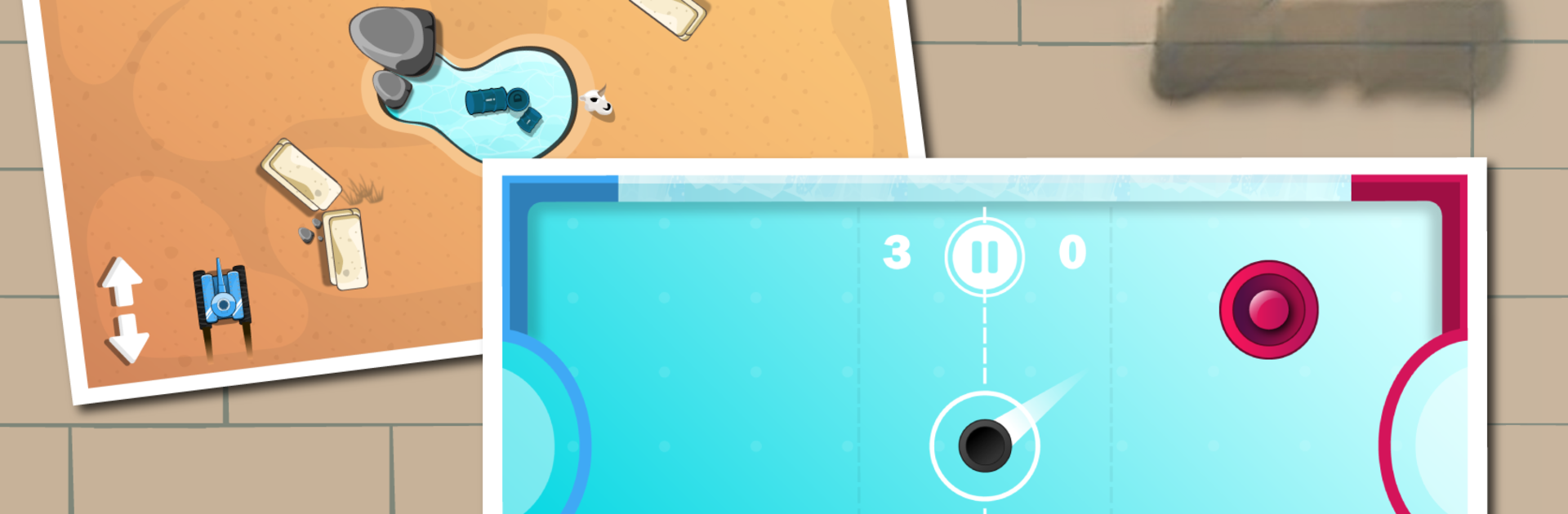
  • A Mix of Mini-Games: Swap between Hockey, Basketball tosses, tank duels, top-down races, slap battles, color-switch challenges, Tic-Tac-Toe, and the sweet chaos of Ice Cream Hit.
  • Solo Options: No partner handy? Many modes are just as fun alone, great for practicing or chasing a personal best.
  • Up to 4 Players: Some games support 3–4 players, turning a quick match into a full-on party.
  • Fast to Start, Easy to Love: Lightweight install, clean interface, and matches that start in a heartbeat keep the fun moving.
  • Bright, Punchy Visuals: Crisp graphics make every win (and every dramatic miss) pop on screen.
  • Free to Play: Jump in without paying a cent—play as much as you want.
  • Great on a Bigger Screen: Prefer playing on PC? It runs nicely with BlueStacks for roomy multiplayer sessions.

Start your journey now. Download the game on BlueStacks, invite your friends, and march on a new adventure.


Game Features

Enhancements

  • Macros
  • Multi Instance
  • Multi Instance Sync
  • Script
  • Enhancements
Macros

Macros

Automate the predictable in Play With Me - 2 Player Games and transform your gameplay with Macros. Get access to inventive Macros in the BlueStacks Macro Community
Multi Instance

Multi Instance

Play Play With Me - 2 Player Games on one window. And chat with your friend on the other. Press CTRL + Shift + 8 to open the Multi-Instance Manager. And start creating fresh instances or clone an existing one.
Multi Instance Sync

Multi Instance Sync

Play Play With Me - 2 Player Games with the power of Multi-Instance Sync. Replicate what you are doing on the main instance on all other instances. Level up faster, play more.
Script

Script

Script your way to gaming glory in Play With Me - 2 Player Games with BlueStacks Script. Write and run a set of commands to automate repeated tasks. Trigger the command by assigning it to any key.
Read More

How to Download and Play Play With Me - 2 Player Games on PC or Mac

  • Download and install BlueStacks on your PC or Mac

  • Complete Google sign-in to access the Play Store, or do it later

  • Look for Play With Me - 2 Player Games in the search bar at the top right corner

  • Click to install Play With Me - 2 Player Games from the search results

  • Complete Google sign-in (if you skipped step 2) to install Play With Me - 2 Player Games

  • Click the Play With Me - 2 Player Games icon on the home screen to start playing

video
Watch Video

Minimum System Requirements

With BlueStacks 5, you can get started on a PC that fulfills the following requirements.

  • Operating System

    Microsoft Windows 7 or above, macOS 11 (Big Sur) or above

  • Processor

    Intel, AMD or Apple Silicon Processor

  • RAM

    at least 4GB

  • HDD

    10GB Free Disk Space

Note:

* You must be an Administrator on your PC. Up to date graphics drivers from Microsoft or the chipset vendor.

Play With Me - 2 Player Games - FAQs

  • How to play Play With Me - 2 Player Games on Windows PC & Mac?

    Play Play With Me - 2 Player Games on your PC or Mac by following these simple steps.

    • Click on 'Play Play With Me - 2 Player Games on PC’ to download BlueStacks
    • Install it and log-in to Google Play Store
    • Launch and play the game.
  • Why is BlueStacks the fastest and safest platform to play games on PC?

    BlueStacks respects your privacy and is always safe and secure to use. It does not carry any malware, spyware, or any sort of additional software that could harm your PC.

    It is engineered to optimize speed and performance for a seamless gaming experience.

  • What are Play With Me - 2 Player Games PC requirements?

    Minimum requirement to run Play With Me - 2 Player Games on your PC

    • OS: Microsoft Windows 7 or above MacOS 11 (Big Sur) or above
    • Processor: Intel, AMD or Apple Silicon Processor
    • RAM: Your PC must have at least 4GB of RAM. (Note that having 4GB or more disk space is not a substitute for RAM)
    • HDD: 10GB Free Disk Space.
    • You must be an Administrator on your PC.