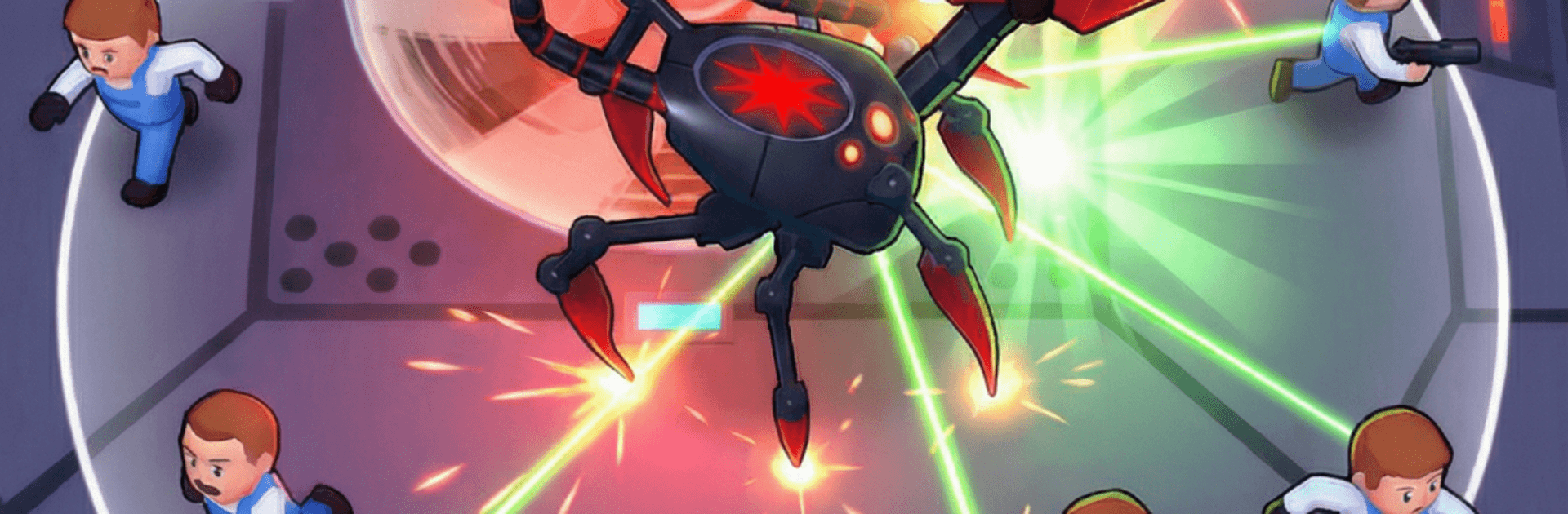
Robot Spider: Idle Invasion

Robot Spider: Idle Invasion

Arcade

| Take Top Entertainment

Play on PC with BlueStacks or from our cloud

  • Overview
  • Game Features
  • How to Play

Page Modified On: April 13, 2026

Play Robot Spider: Idle Invasion on PC or Mac

Robot Spider: Idle Invasion brings the Arcade genre to life, and throws up exciting challenges for gamers. Developed by Black Box Digital, this Android game is best experienced on BlueStacks, the World’s #1 app player for PC and Mac users.

About the Game

Robot Spider: Idle Invasion flips the script—you’re the creeping, clanking menace everyone’s running from. Set in 2077 after a lab disaster, you pilot a hulking metal arachnid that feeds, evolves, and spreads chaos across high-security labs and military zones. It’s an Arcade mix of idle progression and quick-hit action, and it plays great on a bigger screen with BlueStacks if that’s your thing.

Game Features

  • Always Growing: Your spider keeps getting stronger even when you’re not playing. Log back in to spend your haul and push further.
  • Mutations That Matter: Devour energy from humans and fortified bases to unlock wild mutations that change how you look—and how you destroy.
  • Total Takeover: Clear districts, survive enemy waves, and take down big, mean bosses standing between you and domination.
  • Swarm Support: Build an entourage of mini-bots that fight, fetch, and generally make your reign of terror more efficient.
  • Targeted Upgrades: Tune claws, armor, and speed to match your style—bulldoze through defenses or skitter past them fast.
  • Offline Friendly: No connection? Keep the invasion rolling offline and pick up rewards when you return.
  • 2077 War Zones: Stalk scientists through neon labs, shred tanks on city streets, and smash through fortified outposts.
  • Quick Bursts or Long Runs: Perfect for a few chaotic minutes or a longer session of steady, satisfying growth.
  • Clean, Punchy Action: Snappy controls and clear feedback make every chomp, charge, and upgrade feel crunchy and rewarding.

From Black Box Digital, Robot Spider: Idle Invasion brings a gleefully villainous twist to Arcade chaos with an addictive idle backbone.

Get ready for a buttery smooth, high-performance gaming action only on BlueStacks.

Game Features

Enhancements

  • Macros
  • Multi Instance
  • Multi Instance Sync
  • Script
  • Enhancements
Macros

Macros

Automate the predictable in Robot Spider: Idle Invasion and transform your gameplay with Macros. Get access to inventive Macros in the BlueStacks Macro Community
Multi Instance

Multi Instance

Play Robot Spider: Idle Invasion on one window. And chat with your friend on the other. Press CTRL + Shift + 8 to open the Multi-Instance Manager. And start creating fresh instances or clone an existing one.
Multi Instance Sync

Multi Instance Sync

Play Robot Spider: Idle Invasion with the power of Multi-Instance Sync. Replicate what you are doing on the main instance on all other instances. Level up faster, play more.
Script

Script

Script your way to gaming glory in Robot Spider: Idle Invasion with BlueStacks Script. Write and run a set of commands to automate repeated tasks. Trigger the command by assigning it to any key.
Read More

How to Download and Play Robot Spider: Idle Invasion on PC or Mac

  • Download and install BlueStacks on your PC or Mac

  • Complete Google sign-in to access the Play Store, or do it later

  • Look for Robot Spider: Idle Invasion in the search bar at the top right corner

  • Click to install Robot Spider: Idle Invasion from the search results

  • Complete Google sign-in (if you skipped step 2) to install Robot Spider: Idle Invasion

  • Click the Robot Spider: Idle Invasion icon on the home screen to start playing

video
Watch Video

Minimum System Requirements

With BlueStacks 5, you can get started on a PC that fulfills the following requirements.

  • Operating System

    Microsoft Windows 7 or above, macOS 11 (Big Sur) or above

  • Processor

    Intel, AMD or Apple Silicon Processor

  • RAM

    at least 4GB

  • HDD

    10GB Free Disk Space

Note:

* You must be an Administrator on your PC. Up to date graphics drivers from Microsoft or the chipset vendor.

Robot Spider: Idle Invasion - FAQs

  • How to play Robot Spider: Idle Invasion on Windows PC & Mac?

    Play Robot Spider: Idle Invasion on your PC or Mac by following these simple steps.

    • Click on 'Play Robot Spider: Idle Invasion on PC’ to download BlueStacks
    • Install it and log-in to Google Play Store
    • Launch and play the game.
  • Why is BlueStacks the fastest and safest platform to play games on PC?

    BlueStacks respects your privacy and is always safe and secure to use. It does not carry any malware, spyware, or any sort of additional software that could harm your PC.

    It is engineered to optimize speed and performance for a seamless gaming experience.

  • What are Robot Spider: Idle Invasion PC requirements?

    Minimum requirement to run Robot Spider: Idle Invasion on your PC

    • OS: Microsoft Windows 7 or above MacOS 11 (Big Sur) or above
    • Processor: Intel, AMD or Apple Silicon Processor
    • RAM: Your PC must have at least 4GB of RAM. (Note that having 4GB or more disk space is not a substitute for RAM)
    • HDD: 10GB Free Disk Space.
    • You must be an Administrator on your PC.