Tank Hero: Laser Wars Pro

Tank Hero: Laser Wars Pro

Arcade

| Clapfoot Inc.

Play on PC with BlueStacks or from our cloud

  • Overview
  • Game Features
  • How to Play

Page Modified On: July 06, 2026

Play Tank Hero: Laser Wars Pro on PC or Mac

Bring your A-game to Tank Hero: Laser Wars Pro, the Arcade game sensation from Clapfoot Inc.. Give your gameplay the much-needed boost with precise game controls, high FPS graphics, and top-tier features on your PC or Mac with BlueStacks.

About the Game

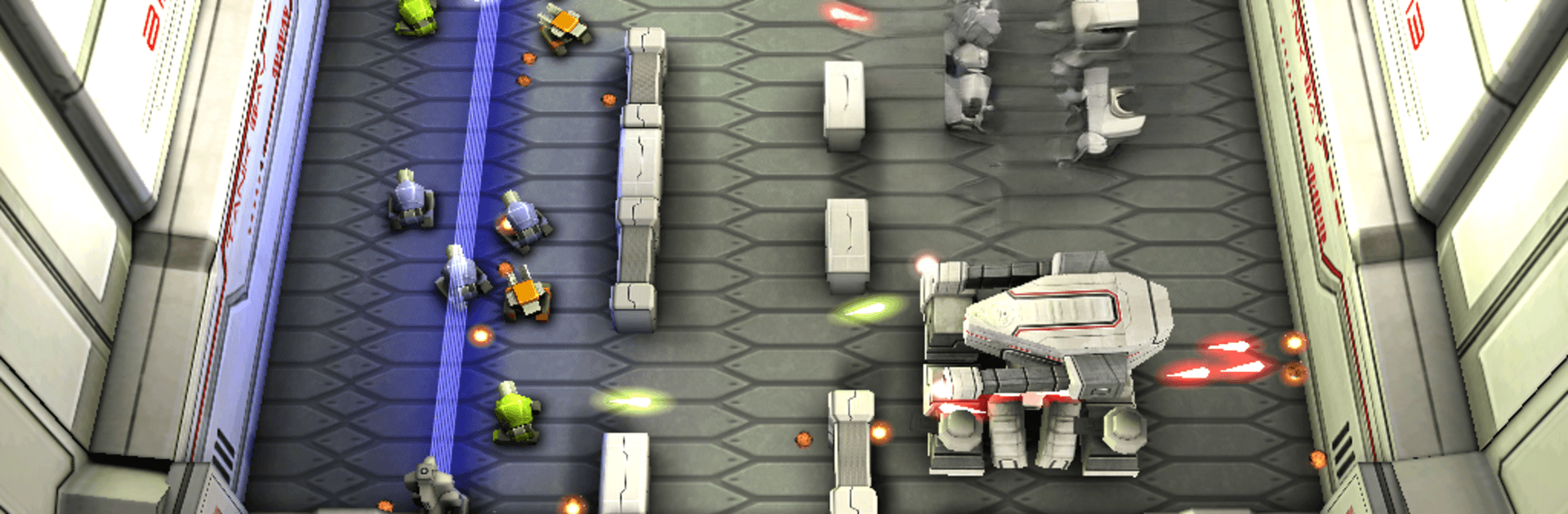
Tank Hero: Laser Wars Pro is a slick, top-down tank shooter where lasers rule and every bounce matters. It delivers fast, punchy Arcade action across tight arenas packed with hazards and clever angles. Expect quick skirmishes, tense boss fights, and that “just one more run” feeling when a perfect ricochet wipes the field.

Game Features

  • Sharp 3D visuals: Clean lighting, flashy impacts, and smooth performance keep the battlefield readable and exciting.
  • Distinctive firepower: Ray guns, plasma howitzers, and sonic cannons each bring their own rhythm, range, and ricochet tricks.
  • Reactive arenas: Force fields bend shots, volatile barrels chain-explode, and obstacles turn the map into a puzzle.
  • Two themed campaigns: Work through sets of handcrafted stages, each with its own flavor and pacing.
  • Big boss battles: Pattern-driven showdowns that push your aim, timing, and positioning.
  • On-the-fly power-ups: Snag energy shields, speed bursts, and other boosts right in the middle of the chaos.
  • Couch-versus mode: Go head-to-head in local split-screen Deathmatch and settle those rivalries the old-fashioned way.
  • Achievements and challenge: Four difficulty settings let you chill, sweat, or something in between—plus goals to chase.
  • Original soundtrack: Energetic tracks that match the pace without getting in your way.
  • Compact install: Quick to set up and play—no bulky add-ons waiting in the wings.
  • Play on a bigger screen: Prefer PC controls and extra space? BlueStacks handles it nicely without making a big deal of it.

Start playing Tank Hero: Laser Wars Pro on BlueStacks and get a smoother, more comfortable PC or Mac setup.


Game Features

Enhancements

  • Macros
  • Multi Instance
  • Multi Instance Sync
  • Script
  • Enhancements
Macros

Macros

Automate the predictable in Tank Hero: Laser Wars Pro and transform your gameplay with Macros. Get access to inventive Macros in the BlueStacks Macro Community
Multi Instance

Multi Instance

Play Tank Hero: Laser Wars Pro on one window. And chat with your friend on the other. Press CTRL + Shift + 8 to open the Multi-Instance Manager. And start creating fresh instances or clone an existing one.
Multi Instance Sync

Multi Instance Sync

Play Tank Hero: Laser Wars Pro with the power of Multi-Instance Sync. Replicate what you are doing on the main instance on all other instances. Level up faster, play more.
Script

Script

Script your way to gaming glory in Tank Hero: Laser Wars Pro with BlueStacks Script. Write and run a set of commands to automate repeated tasks. Trigger the command by assigning it to any key.
Read More

How to Download and Play Tank Hero: Laser Wars Pro on PC or Mac

  • Download and install BlueStacks on your PC or Mac

  • Complete Google sign-in to access the Play Store, or do it later

  • Look for Tank Hero: Laser Wars Pro in the search bar at the top right corner

  • Click to install Tank Hero: Laser Wars Pro from the search results

  • Complete Google sign-in (if you skipped step 2) to install Tank Hero: Laser Wars Pro

  • Click the Tank Hero: Laser Wars Pro icon on the home screen to start playing

video
Watch Video

Minimum System Requirements

With BlueStacks 5, you can get started on a PC that fulfills the following requirements.

  • Operating System

    Microsoft Windows 7 or above, macOS 11 (Big Sur) or above

  • Processor

    Intel, AMD or Apple Silicon Processor

  • RAM

    at least 4GB

  • HDD

    10GB Free Disk Space

Note:

* You must be an Administrator on your PC. Up to date graphics drivers from Microsoft or the chipset vendor.

Tank Hero: Laser Wars Pro - FAQs

  • How to play Tank Hero: Laser Wars Pro on Windows PC & Mac?

    Play Tank Hero: Laser Wars Pro on your PC or Mac by following these simple steps.

    • Click on 'Play Tank Hero: Laser Wars Pro on PC’ to download BlueStacks
    • Install it and log-in to Google Play Store
    • Launch and play the game.
  • Why is BlueStacks the fastest and safest platform to play games on PC?

    BlueStacks respects your privacy and is always safe and secure to use. It does not carry any malware, spyware, or any sort of additional software that could harm your PC.

    It is engineered to optimize speed and performance for a seamless gaming experience.

  • What are Tank Hero: Laser Wars Pro PC requirements?

    Minimum requirement to run Tank Hero: Laser Wars Pro on your PC

    • OS: Microsoft Windows 7 or above MacOS 11 (Big Sur) or above
    • Processor: Intel, AMD or Apple Silicon Processor
    • RAM: Your PC must have at least 4GB of RAM. (Note that having 4GB or more disk space is not a substitute for RAM)
    • HDD: 10GB Free Disk Space.
    • You must be an Administrator on your PC.