Auf Achse Logistics Board Game

Auf Achse Logistics Board Game

Board

| Fumapps

Play on PC with BlueStacks or from our cloud

  • Overview
  • Game Features
  • How to Play

Page Modified On: September 07, 2026

Play Auf Achse Logistics Board Game on PC or Mac

Play Auf Achse Logistics Board Game by Fumapps on PC or Mac with BlueStacks. Use a bigger screen, mouse and keyboard controls, and smoother performance while you play.

About the Game

Auf Achse Logistics Board Game turns long‑haul trucking into a clever, competitive puzzle you can play anywhere. This is a Board experience built around planning routes, bidding on contracts, loading up trailers, and squeezing more profit out of every mile than your rivals. Expect tight decisions, the occasional curveball, and that “one more turn” feeling as you race to end the game as the richest transporter. Prefer a bigger view? It plays comfortably on BlueStacks, too.

Game Features

  • Classic feel, modern touch: Enjoy a faithful digital take on the tabletop favorite, complete with the refined 2007 rules and a clean interface.
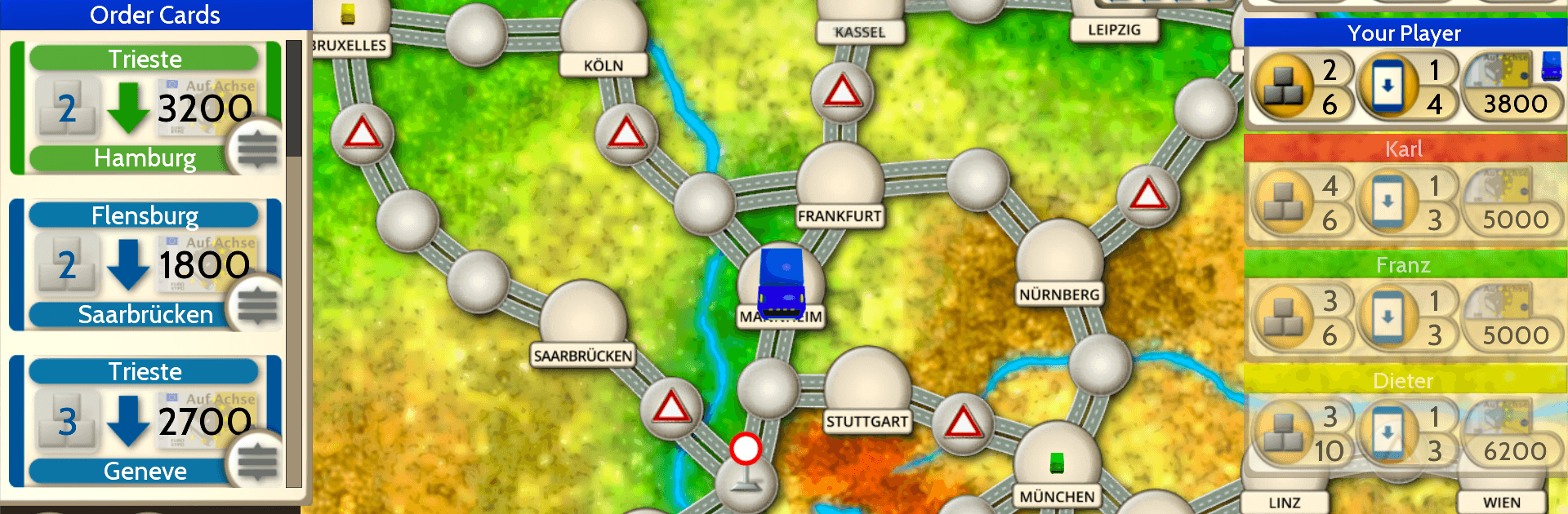
  • Contract juggling: Snag delivery orders, sequence pickups and drop‑offs, and stack payouts by planning smarter runs.
  • Auction showdowns: Enter fast bidding wars for lucrative jobs and decide how much you’re willing to pay to secure them.
  • Map‑smart routing: Chart efficient paths across European cities, weighing distance, timing, and potential detours.
  • Surprise events: Handle unexpected twists that can reroute you, shift prices, or mess with your perfect plan.
  • Trailer upgrades: Invest in extra capacity so you can haul more freight at once and boost your earnings.
  • Win by wealth: It’s all about ending with the biggest bankroll—every decision nudges the final tally.
  • Solo challenges: Face computer opponents with three difficulty levels, from relaxed to ruthless.
  • Online head‑to‑head: Jump into real‑time matches with friends or quick games against new opponents.
  • Pass‑and‑play fun: Share one screen for an easy, old‑school game night with multiple players.
  • Guided start: An interactive tutorial walks you through the basics so you’re up to speed fast.
  • Save and continue: Pause mid‑route and pick up right where you left off whenever you’re ready.
  • Bragging rights: Chase leaderboard spots for highest earnings and best overall score.

Start your journey now. Download the game on BlueStacks, invite your friends, and march on a new adventure.


Game Features

Enhancements

  • Macros
  • Multi Instance
  • Multi Instance Sync
  • Script
  • Enhancements
Macros

Macros

Automate the predictable in Auf Achse Logistics Board Game and transform your gameplay with Macros. Get access to inventive Macros in the BlueStacks Macro Community
Multi Instance

Multi Instance

Play Auf Achse Logistics Board Game on one window. And chat with your friend on the other. Press CTRL + Shift + 8 to open the Multi-Instance Manager. And start creating fresh instances or clone an existing one.
Multi Instance Sync

Multi Instance Sync

Play Auf Achse Logistics Board Game with the power of Multi-Instance Sync. Replicate what you are doing on the main instance on all other instances. Level up faster, play more.
Script

Script

Script your way to gaming glory in Auf Achse Logistics Board Game with BlueStacks Script. Write and run a set of commands to automate repeated tasks. Trigger the command by assigning it to any key.
Read More

How to Download and Play Auf Achse Logistics Board Game on PC or Mac

  • Download and install BlueStacks on your PC or Mac

  • Complete Google sign-in to access the Play Store, or do it later

  • Look for Auf Achse Logistics Board Game in the search bar at the top right corner

  • Click to install Auf Achse Logistics Board Game from the search results

  • Complete Google sign-in (if you skipped step 2) to install Auf Achse Logistics Board Game

  • Click the Auf Achse Logistics Board Game icon on the home screen to start playing

video
Watch Video

Minimum System Requirements

With BlueStacks 5, you can get started on a PC that fulfills the following requirements.

  • Operating System

    Microsoft Windows 7 or above, macOS 11 (Big Sur) or above

  • Processor

    Intel, AMD or Apple Silicon Processor

  • RAM

    at least 4GB

  • HDD

    10GB Free Disk Space

Note:

* You must be an Administrator on your PC. Up to date graphics drivers from Microsoft or the chipset vendor.

Auf Achse Logistics Board Game - FAQs

  • How to play Auf Achse Logistics Board Game on Windows PC & Mac?

    Play Auf Achse Logistics Board Game on your PC or Mac by following these simple steps.

    • Click on 'Play Auf Achse Logistics Board Game on PC’ to download BlueStacks
    • Install it and log-in to Google Play Store
    • Launch and play the game.
  • Why is BlueStacks the fastest and safest platform to play games on PC?

    BlueStacks respects your privacy and is always safe and secure to use. It does not carry any malware, spyware, or any sort of additional software that could harm your PC.

    It is engineered to optimize speed and performance for a seamless gaming experience.

  • What are Auf Achse Logistics Board Game PC requirements?

    Minimum requirement to run Auf Achse Logistics Board Game on your PC

    • OS: Microsoft Windows 7 or above MacOS 11 (Big Sur) or above
    • Processor: Intel, AMD or Apple Silicon Processor
    • RAM: Your PC must have at least 4GB of RAM. (Note that having 4GB or more disk space is not a substitute for RAM)
    • HDD: 10GB Free Disk Space.
    • You must be an Administrator on your PC.