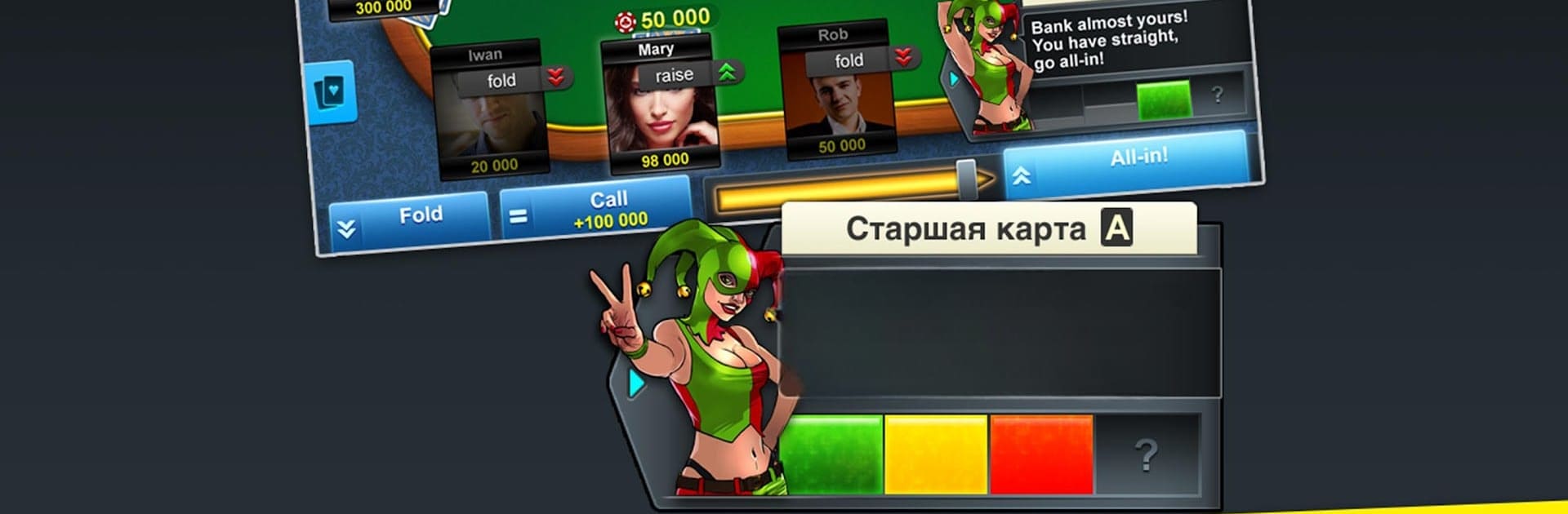
Poker Arena: texas holdem game

Poker Arena: texas holdem game

Card

| VK.com

Play on PC with BlueStacks or from our cloud

  • Overview
  • Game Features
  • How to Play

Page Modified On: September 19, 2025

Play Poker Arena: texas holdem game on PC or Mac

Bring your A-game to Poker Arena: texas holdem game, the Card game sensation from VK.com. Give your gameplay the much-needed boost with precise game controls, high FPS graphics, and top-tier features on your PC or Mac with BlueStacks.

Poker Arena is straight up Texas Holdem with a clean look and a quick flow, the kind that keeps a table running without a lot of waiting around. It matches players fast, the chips and cards feel snappy, and the interface stays readable even when the pot gets messy. There is in-game chat for some light table talk, plus goofy little gifts to send if someone lands a wild river. New players do not get pushed into the deep end either. There is a tutorial, a simple chart of hand rankings, and a visual meter that shows how strong the current hand is, which helps a lot when the board pairs or the flush looks close. For solo time, there is an offline campaign called Trixie’s Story and a Training mode against bots, good for testing ranges or just getting comfortable with the pacing.

Regular tables run all day, and there are weekly tournaments for anyone who wants structure instead of just ring hands. Daily chip bonuses help keep the bankroll alive, which softens the tilt after a bad beat. On PC through BlueStacks, the bigger screen makes the bet slider and chat easier to handle, and it is nicer for reading the board without squinting. It feels casual and social, but still gives enough info for someone who actually wants to play better and not only push all-ins for fun.

Start your journey now. Download the game on BlueStacks, invite your friends, and march on a new adventure.


Game Features

Enhancements

  • Macros
  • Multi Instance
  • Multi Instance Sync
  • Script
  • Enhancements
Macros

Macros

Automate the predictable in Poker Arena: texas holdem game and transform your gameplay with Macros. Get access to inventive Macros in the BlueStacks Macro Community
Multi Instance

Multi Instance

Play Poker Arena: texas holdem game on one window. And chat with your friend on the other. Press CTRL + Shift + 8 to open the Multi-Instance Manager. And start creating fresh instances or clone an existing one.
Multi Instance Sync

Multi Instance Sync

Play Poker Arena: texas holdem game with the power of Multi-Instance Sync. Replicate what you are doing on the main instance on all other instances. Level up faster, play more.
Script

Script

Script your way to gaming glory in Poker Arena: texas holdem game with BlueStacks Script. Write and run a set of commands to automate repeated tasks. Trigger the command by assigning it to any key.
Read More

How to Download and Play Poker Arena: texas holdem game on PC or Mac

  • Download and install BlueStacks on your PC or Mac

  • Complete Google sign-in to access the Play Store, or do it later

  • Look for Poker Arena: texas holdem game in the search bar at the top right corner

  • Click to install Poker Arena: texas holdem game from the search results

  • Complete Google sign-in (if you skipped step 2) to install Poker Arena: texas holdem game

  • Click the Poker Arena: texas holdem game icon on the home screen to start playing

video
Watch Video

Minimum System Requirements

With BlueStacks 5, you can get started on a PC that fulfills the following requirements.

  • Operating System

    Microsoft Windows 7 or above, macOS 11 (Big Sur) or above

  • Processor

    Intel, AMD or Apple Silicon Processor

  • RAM

    at least 4GB

  • HDD

    10GB Free Disk Space

Note:

* You must be an Administrator on your PC. Up to date graphics drivers from Microsoft or the chipset vendor.

Poker Arena: texas holdem game - FAQs

  • How to play Poker Arena: texas holdem game on Windows PC & Mac?

    Play Poker Arena: texas holdem game on your PC or Mac by following these simple steps.

    • Click on 'Play Poker Arena: texas holdem game on PC’ to download BlueStacks
    • Install it and log-in to Google Play Store
    • Launch and play the game.
  • Why is BlueStacks the fastest and safest platform to play games on PC?

    BlueStacks respects your privacy and is always safe and secure to use. It does not carry any malware, spyware, or any sort of additional software that could harm your PC.

    It is engineered to optimize speed and performance for a seamless gaming experience.

  • What are Poker Arena: texas holdem game PC requirements?

    Minimum requirement to run Poker Arena: texas holdem game on your PC

    • OS: Microsoft Windows 7 or above MacOS 11 (Big Sur) or above
    • Processor: Intel, AMD or Apple Silicon Processor
    • RAM: Your PC must have at least 4GB of RAM. (Note that having 4GB or more disk space is not a substitute for RAM)
    • HDD: 10GB Free Disk Space.
    • You must be an Administrator on your PC.