Tarot Offline - Single Player Card Game

Tarot Offline - Single Player Card Game

Card

| VIP GAMES - Card & Board Games Online

Play on PC with BlueStacks or from our cloud

  • Overview
  • Game Features
  • How to Play

Page Modified On: November 10, 2025

Play Tarot Offline - Single Player Card Game on PC or Mac

Step into the World of Tarot Offline – Single Player Card Game, a thrilling Card game from the house of VIP GAMES – Card & Board Games Online. Play this Android game on BlueStacks App Player and experience immersive gaming on PC or Mac.

About the Game

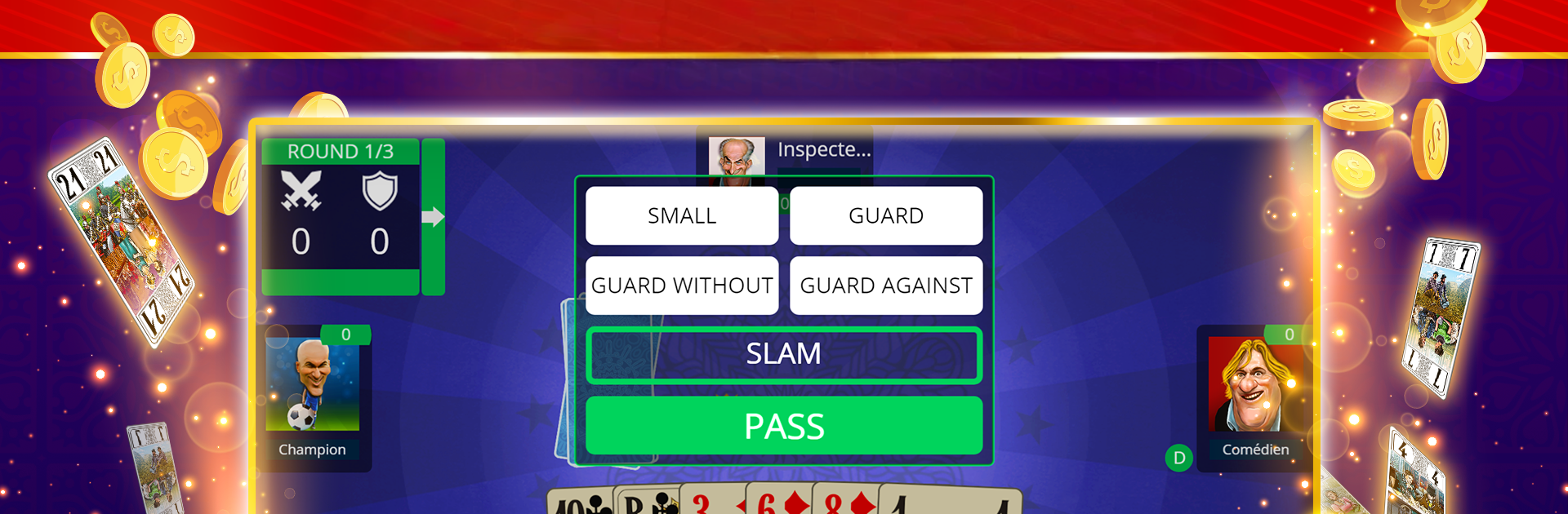
Tarot Offline – Single Player Card Game brings the classic French Tarot table to your screen and lets you play anytime, even without internet. Bid, lead, and manage trumps against smart computer opponents while getting comfortable with the 78-card deck rooted in the Marseille tradition. From VIP GAMES – Card & Board Games Online, it’s a friendly, pick-up-and-play Card experience that fits coffee breaks, commutes, or a late-night strategy fix.

Game Features

  • Classic French Tarot, Offline
    Play wherever you are—no signal needed. Start a round in seconds and continue exactly where you left off.

  • Authentic 78-Card Rules
    Enjoy the full French Tarot ruleset with the proper deck, bidding, and trick-taking flow that fans know and love.

  • Single-Player vs. Smart AI
    Face well-tuned opponents that challenge your decisions and encourage thoughtful play, from cautious bids to bold slams.

  • Rooms for Every Skill Level
    Choose tables that match your experience, whether you’re learning the ropes or refining advanced tactics.

  • Fast, Responsive Gameplay
    Snappy controls and quick animations keep hands moving, so you spend time thinking about strategy—not waiting.

  • Clean HD Visuals
    Crisp cards and smooth effects make it easy to read the table and track the action at a glance.

  • Daily Bonuses and Chips
    Log in, collect rewards, and keep the games rolling without pressure.

  • Practice Without Pressure
    Experiment with openings, test defensive lines, and build confidence before heading into competitive play elsewhere.

  • Subtle PC Play with BlueStacks
    Prefer a bigger screen? It runs smoothly on BlueStacks if you’d rather play on your computer.

  • Genre: Card
    A pure trick-taking focus for players who enjoy reading the table, counting cards, and planning a few moves ahead.

Start your journey now. Download the game on BlueStacks, invite your friends, and march on a new adventure.


Game Features

Enhancements

  • Macros
  • Multi Instance
  • Multi Instance Sync
  • Script
  • Enhancements
Macros

Macros

Automate the predictable in Tarot Offline - Single Player Card Game and transform your gameplay with Macros. Get access to inventive Macros in the BlueStacks Macro Community
Multi Instance

Multi Instance

Play Tarot Offline - Single Player Card Game on one window. And chat with your friend on the other. Press CTRL + Shift + 8 to open the Multi-Instance Manager. And start creating fresh instances or clone an existing one.
Multi Instance Sync

Multi Instance Sync

Play Tarot Offline - Single Player Card Game with the power of Multi-Instance Sync. Replicate what you are doing on the main instance on all other instances. Level up faster, play more.
Script

Script

Script your way to gaming glory in Tarot Offline - Single Player Card Game with BlueStacks Script. Write and run a set of commands to automate repeated tasks. Trigger the command by assigning it to any key.
Read More

How to Download and Play Tarot Offline - Single Player Card Game on PC or Mac

  • Download and install BlueStacks on your PC or Mac

  • Complete Google sign-in to access the Play Store, or do it later

  • Look for Tarot Offline - Single Player Card Game in the search bar at the top right corner

  • Click to install Tarot Offline - Single Player Card Game from the search results

  • Complete Google sign-in (if you skipped step 2) to install Tarot Offline - Single Player Card Game

  • Click the Tarot Offline - Single Player Card Game icon on the home screen to start playing

video
Watch Video

Minimum System Requirements

With BlueStacks 5, you can get started on a PC that fulfills the following requirements.

  • Operating System

    Microsoft Windows 7 or above, macOS 11 (Big Sur) or above

  • Processor

    Intel, AMD or Apple Silicon Processor

  • RAM

    at least 4GB

  • HDD

    10GB Free Disk Space

Note:

* You must be an Administrator on your PC. Up to date graphics drivers from Microsoft or the chipset vendor.

Tarot Offline - Single Player Card Game - FAQs

  • How to play Tarot Offline - Single Player Card Game on Windows PC & Mac?

    Play Tarot Offline - Single Player Card Game on your PC or Mac by following these simple steps.

    • Click on 'Play Tarot Offline - Single Player Card Game on PC’ to download BlueStacks
    • Install it and log-in to Google Play Store
    • Launch and play the game.
  • Why is BlueStacks the fastest and safest platform to play games on PC?

    BlueStacks respects your privacy and is always safe and secure to use. It does not carry any malware, spyware, or any sort of additional software that could harm your PC.

    It is engineered to optimize speed and performance for a seamless gaming experience.

  • What are Tarot Offline - Single Player Card Game PC requirements?

    Minimum requirement to run Tarot Offline - Single Player Card Game on your PC

    • OS: Microsoft Windows 7 or above MacOS 11 (Big Sur) or above
    • Processor: Intel, AMD or Apple Silicon Processor
    • RAM: Your PC must have at least 4GB of RAM. (Note that having 4GB or more disk space is not a substitute for RAM)
    • HDD: 10GB Free Disk Space.
    • You must be an Administrator on your PC.