Air Control HD
Air Control HD

Air Control HD

Casual

| Four Pixels Games

Play on PC with BlueStacks or from our cloud

  • Overview
  • Game Features
  • How to Play

Page Modified On: November 10, 2025

Play Air Control HD on PC or Mac

Explore a whole new adventure with Air Control HD, a Casual game created by Four Pixels Games. Experience great gameplay with BlueStacks, the most popular gaming platform to play Android games on your PC or Mac.

About the Game

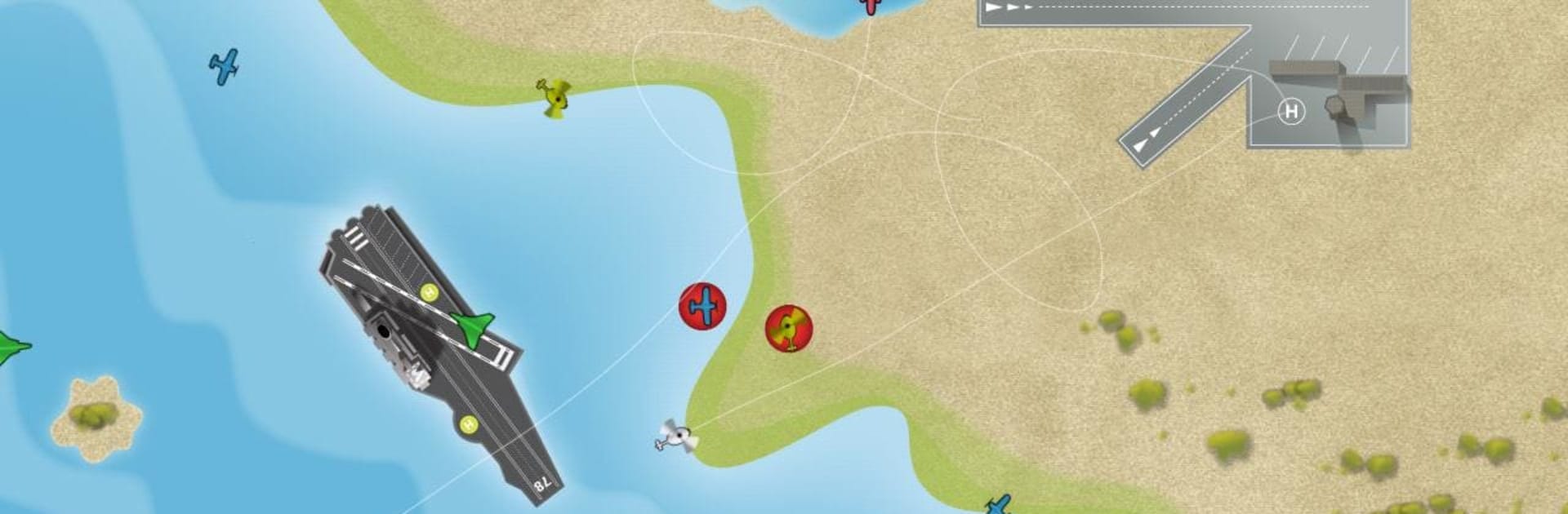
Air Control HD puts you in the hot seat as the person who decides where every plane lands and how they get there. It’s a quick, smart, and occasionally chaotic Casual experience from Four Pixels Games where you draw flight paths, prevent mid-air mishaps, and keep the runway queues moving. Prefer a larger screen? It plays great on BlueStacks, too.

Game Features

  • HD Visuals
  • Clean, sharp graphics make busy airfields easy to read, especially on high‑resolution phones and tablets.

  • Touch-and-Draw Controls

  • Sketch smooth routes with your finger and adjust on the fly; multitouch lets you coordinate with a friend on the same device.

  • Five Distinct Maps

  • Switch between varied airfields, including an HD‑exclusive layout that uses extra screen space for bigger, more strategic traffic patterns.

  • Aircraft Variety

  • Manage everything from speedy passenger jets to a supersonic jet and a slow, floating zeppelin, each changing how you plan approaches.

  • Two Play Styles

  • Go for survival in Classic mode or tackle bite‑sized, brainy challenges in the unique Puzzle mode.

  • Online High Scores

  • Compare your best runs with other players and see how long you can keep the skies incident‑free.

  • Satisfying Flight Paths

  • Those clean arcs you draw aren’t just for show—they’re the key to smooth landings and near‑miss saves.

  • Built for Quick Sessions

  • Easy to pick up for a few minutes, yet tense and absorbing enough to keep you looping planes for much longer.

Slay your opponents with your epic moves. Play it your way on BlueStacks and dominate the battlefield.


Game Features

Enhancements

  • Macros
  • Multi Instance
  • Script
  • Repeated Tap
  • Enhancements
Macros

Macros

Automate the predictable in Air Control HD and transform your gameplay with Macros. Get access to inventive Macros in the BlueStacks Macro Community
Multi Instance

Multi Instance

Play Air Control HD on one window. And chat with your friend on the other. Press CTRL + Shift + 8 to open the Multi-Instance Manager. And start creating fresh instances or clone an existing one.
Script

Script

Script your way to gaming glory in Air Control HD with BlueStacks Script. Write and run a set of commands to automate repeated tasks. Trigger the command by assigning it to any key.
Repeated Tap

Repeated Tap

BlueStacks lets you master Air Control HD with useful features like the Repeated Tap. Now you do not have to press the same key repeatedly to initiate an action. Just assign it to one key and you are good to go.
Read More

How to Download and Play Air Control HD on PC or Mac

  • Download and install BlueStacks on your PC or Mac

  • Complete Google sign-in to access the Play Store, or do it later

  • Look for Air Control HD in the search bar at the top right corner

  • Click to install Air Control HD from the search results

  • Complete Google sign-in (if you skipped step 2) to install Air Control HD

  • Click the Air Control HD icon on the home screen to start playing

video
Watch Video

Minimum System Requirements

With BlueStacks 5, you can get started on a PC that fulfills the following requirements.

  • Operating System

    Microsoft Windows 7 or above, macOS 11 (Big Sur) or above

  • Processor

    Intel, AMD or Apple Silicon Processor

  • RAM

    at least 4GB

  • HDD

    10GB Free Disk Space

Note:

* You must be an Administrator on your PC. Up to date graphics drivers from Microsoft or the chipset vendor.

Air Control HD - FAQs

  • How to play Air Control HD on Windows PC & Mac?

    Play Air Control HD on your PC or Mac by following these simple steps.

    • Click on 'Play Air Control HD on PC’ to download BlueStacks
    • Install it and log-in to Google Play Store
    • Launch and play the game.
  • Why is BlueStacks the fastest and safest platform to play games on PC?

    BlueStacks respects your privacy and is always safe and secure to use. It does not carry any malware, spyware, or any sort of additional software that could harm your PC.

    It is engineered to optimize speed and performance for a seamless gaming experience.

  • What are Air Control HD PC requirements?

    Minimum requirement to run Air Control HD on your PC

    • OS: Microsoft Windows 7 or above MacOS 11 (Big Sur) or above
    • Processor: Intel, AMD or Apple Silicon Processor
    • RAM: Your PC must have at least 4GB of RAM. (Note that having 4GB or more disk space is not a substitute for RAM)
    • HDD: 10GB Free Disk Space.
    • You must be an Administrator on your PC.