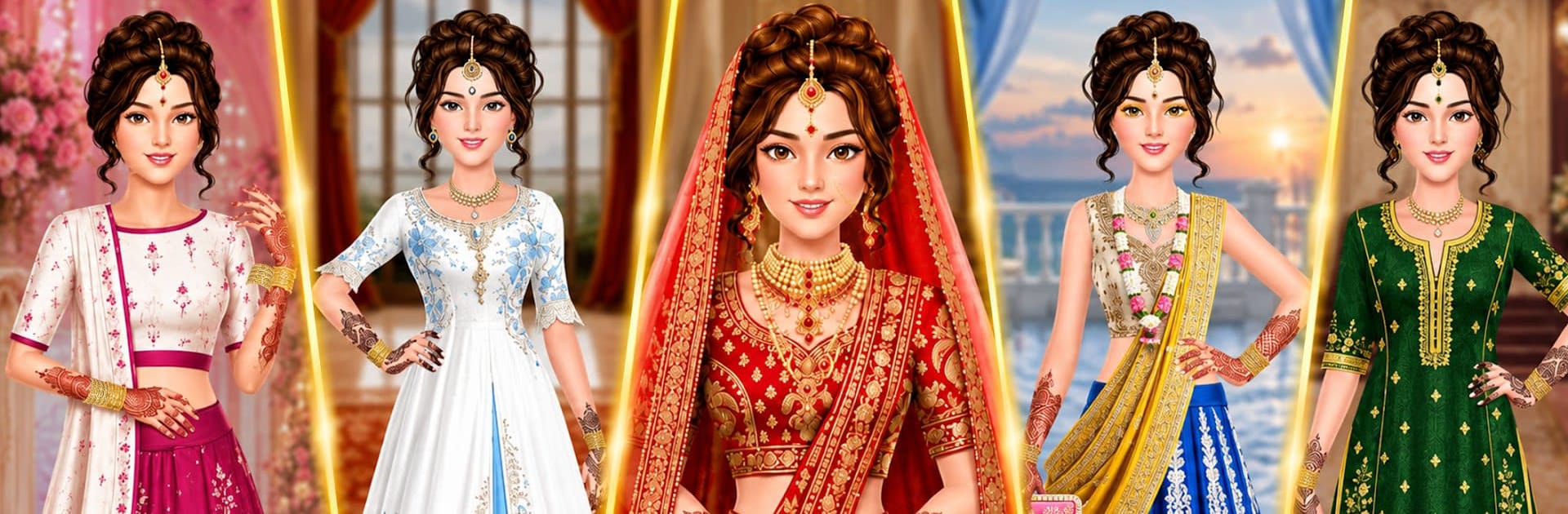
Bridal Wedding: DressUp Makeup

Bridal Wedding: DressUp Makeup

Casual

| Code Tech Media

Play on PC with BlueStacks or from our cloud

  • Overview
  • Game Features
  • How to Play

Page Modified On: August 20, 2026

Play Bridal Wedding: DressUp Makeup on PC or Mac

Bring your A-game to Bridal Wedding: DressUp Makeup, the Casual game sensation from Code Tech Media. Give your gameplay the much-needed boost with precise game controls, high FPS graphics, and top-tier features on your PC or Mac with BlueStacks.

About the Game

Planning looks for the big day is half the fun. Bridal Wedding: DressUp Makeup lets you play stylist for stunning Indian brides, from the first swipe of eyeliner to the final bangle click. It’s a relaxed Casual playground with rich outfits, traditional vibes, and tons of mix-and-match choices—easy to sink into for a few minutes or an hour. Prefer a bigger screen and smooth controls? It feels right at home on BlueStacks.

Game Features

  • Bridal Makeup Studio: Build the look with eyeliner, eyeshadow, blush, and lipstick that pop, then add a soft bridal glow.
  • Wardrobe Variety: Dress brides in sarees, lehenga cholis, or dreamy gowns—each with colors and cuts for different ceremonies.
  • Jewelry & Accessories: Stack bangles, pick necklaces and earrings, and layer in extras to pull the whole style together.
  • Indian Wedding Themes: Style for classic, royal, or modern celebrations with visuals that capture traditional flair.
  • Hairstyles That Work: Try chic updos, flowing curls, or detailed braids and match them with veils or hairpieces.
  • Mix-and-Match Freedom: Swap pieces freely, test bold combos, and keep refining until the look feels just right.
  • Realistic Tools: Easy-to-use brushes and sliders help makeup blend naturally, so nothing looks flat or painted on.
  • Easy, Friendly Controls: Tap, drag, and switch items quickly—great for fast makeovers or deep styling sessions.
  • Offline Play: Create gorgeous bridal looks anytime, even when you’re not connected.
  • Colorful Visuals: Crisp art and lively animations make every outfit shine and every detail stand out.

Start your journey now. Download the game on BlueStacks, invite your friends, and march on a new adventure.


Game Features

Enhancements

  • Macros
  • Multi Instance
  • Script
  • Repeated Tap
  • Enhancements
Macros

Macros

Automate the predictable in Bridal Wedding: DressUp Makeup and transform your gameplay with Macros. Get access to inventive Macros in the BlueStacks Macro Community
Multi Instance

Multi Instance

Play Bridal Wedding: DressUp Makeup on one window. And chat with your friend on the other. Press CTRL + Shift + 8 to open the Multi-Instance Manager. And start creating fresh instances or clone an existing one.
Script

Script

Script your way to gaming glory in Bridal Wedding: DressUp Makeup with BlueStacks Script. Write and run a set of commands to automate repeated tasks. Trigger the command by assigning it to any key.
Repeated Tap

Repeated Tap

BlueStacks lets you master Bridal Wedding: DressUp Makeup with useful features like the Repeated Tap. Now you do not have to press the same key repeatedly to initiate an action. Just assign it to one key and you are good to go.
Read More

How to Download and Play Bridal Wedding: DressUp Makeup on PC or Mac

  • Download and install BlueStacks on your PC or Mac

  • Complete Google sign-in to access the Play Store, or do it later

  • Look for Bridal Wedding: DressUp Makeup in the search bar at the top right corner

  • Click to install Bridal Wedding: DressUp Makeup from the search results

  • Complete Google sign-in (if you skipped step 2) to install Bridal Wedding: DressUp Makeup

  • Click the Bridal Wedding: DressUp Makeup icon on the home screen to start playing

video
Watch Video

Minimum System Requirements

With BlueStacks 5, you can get started on a PC that fulfills the following requirements.

  • Operating System

    Microsoft Windows 7 or above, macOS 11 (Big Sur) or above

  • Processor

    Intel, AMD or Apple Silicon Processor

  • RAM

    at least 4GB

  • HDD

    10GB Free Disk Space

Note:

* You must be an Administrator on your PC. Up to date graphics drivers from Microsoft or the chipset vendor.

Bridal Wedding: DressUp Makeup - FAQs

  • How to play Bridal Wedding: DressUp Makeup on Windows PC & Mac?

    Play Bridal Wedding: DressUp Makeup on your PC or Mac by following these simple steps.

    • Click on 'Play Bridal Wedding: DressUp Makeup on PC’ to download BlueStacks
    • Install it and log-in to Google Play Store
    • Launch and play the game.
  • Why is BlueStacks the fastest and safest platform to play games on PC?

    BlueStacks respects your privacy and is always safe and secure to use. It does not carry any malware, spyware, or any sort of additional software that could harm your PC.

    It is engineered to optimize speed and performance for a seamless gaming experience.

  • What are Bridal Wedding: DressUp Makeup PC requirements?

    Minimum requirement to run Bridal Wedding: DressUp Makeup on your PC

    • OS: Microsoft Windows 7 or above MacOS 11 (Big Sur) or above
    • Processor: Intel, AMD or Apple Silicon Processor
    • RAM: Your PC must have at least 4GB of RAM. (Note that having 4GB or more disk space is not a substitute for RAM)
    • HDD: 10GB Free Disk Space.
    • You must be an Administrator on your PC.