Doctor Simulator Surgery Games

Doctor Simulator Surgery Games

Casual

| Maritime Simulation Games

Play on PC with BlueStacks or from our cloud

  • Overview
  • Game Features
  • How to Play

Page Modified On: December 26, 2025

Play Doctor Simulator Surgery Games on PC or Mac

Step into the World of Doctor Simulator Surgery Games, a thrilling Casual game from the house of Maritime Simulation Games. Play this Android game on BlueStacks App Player and experience immersive gaming on PC or Mac.

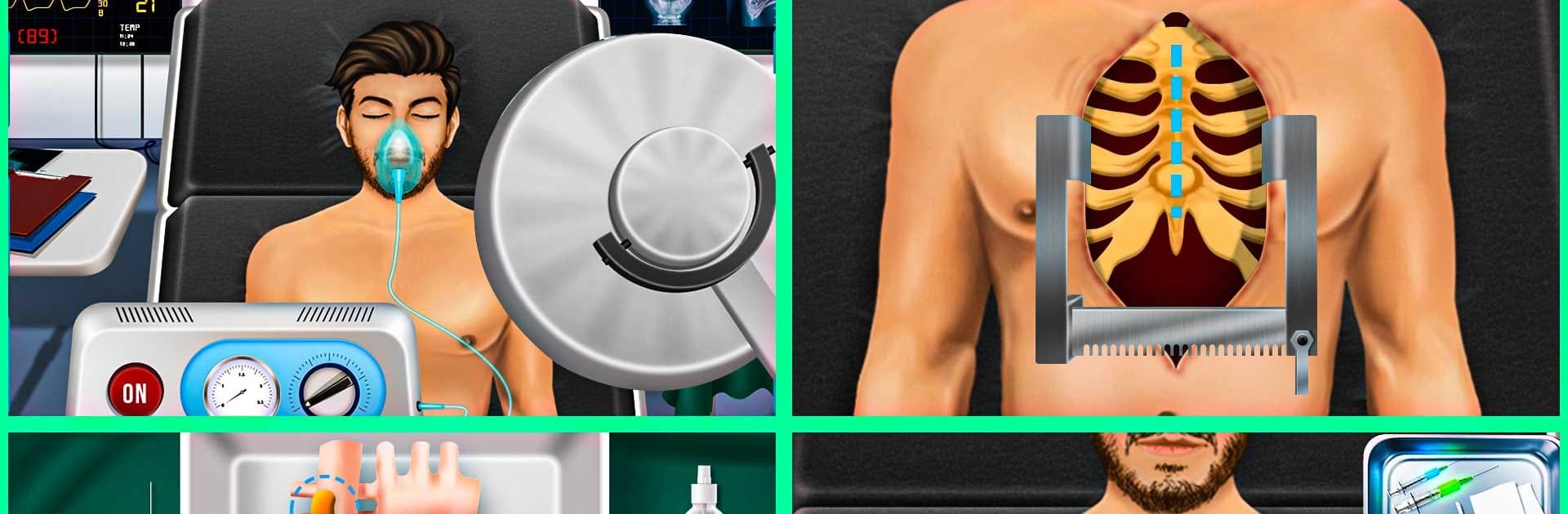
Doctor Simulator Surgery Games plays like a bunch of quick hospital scenarios stitched together, each one about diagnosing a patient and running through a step by step procedure. One moment there is a heart case with ECG checks or an angiography to clear a blocked vein, the next there is a broken bone to set, an ear to clean with little tools, or a dental visit where teeth get polished, stains removed, and tiny cavities filled. It leans arcade more than hardcore sim, but it still walks through real terms and basic sequences so the flow makes sense. There is an expert mode with fewer hints if someone wants a little pressure, and the regular mode keeps big prompts on screen so it never feels confusing.

The hospital is rendered in simple 3D, bright and not gory, with different rooms, nurse chatter, and a carousel of tools to pick up and use. Most actions are tap, drag, hold, or timing a meter, so sessions stay short and easy to replay offline. On PC with BlueStacks, the mouse makes selecting delicate instruments and tracing lines cleaner, and the larger screen helps when the game throws lots of icons at once. It suits players who enjoy medical themed mini tasks, checking vitals, following clear guidelines, and seeing a patient go from problem to fixed. It does repeat a few procedures after a while, but the variety across cardiology, bones, plastic, ear, and dental keeps it moving for quick play.

Make your gaming sessions memorable with precise controls that give you an edge in close combats and visuals that pop up, bringing every character to life.


Game Features

Enhancements

  • Macros
  • Multi Instance
  • Script
  • Repeated Tap
  • Enhancements
Macros

Macros

Automate the predictable in Doctor Simulator Surgery Games and transform your gameplay with Macros. Get access to inventive Macros in the BlueStacks Macro Community
Multi Instance

Multi Instance

Play Doctor Simulator Surgery Games on one window. And chat with your friend on the other. Press CTRL + Shift + 8 to open the Multi-Instance Manager. And start creating fresh instances or clone an existing one.
Script

Script

Script your way to gaming glory in Doctor Simulator Surgery Games with BlueStacks Script. Write and run a set of commands to automate repeated tasks. Trigger the command by assigning it to any key.
Repeated Tap

Repeated Tap

BlueStacks lets you master Doctor Simulator Surgery Games with useful features like the Repeated Tap. Now you do not have to press the same key repeatedly to initiate an action. Just assign it to one key and you are good to go.
Read More

How to Download and Play Doctor Simulator Surgery Games on PC or Mac

  • Download and install BlueStacks on your PC or Mac

  • Complete Google sign-in to access the Play Store, or do it later

  • Look for Doctor Simulator Surgery Games in the search bar at the top right corner

  • Click to install Doctor Simulator Surgery Games from the search results

  • Complete Google sign-in (if you skipped step 2) to install Doctor Simulator Surgery Games

  • Click the Doctor Simulator Surgery Games icon on the home screen to start playing

video
Watch Video

Minimum System Requirements

With BlueStacks 5, you can get started on a PC that fulfills the following requirements.

  • Operating System

    Microsoft Windows 7 or above, macOS 11 (Big Sur) or above

  • Processor

    Intel, AMD or Apple Silicon Processor

  • RAM

    at least 4GB

  • HDD

    10GB Free Disk Space

Note:

* You must be an Administrator on your PC. Up to date graphics drivers from Microsoft or the chipset vendor.

Doctor Simulator Surgery Games - FAQs

  • How to play Doctor Simulator Surgery Games on Windows PC & Mac?

    Play Doctor Simulator Surgery Games on your PC or Mac by following these simple steps.

    • Click on 'Play Doctor Simulator Surgery Games on PC’ to download BlueStacks
    • Install it and log-in to Google Play Store
    • Launch and play the game.
  • Why is BlueStacks the fastest and safest platform to play games on PC?

    BlueStacks respects your privacy and is always safe and secure to use. It does not carry any malware, spyware, or any sort of additional software that could harm your PC.

    It is engineered to optimize speed and performance for a seamless gaming experience.

  • What are Doctor Simulator Surgery Games PC requirements?

    Minimum requirement to run Doctor Simulator Surgery Games on your PC

    • OS: Microsoft Windows 7 or above MacOS 11 (Big Sur) or above
    • Processor: Intel, AMD or Apple Silicon Processor
    • RAM: Your PC must have at least 4GB of RAM. (Note that having 4GB or more disk space is not a substitute for RAM)
    • HDD: 10GB Free Disk Space.
    • You must be an Administrator on your PC.