Princess Town: Doll Girl Games

Princess Town: Doll Girl Games

Casual

| Kids Food Games Inc.

Play on PC with BlueStacks or from our cloud

  • Overview
  • Game Features
  • How to Play

Page Modified On: December 05, 2025

Play Princess Town: Doll Girl Games on PC or Mac

Princess Town: Doll Girl Games brings the Casual genre to life, and throws up exciting challenges for gamers. Developed by Kids Food Games Inc., this Android game is best experienced on BlueStacks, the World’s #1 app player for PC and Mac users.

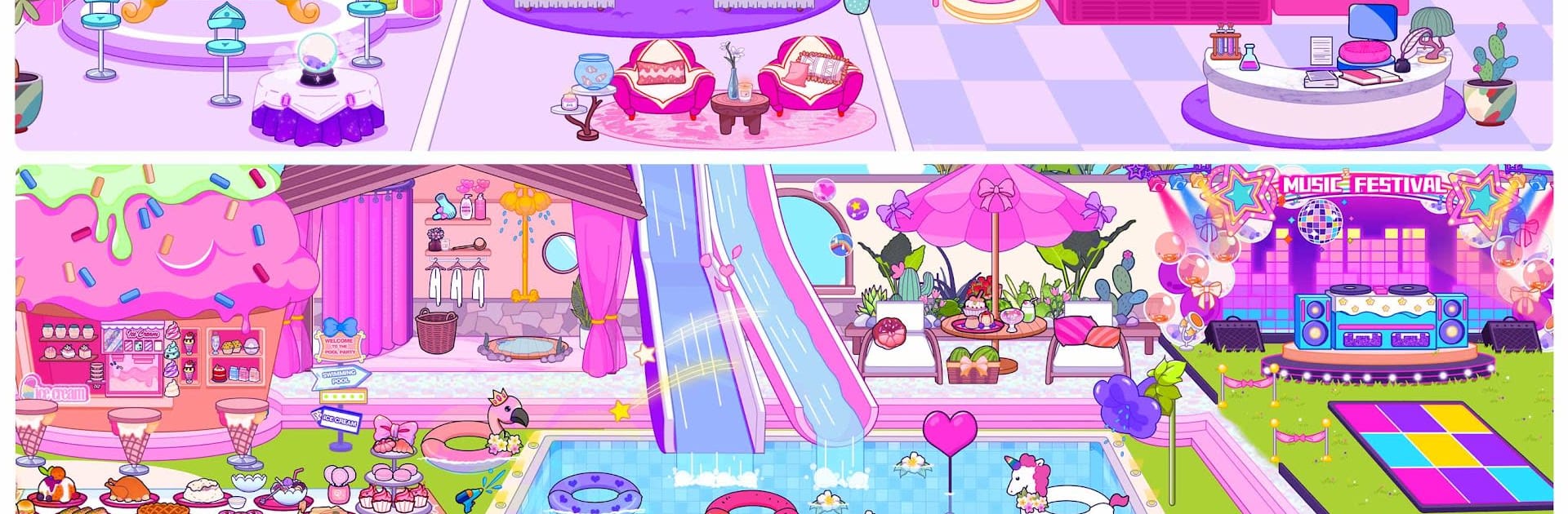
Princess Town: Doll Girl Games feels like a laid-back make-your-own-story playground. It drops the player into a cute resort that swings between spooky-cool and sunny chill. There is a vampire hotel with old charm, a luxury suite to poke around, an ice castle for skating outfits, a loud pool party, a beach and island for sun and water, and a beauty salon for facials and perfumes. The hook is the Character Creator. Players build dolls from scratch, dress them up, tweak looks, then toss them into scenes with a bunch of royal NPCs and a few elves who act like a ready-made cast. Each spot has lots of little objects to move, tap, or mix together, so stories sort of write themselves.

There are no scores or missions, which is the point. It is a dollhouse sandbox where the fun is setting a scene, swapping clothes, and seeing who chats with who. The controls on PC with BlueStacks feel natural because dragging items with a mouse is smooth and the bigger screen helps spot tiny accessories. The vibe is friendly and safe, more imagination than challenge, and it plays at the pace someone wants. Younger players will love the salon massages and ice dances, older ones might enjoy stitching together goofy hotel drama. It is free to play with ads and there are optional purchases, so that is worth knowing. Characters and items are all interactive, so there is a lot to fiddle with and no pressure to do anything in a certain order.

Get ready for a buttery smooth, high-performance gaming action only on BlueStacks.

Game Features

Enhancements

  • Macros
  • Multi Instance
  • Script
  • Repeated Tap
  • Enhancements
Macros

Macros

Automate the predictable in Princess Town: Doll Girl Games and transform your gameplay with Macros. Get access to inventive Macros in the BlueStacks Macro Community
Multi Instance

Multi Instance

Play Princess Town: Doll Girl Games on one window. And chat with your friend on the other. Press CTRL + Shift + 8 to open the Multi-Instance Manager. And start creating fresh instances or clone an existing one.
Script

Script

Script your way to gaming glory in Princess Town: Doll Girl Games with BlueStacks Script. Write and run a set of commands to automate repeated tasks. Trigger the command by assigning it to any key.
Repeated Tap

Repeated Tap

BlueStacks lets you master Princess Town: Doll Girl Games with useful features like the Repeated Tap. Now you do not have to press the same key repeatedly to initiate an action. Just assign it to one key and you are good to go.
Read More

How to Download and Play Princess Town: Doll Girl Games on PC or Mac

  • Download and install BlueStacks on your PC or Mac

  • Complete Google sign-in to access the Play Store, or do it later

  • Look for Princess Town: Doll Girl Games in the search bar at the top right corner

  • Click to install Princess Town: Doll Girl Games from the search results

  • Complete Google sign-in (if you skipped step 2) to install Princess Town: Doll Girl Games

  • Click the Princess Town: Doll Girl Games icon on the home screen to start playing

video
Watch Video

Minimum System Requirements

With BlueStacks 5, you can get started on a PC that fulfills the following requirements.

  • Operating System

    Microsoft Windows 7 or above, macOS 11 (Big Sur) or above

  • Processor

    Intel, AMD or Apple Silicon Processor

  • RAM

    at least 4GB

  • HDD

    10GB Free Disk Space

Note:

* You must be an Administrator on your PC. Up to date graphics drivers from Microsoft or the chipset vendor.

Princess Town: Doll Girl Games - FAQs

  • How to play Princess Town: Doll Girl Games on Windows PC & Mac?

    Play Princess Town: Doll Girl Games on your PC or Mac by following these simple steps.

    • Click on 'Play Princess Town: Doll Girl Games on PC’ to download BlueStacks
    • Install it and log-in to Google Play Store
    • Launch and play the game.
  • Why is BlueStacks the fastest and safest platform to play games on PC?

    BlueStacks respects your privacy and is always safe and secure to use. It does not carry any malware, spyware, or any sort of additional software that could harm your PC.

    It is engineered to optimize speed and performance for a seamless gaming experience.

  • What are Princess Town: Doll Girl Games PC requirements?

    Minimum requirement to run Princess Town: Doll Girl Games on your PC

    • OS: Microsoft Windows 7 or above MacOS 11 (Big Sur) or above
    • Processor: Intel, AMD or Apple Silicon Processor
    • RAM: Your PC must have at least 4GB of RAM. (Note that having 4GB or more disk space is not a substitute for RAM)
    • HDD: 10GB Free Disk Space.
    • You must be an Administrator on your PC.