
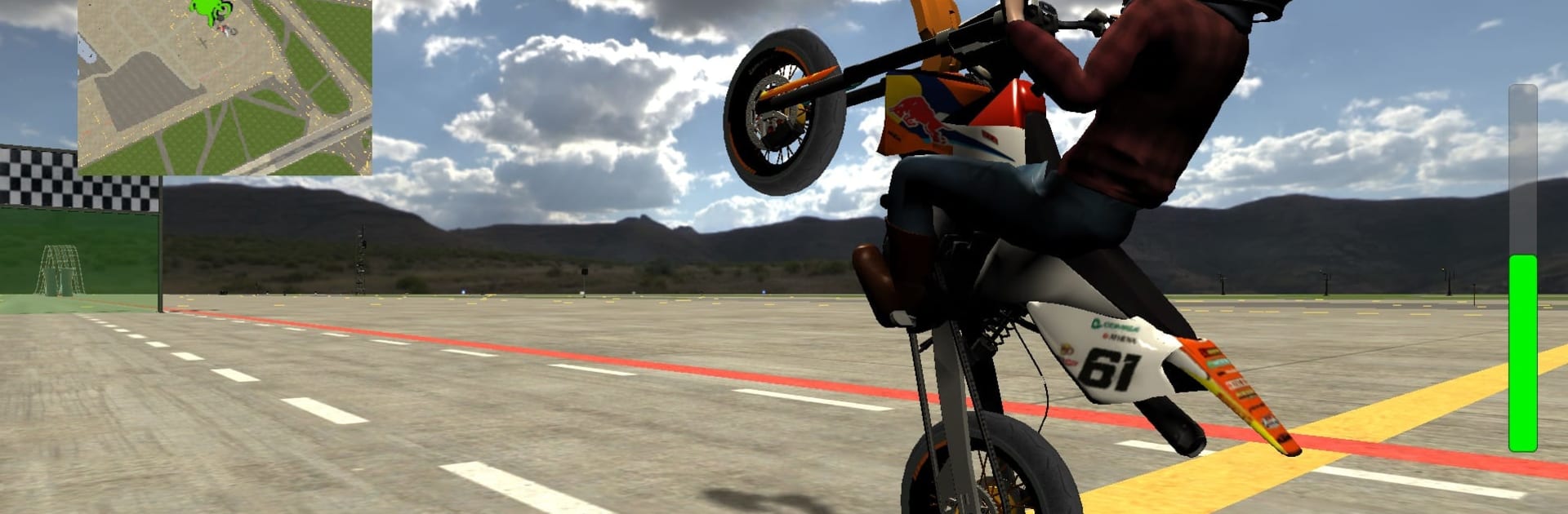
Wheelie King 5 - Motorcycles

Wheelie King 5 - Motorcycles

Casual

| Wheelie Kings

Play on PC with BlueStacks or from our cloud

  • Overview
  • Game Features
  • How to Play

Page Modified On: January 06, 2026

Play Wheelie King 5 - Motorcycles on PC or Mac

From the innovators and creators at Wheelie Kings, Wheelie King 5 – Motorcycles is another fun addition to the World of Casual games. Go beyond your mobile screen and play it bigger and better on your PC or Mac. An immersive experience awaits you.

Wheelie King 5 is a stunt-first bike racer that lives on balance and throttle control. The fun is keeping the front wheel in the air without eating pavement, while the road throws little bumps, traffic, and corners that mess with timing. Players roll on the gas, feather the rear brake, lean back and forward, and try to hold a clean line. It punishes sloppy inputs, but restarts happen fast and that next-try itch hits quick.

The garage is huge. Tiny scooters and 50 cc buzzers up to 1300 cc rockets, two stroke and four stroke, all with their own quirks. Light bikes pop up instantly, big ones pull hard but need space and calm hands. Upgrades are not just fluff. Engines, gearing, tires, suspension, even cosmetic bits, can be tuned until a bike fits stunts or straight speed. Paint jobs and little parts help give it some character.

Tracks bounce from city streets to long highways with plenty of room for drifts, endos, and those long sketchy wheelies that go a little too far. Online races are simple head to head and leaderboards reward clean distance and control more than chaos. On PC through BlueStacks, mapping throttle and brake to keys makes balance corrections easier, and the bigger screen helps judge angle and scrape distance. The bikes sound raspy, visuals are clean not flashy, and the physics feel weighty without turning into a sim.

Start your journey now. Download the game on BlueStacks, invite your friends, and march on a new adventure.


Game Features

Enhancements

  • Macros
  • Multi Instance
  • Script
  • Repeated Tap
  • Enhancements
Macros

Macros

Automate the predictable in Wheelie King 5 - Motorcycles and transform your gameplay with Macros. Get access to inventive Macros in the BlueStacks Macro Community
Multi Instance

Multi Instance

Play Wheelie King 5 - Motorcycles on one window. And chat with your friend on the other. Press CTRL + Shift + 8 to open the Multi-Instance Manager. And start creating fresh instances or clone an existing one.
Script

Script

Script your way to gaming glory in Wheelie King 5 - Motorcycles with BlueStacks Script. Write and run a set of commands to automate repeated tasks. Trigger the command by assigning it to any key.
Repeated Tap

Repeated Tap

BlueStacks lets you master Wheelie King 5 - Motorcycles with useful features like the Repeated Tap. Now you do not have to press the same key repeatedly to initiate an action. Just assign it to one key and you are good to go.
Read More

How to Download and Play Wheelie King 5 - Motorcycles on PC or Mac

  • Download and install BlueStacks on your PC or Mac

  • Complete Google sign-in to access the Play Store, or do it later

  • Look for Wheelie King 5 - Motorcycles in the search bar at the top right corner

  • Click to install Wheelie King 5 - Motorcycles from the search results

  • Complete Google sign-in (if you skipped step 2) to install Wheelie King 5 - Motorcycles

  • Click the Wheelie King 5 - Motorcycles icon on the home screen to start playing

video
Watch Video

Minimum System Requirements

With BlueStacks 5, you can get started on a PC that fulfills the following requirements.

  • Operating System

    Microsoft Windows 7 or above, macOS 11 (Big Sur) or above

  • Processor

    Intel, AMD or Apple Silicon Processor

  • RAM

    at least 4GB

  • HDD

    10GB Free Disk Space

Note:

* You must be an Administrator on your PC. Up to date graphics drivers from Microsoft or the chipset vendor.

Wheelie King 5 - Motorcycles - FAQs

  • How to play Wheelie King 5 - Motorcycles on Windows PC & Mac?

    Play Wheelie King 5 - Motorcycles on your PC or Mac by following these simple steps.

    • Click on 'Play Wheelie King 5 - Motorcycles on PC’ to download BlueStacks
    • Install it and log-in to Google Play Store
    • Launch and play the game.
  • Why is BlueStacks the fastest and safest platform to play games on PC?

    BlueStacks respects your privacy and is always safe and secure to use. It does not carry any malware, spyware, or any sort of additional software that could harm your PC.

    It is engineered to optimize speed and performance for a seamless gaming experience.

  • What are Wheelie King 5 - Motorcycles PC requirements?

    Minimum requirement to run Wheelie King 5 - Motorcycles on your PC

    • OS: Microsoft Windows 7 or above MacOS 11 (Big Sur) or above
    • Processor: Intel, AMD or Apple Silicon Processor
    • RAM: Your PC must have at least 4GB of RAM. (Note that having 4GB or more disk space is not a substitute for RAM)
    • HDD: 10GB Free Disk Space.
    • You must be an Administrator on your PC.







