文字趙雲:我不是阿鬥
文字趙雲:我不是阿鬥

文字趙雲:我不是阿鬥

Casual

| Drive2Digit

Play on PC with BlueStacks or from our cloud

  • Overview
  • Game Features
  • How to Play

Page Modified On: September 07, 2026

Play 文字趙雲:我不是阿鬥 on PC or Mac

文字趙雲:我不是阿鬥 brings the Casual genre to life, and throws up exciting challenges for gamers. Developed by Drive2Digit, this Android game is best experienced on BlueStacks, the World’s #1 app player for PC and Mac users.

About the Game

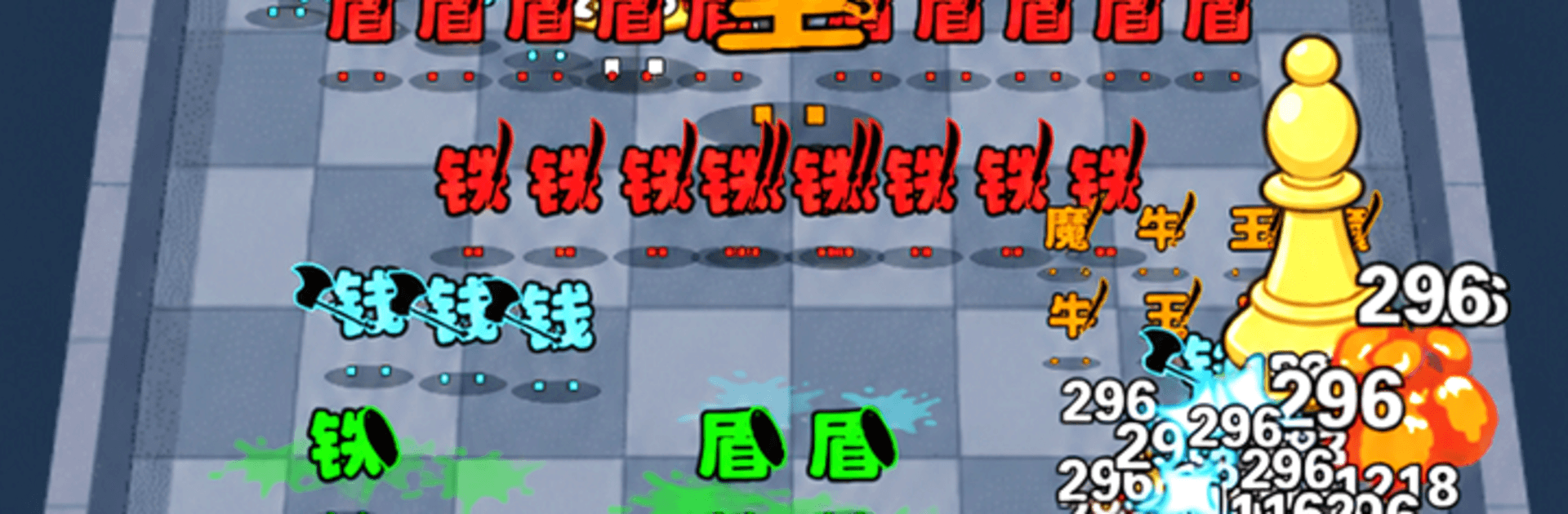
文字趙雲:我不是阿鬥 turns written characters into a full-on battlefield. You slide Zhao Yun across the bottom of the screen while he auto-fires upward, shredding waves of enemy text and keeping a crowned “斗” safe in the center. It’s a snappy, arcade-style Casual experience with short runs, quick decisions, and that satisfying “just one more round” feeling. Prefer a bigger screen? It works smoothly on PC with BlueStacks.

Game Features

  • Drag-to-aim shooting: Hold Zhao Yun and glide left or right to line up clean shots—he fires automatically, and the faster you weave, the thicker the barrage.
  • Protect the crowned “斗”: Your job is to keep the wobbly “斗” in the middle from getting rammed; let too many enemies slip through and the run ends.
  • Distinct enemy roles: “兵” swarm in numbers, “卒” soak damage, “騎” dash straight for the core, and “將” lumber in huge and can call in extras.
  • Word-fusion threats: Paired characters merge into buffed combos that hit harder and demand priority attention.
  • Attribute matchups: Different bullet types deal bonus damage to specific foes—aim smart and the screen clears way faster.
  • Ink-splash impact: Shattered characters burst into inky fireworks on a rice-paper backdrop—minimalist, bold, and super satisfying in motion.
  • Quick, snackable rounds: Most battles wrap in about 3–5 minutes, perfect for a fast fix.
  • Always ready to play: No stamina systems and fully offline-friendly, so you can jump in whenever you’ve got a moment.
  • Skill-first design: No stat sales or pay-to-win creep—wins come from aim, timing, and a cool head when the screen gets crowded.

Start playing 文字趙雲:我不是阿鬥 on BlueStacks and get a smoother, more comfortable PC or Mac setup.

Game Features

Enhancements

  • Macros
  • Multi Instance
  • Script
  • Repeated Tap
  • Enhancements
Macros

Macros

Automate the predictable in 文字趙雲:我不是阿鬥 and transform your gameplay with Macros. Get access to inventive Macros in the BlueStacks Macro Community
Multi Instance

Multi Instance

Play 文字趙雲:我不是阿鬥 on one window. And chat with your friend on the other. Press CTRL + Shift + 8 to open the Multi-Instance Manager. And start creating fresh instances or clone an existing one.
Script

Script

Script your way to gaming glory in 文字趙雲:我不是阿鬥 with BlueStacks Script. Write and run a set of commands to automate repeated tasks. Trigger the command by assigning it to any key.
Repeated Tap

Repeated Tap

BlueStacks lets you master 文字趙雲:我不是阿鬥 with useful features like the Repeated Tap. Now you do not have to press the same key repeatedly to initiate an action. Just assign it to one key and you are good to go.
Read More

How to Download and Play 文字趙雲:我不是阿鬥 on PC or Mac

  • Download and install BlueStacks on your PC or Mac

  • Complete Google sign-in to access the Play Store, or do it later

  • Look for 文字趙雲:我不是阿鬥 in the search bar at the top right corner

  • Click to install 文字趙雲:我不是阿鬥 from the search results

  • Complete Google sign-in (if you skipped step 2) to install 文字趙雲:我不是阿鬥

  • Click the 文字趙雲:我不是阿鬥 icon on the home screen to start playing

video
Watch Video

Minimum System Requirements

With BlueStacks 5, you can get started on a PC that fulfills the following requirements.

  • Operating System

    Microsoft Windows 7 or above, macOS 11 (Big Sur) or above

  • Processor

    Intel, AMD or Apple Silicon Processor

  • RAM

    at least 4GB

  • HDD

    10GB Free Disk Space

Note:

* You must be an Administrator on your PC. Up to date graphics drivers from Microsoft or the chipset vendor.

文字趙雲:我不是阿鬥 - FAQs

  • How to play 文字趙雲:我不是阿鬥 on Windows PC & Mac?

    Play 文字趙雲:我不是阿鬥 on your PC or Mac by following these simple steps.

    • Click on 'Play 文字趙雲:我不是阿鬥 on PC’ to download BlueStacks
    • Install it and log-in to Google Play Store
    • Launch and play the game.
  • Why is BlueStacks the fastest and safest platform to play games on PC?

    BlueStacks respects your privacy and is always safe and secure to use. It does not carry any malware, spyware, or any sort of additional software that could harm your PC.

    It is engineered to optimize speed and performance for a seamless gaming experience.

  • What are 文字趙雲:我不是阿鬥 PC requirements?

    Minimum requirement to run 文字趙雲:我不是阿鬥 on your PC

    • OS: Microsoft Windows 7 or above MacOS 11 (Big Sur) or above
    • Processor: Intel, AMD or Apple Silicon Processor
    • RAM: Your PC must have at least 4GB of RAM. (Note that having 4GB or more disk space is not a substitute for RAM)
    • HDD: 10GB Free Disk Space.
    • You must be an Administrator on your PC.