Block Out: 3D Cube Puzzle Game

Block Out: 3D Cube Puzzle Game

Puzzle

| Sugame

Play on PC with BlueStacks or from our cloud

  • Overview
  • Game Features
  • How to Play

Page Modified On: June 17, 2026

Play Block Out: 3D Cube Puzzle Game on PC or Mac

Block Out: 3D Cube Puzzle Game by Sugame has plenty to keep you busy. BlueStacks lets you play it on PC or Mac with more screen space, better control, and fewer mobile limits.

About the Game

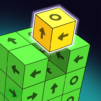
Block Out: 3D Cube Puzzle Game takes the classic block puzzle idea and flips it into full 3D. You’ll tap blocks to slide them out in the only direction they can move, rotate the shape to scout hidden pieces, and clear the whole stack one smart move at a time. It’s calm, colorful, and surprisingly tactical—great for quick breaks or a focused brain workout.

Game Features

  • 3D Block-Turning Play: Spin the structure and check every angle so nothing sneaks past you. Front, back, corners—see it all.
  • Tap-to-Move Logic: Each block shows an arrow for its one allowed direction. Tap to send it out, and plan the sequence so you don’t trap the next piece.
  • 1,000+ Puzzles: A huge library of layouts—from quick clears to tricky builds—that steadily test your logic and spatial awareness.
  • Bright, Readable Designs: Clean colors and distinct shapes make it easy to track what’s blocking what.
  • Smooth, Snappy Controls: Tapping, rotating, and pinch-to-zoom feel natural, so the challenge is the puzzle, not the controls.
  • Play at Your Pace: No pressure vibes and clear goals make it perfect for winding down or sharpening focus.
  • Spot the Hidden Stuff: Zoom in and out to reveal tucked-away pieces and plan around tight spaces.
  • For Every Skill Level: Early stages teach the basics; later levels ask for careful ordering and a bit of foresight.
  • Looks Great on a Bigger Screen: Prefer playing on PC? BlueStacks handles the 3D view and touch-style controls nicely.

Get ready for a buttery smooth, high-performance gaming action only on BlueStacks.

Game Features

Enhancements

  • Macros
  • Multi Instance
  • Multi Instance Sync
  • Script
  • Enhancements
Macros

Macros

Automate the predictable in Block Out: 3D Cube Puzzle Game and transform your gameplay with Macros. Get access to inventive Macros in the BlueStacks Macro Community
Multi Instance

Multi Instance

Play Block Out: 3D Cube Puzzle Game on one window. And chat with your friend on the other. Press CTRL + Shift + 8 to open the Multi-Instance Manager. And start creating fresh instances or clone an existing one.
Multi Instance Sync

Multi Instance Sync

Play Block Out: 3D Cube Puzzle Game with the power of Multi-Instance Sync. Replicate what you are doing on the main instance on all other instances. Level up faster, play more.
Script

Script

Script your way to gaming glory in Block Out: 3D Cube Puzzle Game with BlueStacks Script. Write and run a set of commands to automate repeated tasks. Trigger the command by assigning it to any key.
Read More

How to Download and Play Block Out: 3D Cube Puzzle Game on PC or Mac

  • Download and install BlueStacks on your PC or Mac

  • Complete Google sign-in to access the Play Store, or do it later

  • Look for Block Out: 3D Cube Puzzle Game in the search bar at the top right corner

  • Click to install Block Out: 3D Cube Puzzle Game from the search results

  • Complete Google sign-in (if you skipped step 2) to install Block Out: 3D Cube Puzzle Game

  • Click the Block Out: 3D Cube Puzzle Game icon on the home screen to start playing

video
Watch Video

Minimum System Requirements

With BlueStacks 5, you can get started on a PC that fulfills the following requirements.

  • Operating System

    Microsoft Windows 7 or above, macOS 11 (Big Sur) or above

  • Processor

    Intel, AMD or Apple Silicon Processor

  • RAM

    at least 4GB

  • HDD

    10GB Free Disk Space

Note:

* You must be an Administrator on your PC. Up to date graphics drivers from Microsoft or the chipset vendor.

Block Out: 3D Cube Puzzle Game - FAQs

  • How to play Block Out: 3D Cube Puzzle Game on Windows PC & Mac?

    Play Block Out: 3D Cube Puzzle Game on your PC or Mac by following these simple steps.

    • Click on 'Play Block Out: 3D Cube Puzzle Game on PC’ to download BlueStacks
    • Install it and log-in to Google Play Store
    • Launch and play the game.
  • Why is BlueStacks the fastest and safest platform to play games on PC?

    BlueStacks respects your privacy and is always safe and secure to use. It does not carry any malware, spyware, or any sort of additional software that could harm your PC.

    It is engineered to optimize speed and performance for a seamless gaming experience.

  • What are Block Out: 3D Cube Puzzle Game PC requirements?

    Minimum requirement to run Block Out: 3D Cube Puzzle Game on your PC

    • OS: Microsoft Windows 7 or above MacOS 11 (Big Sur) or above
    • Processor: Intel, AMD or Apple Silicon Processor
    • RAM: Your PC must have at least 4GB of RAM. (Note that having 4GB or more disk space is not a substitute for RAM)
    • HDD: 10GB Free Disk Space.
    • You must be an Administrator on your PC.