MECCHA CHAMELEON
MECCHA CHAMELEON

MECCHA CHAMELEON

Puzzle

| Shakila developer

Play on PC with BlueStacks or from our cloud

  • Overview
  • Game Features
  • How to Play

Page Modified On: June 26, 2026

Play MECCHA CHAMELEON on PC or Mac

MECCHA CHAMELEON brings the Puzzle genre to life, and throws up exciting challenges for gamers. Developed by Shakila developer, this Android game is best experienced on BlueStacks, the World’s #1 app player for PC and Mac users.

About the Game

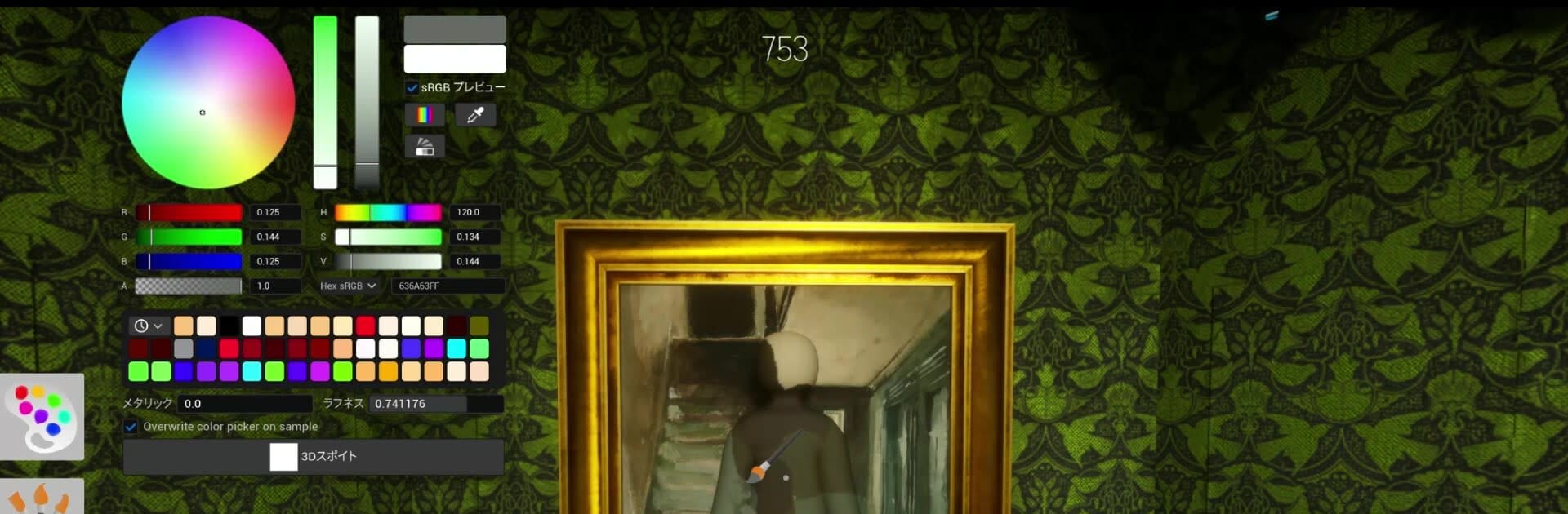
MECCHA CHAMELEON is a playful Puzzle twist on hide-and-seek where art class meets clever sneaking. You’re either hunting down suspicious shapes or painting yourself to disappear in plain sight. It’s quick to pick up, super social, and all about sharp eyes and cheeky creativity.

Game Features

  • Team Roles: Choose to be a Seeker who tracks everyone down before the clock runs out, or a Hider who stays unseen until the final second.
  • Camouflage Painting: Start with a blank, white body and paint it to match walls, floors, and props around you. Colors, patterns, and edges matter more than you’d think.
  • Pose to Sell the Illusion: Don’t just hide—freeze in a pose that fits the scene. Become a crate’s corner, a statue’s stance, or a shadow on the wall.
  • Skillful Deception: Outsmart keen-eyed Seekers with crafty brushwork and positioning. It’s equal parts puzzle-solving and acting cool under pressure.
  • Public or Private Rooms: Jump into open matches with anyone or host a private room for friends. Set the vibe and start a round in seconds.
  • Streamer-Friendly Hosting: Want viewer games? Hosting makes it easy for communities to join and play along without hassle.
  • Scales with Your Connection: The max number of players depends on the host’s network, keeping matches smooth and responsive.
  • Quick, Snackable Rounds: Fast matches and simple controls make it perfect for short sessions—or a whole night of “one more game.”
  • PC Play Option: Prefer playing on your computer? It runs smoothly on BlueStacks and feels great with a keyboard and mouse.

Ready to top the leaderboard? We bet you do. Let precise controls and sharp visuals optimized on BlueStacks lead you to victory.


Game Features

Enhancements

  • Macros
  • Multi Instance
  • Multi Instance Sync
  • Script
  • Enhancements
Macros

Macros

Automate the predictable in MECCHA CHAMELEON and transform your gameplay with Macros. Get access to inventive Macros in the BlueStacks Macro Community
Multi Instance

Multi Instance

Play MECCHA CHAMELEON on one window. And chat with your friend on the other. Press CTRL + Shift + 8 to open the Multi-Instance Manager. And start creating fresh instances or clone an existing one.
Multi Instance Sync

Multi Instance Sync

Play MECCHA CHAMELEON with the power of Multi-Instance Sync. Replicate what you are doing on the main instance on all other instances. Level up faster, play more.
Script

Script

Script your way to gaming glory in MECCHA CHAMELEON with BlueStacks Script. Write and run a set of commands to automate repeated tasks. Trigger the command by assigning it to any key.
Read More

How to Download and Play MECCHA CHAMELEON on PC or Mac

  • Download and install BlueStacks on your PC or Mac

  • Complete Google sign-in to access the Play Store, or do it later

  • Look for MECCHA CHAMELEON in the search bar at the top right corner

  • Click to install MECCHA CHAMELEON from the search results

  • Complete Google sign-in (if you skipped step 2) to install MECCHA CHAMELEON

  • Click the MECCHA CHAMELEON icon on the home screen to start playing

video
Watch Video

Minimum System Requirements

With BlueStacks 5, you can get started on a PC that fulfills the following requirements.

  • Operating System

    Microsoft Windows 7 or above, macOS 11 (Big Sur) or above

  • Processor

    Intel, AMD or Apple Silicon Processor

  • RAM

    at least 4GB

  • HDD

    10GB Free Disk Space

Note:

* You must be an Administrator on your PC. Up to date graphics drivers from Microsoft or the chipset vendor.

MECCHA CHAMELEON - FAQs

  • How to play MECCHA CHAMELEON on Windows PC & Mac?

    Play MECCHA CHAMELEON on your PC or Mac by following these simple steps.

    • Click on 'Play MECCHA CHAMELEON on PC’ to download BlueStacks
    • Install it and log-in to Google Play Store
    • Launch and play the game.
  • Why is BlueStacks the fastest and safest platform to play games on PC?

    BlueStacks respects your privacy and is always safe and secure to use. It does not carry any malware, spyware, or any sort of additional software that could harm your PC.

    It is engineered to optimize speed and performance for a seamless gaming experience.

  • What are MECCHA CHAMELEON PC requirements?

    Minimum requirement to run MECCHA CHAMELEON on your PC

    • OS: Microsoft Windows 7 or above MacOS 11 (Big Sur) or above
    • Processor: Intel, AMD or Apple Silicon Processor
    • RAM: Your PC must have at least 4GB of RAM. (Note that having 4GB or more disk space is not a substitute for RAM)
    • HDD: 10GB Free Disk Space.
    • You must be an Administrator on your PC.