Wood Block Match
Wood Block Match

Wood Block Match

Puzzle

| mobirix

Play on PC with BlueStacks or from our cloud

  • Overview
  • Game Features
  • How to Play

Page Modified On: October 30, 2026

Play Wood Block Match on PC or Mac

Play Wood Block Match by mobirix on PC or Mac with BlueStacks. Use a bigger screen, mouse and keyboard controls, and smoother performance while you play.

About the Game

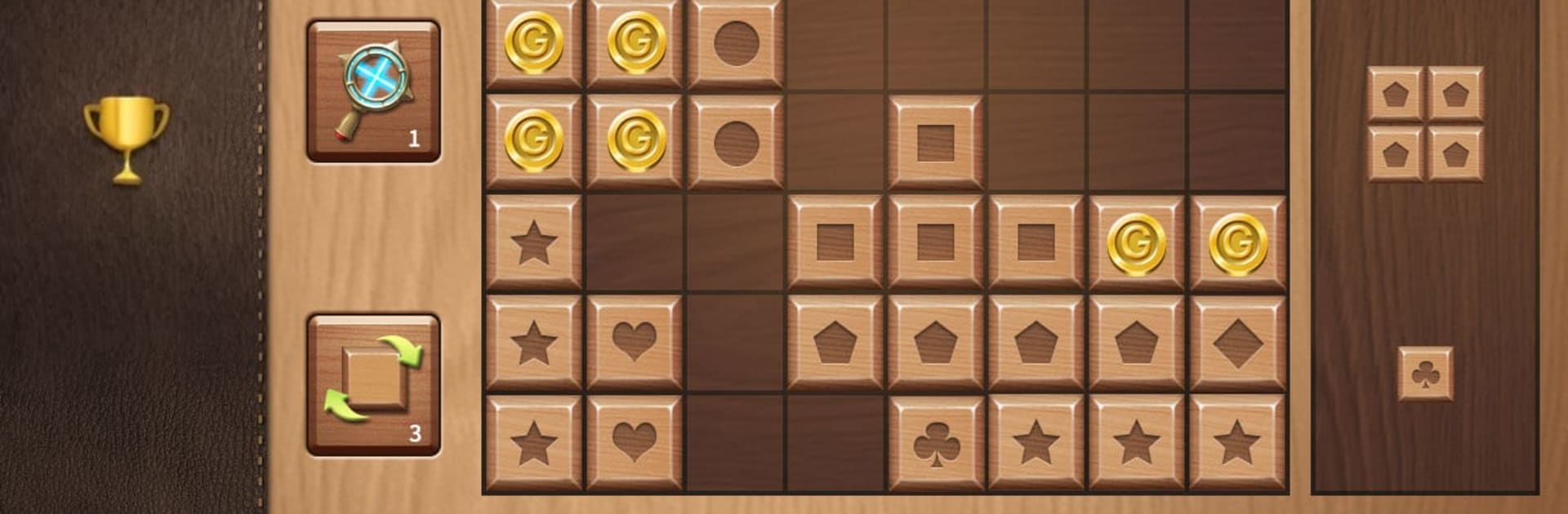
Wood Block Match is a chill, pick-up-and-play Puzzle experience built around simple moves and satisfying clears. Slide wooden pieces onto the board, line them up just right, and watch full rows or columns vanish with a clean pop. It’s easy to learn, surprisingly strategic, and perfect for quick breaks or longer streaks. Prefer a bigger screen? It also feels right at home on PC with BlueStacks.

Game Features

  • Intuitive drag-and-drop: Grab wooden blocks and place them with smooth, responsive controls—no fuss, no learning curve.
  • Satisfying line clears: Complete a full row or column to clear space and keep your run alive as the board tightens up.
  • Helpful power items: Use Block Shuffle, Cross Removal, and Bombs when you need a fresh layout or a last-second rescue.
  • Loads of stages: Work through a wide range of layouts that keep things fresh and test different ways of thinking.
  • Classic score chase: Jump into a timeless mode focused purely on racking up the highest score you can manage.
  • Clean, friendly UI: A tidy look and straightforward menus make it easy to jump in and stay focused on the board.
  • Leaderboards and achievements: Track milestones, compare scores, and see how your best stacks up against others.
  • Multilingual support: Play comfortably with 16 languages available right out of the box.
  • Optimized for larger screens: Looks sharp and plays smoothly on tablets, with plenty of room to plan your next move.

Get ready for a buttery smooth, high-performance gaming action only on BlueStacks.

Game Features

Enhancements

  • Macros
  • Multi Instance
  • Multi Instance Sync
  • Script
  • Enhancements
Macros

Macros

Automate the predictable in Wood Block Match and transform your gameplay with Macros. Get access to inventive Macros in the BlueStacks Macro Community
Multi Instance

Multi Instance

Play Wood Block Match on one window. And chat with your friend on the other. Press CTRL + Shift + 8 to open the Multi-Instance Manager. And start creating fresh instances or clone an existing one.
Multi Instance Sync

Multi Instance Sync

Play Wood Block Match with the power of Multi-Instance Sync. Replicate what you are doing on the main instance on all other instances. Level up faster, play more.
Script

Script

Script your way to gaming glory in Wood Block Match with BlueStacks Script. Write and run a set of commands to automate repeated tasks. Trigger the command by assigning it to any key.
Read More

How to Download and Play Wood Block Match on PC or Mac

  • Download and install BlueStacks on your PC or Mac

  • Complete Google sign-in to access the Play Store, or do it later

  • Look for Wood Block Match in the search bar at the top right corner

  • Click to install Wood Block Match from the search results

  • Complete Google sign-in (if you skipped step 2) to install Wood Block Match

  • Click the Wood Block Match icon on the home screen to start playing

video
Watch Video

Minimum System Requirements

With BlueStacks 5, you can get started on a PC that fulfills the following requirements.

  • Operating System

    Microsoft Windows 7 or above, macOS 11 (Big Sur) or above

  • Processor

    Intel, AMD or Apple Silicon Processor

  • RAM

    at least 4GB

  • HDD

    10GB Free Disk Space

Note:

* You must be an Administrator on your PC. Up to date graphics drivers from Microsoft or the chipset vendor.

Wood Block Match - FAQs

  • How to play Wood Block Match on Windows PC & Mac?

    Play Wood Block Match on your PC or Mac by following these simple steps.

    • Click on 'Play Wood Block Match on PC’ to download BlueStacks
    • Install it and log-in to Google Play Store
    • Launch and play the game.
  • Why is BlueStacks the fastest and safest platform to play games on PC?

    BlueStacks respects your privacy and is always safe and secure to use. It does not carry any malware, spyware, or any sort of additional software that could harm your PC.

    It is engineered to optimize speed and performance for a seamless gaming experience.

  • What are Wood Block Match PC requirements?

    Minimum requirement to run Wood Block Match on your PC

    • OS: Microsoft Windows 7 or above MacOS 11 (Big Sur) or above
    • Processor: Intel, AMD or Apple Silicon Processor
    • RAM: Your PC must have at least 4GB of RAM. (Note that having 4GB or more disk space is not a substitute for RAM)
    • HDD: 10GB Free Disk Space.
    • You must be an Administrator on your PC.