Forza Horizon: 6 Fast Car

Forza Horizon: 6 Fast Car

Racing

| Baqir Interactive Hub

Play on PC with BlueStacks or from our cloud

  • Overview
  • Game Features
  • How to Play

Page Modified On: June 02, 2026

Play Forza Horizon: 6 Fast Car on PC or Mac

Bring your A-game to Forza Horizon: 6 Fast Car, the Racing game sensation from Baqir Interactive Hub. Give your gameplay the much-needed boost with precise game controls, high FPS graphics, and top-tier features on your PC or Mac with BlueStacks.

About the Game

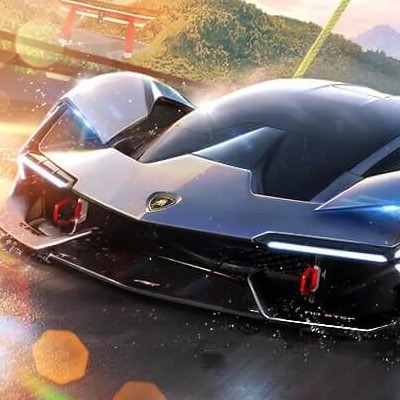
Forza Horizon: 6 Fast Car is all about that sweet spot between freedom and pure speed. You get a big open map to explore, a garage full of quick machines, and driving that actually feels right. Want to cruise the highway, drift through tight corners, or chase first place? It’s a Racing experience that lets you do all of it without slowing down.

Game Features

  • Open-world driving: Roll through wide highways, busy city streets, and rough off-road paths at your own pace or at full throttle.
  • Real-feel handling: Weighty steering, responsive brakes, and grippy tires make every overtake, slide, and late apex feel earned.
  • Garage of performers: Jump into a range of sports and supercars, then unlock more as you keep winning and exploring.
  • Race your way: Sprint races, drift trials, high-speed highway runs, or simple free drive when you just want the road.
  • Smooth drift system: Link corners cleanly with drift-friendly physics that reward timing and throttle control.
  • Lively locations: Navigate urban grids, long coastal roads, and rugged routes that keep changing up your line.
  • Engine audio that pops: Hear revs climb, turbos spool, and tires protest when you push a little too hard.
  • Play offline: No connection? No problem. Hit the road and keep progressing anytime.
  • Crisp visuals: Sharp cars, clear road detail, and slick effects that make speed look and feel fast.
  • Challenges and missions: Tackle goal-based events that test precision, bravery, and consistency.
  • Genre: Racing — built around speed, control, and the rush of a clean pass.
  • BlueStacks support: Prefer a bigger screen and keyboard controls? You can play on PC with BlueStacks for a comfy setup.

Start playing Forza Horizon: 6 Fast Car on BlueStacks and get a smoother, more comfortable PC or Mac setup.


Game Features

Enhancements

  • Macros
  • Multi Instance
  • Multi Instance Sync
  • Script
  • Enhancements
Macros

Macros

Automate the predictable in Forza Horizon: 6 Fast Car and transform your gameplay with Macros. Get access to inventive Macros in the BlueStacks Macro Community
Multi Instance

Multi Instance

Play Forza Horizon: 6 Fast Car on one window. And chat with your friend on the other. Press CTRL + Shift + 8 to open the Multi-Instance Manager. And start creating fresh instances or clone an existing one.
Multi Instance Sync

Multi Instance Sync

Play Forza Horizon: 6 Fast Car with the power of Multi-Instance Sync. Replicate what you are doing on the main instance on all other instances. Level up faster, play more.
Script

Script

Script your way to gaming glory in Forza Horizon: 6 Fast Car with BlueStacks Script. Write and run a set of commands to automate repeated tasks. Trigger the command by assigning it to any key.
Read More

How to Download and Play Forza Horizon: 6 Fast Car on PC or Mac

  • Download and install BlueStacks on your PC or Mac

  • Complete Google sign-in to access the Play Store, or do it later

  • Look for Forza Horizon: 6 Fast Car in the search bar at the top right corner

  • Click to install Forza Horizon: 6 Fast Car from the search results

  • Complete Google sign-in (if you skipped step 2) to install Forza Horizon: 6 Fast Car

  • Click the Forza Horizon: 6 Fast Car icon on the home screen to start playing

video
Watch Video

Minimum System Requirements

With BlueStacks 5, you can get started on a PC that fulfills the following requirements.

  • Operating System

    Microsoft Windows 7 or above, macOS 11 (Big Sur) or above

  • Processor

    Intel, AMD or Apple Silicon Processor

  • RAM

    at least 4GB

  • HDD

    10GB Free Disk Space

Note:

* You must be an Administrator on your PC. Up to date graphics drivers from Microsoft or the chipset vendor.

Forza Horizon: 6 Fast Car - FAQs

  • How to play Forza Horizon: 6 Fast Car on Windows PC & Mac?

    Play Forza Horizon: 6 Fast Car on your PC or Mac by following these simple steps.

    • Click on 'Play Forza Horizon: 6 Fast Car on PC’ to download BlueStacks
    • Install it and log-in to Google Play Store
    • Launch and play the game.
  • Why is BlueStacks the fastest and safest platform to play games on PC?

    BlueStacks respects your privacy and is always safe and secure to use. It does not carry any malware, spyware, or any sort of additional software that could harm your PC.

    It is engineered to optimize speed and performance for a seamless gaming experience.

  • What are Forza Horizon: 6 Fast Car PC requirements?

    Minimum requirement to run Forza Horizon: 6 Fast Car on your PC

    • OS: Microsoft Windows 7 or above MacOS 11 (Big Sur) or above
    • Processor: Intel, AMD or Apple Silicon Processor
    • RAM: Your PC must have at least 4GB of RAM. (Note that having 4GB or more disk space is not a substitute for RAM)
    • HDD: 10GB Free Disk Space.
    • You must be an Administrator on your PC.