I Am Rally Racer 2026

I Am Rally Racer 2026

Racing

| Timuz Games

Play on PC with BlueStacks or from our cloud

  • Overview
  • Game Features
  • How to Play

Page Modified On: September 25, 2026

Play I Am Rally Racer 2026 on PC or Mac

Step into the World of I Am Rally Racer 2026, a thrilling Racing game from the house of Timuz Games. Play this Android game on BlueStacks App Player and experience immersive gaming on PC or Mac.

About the Game

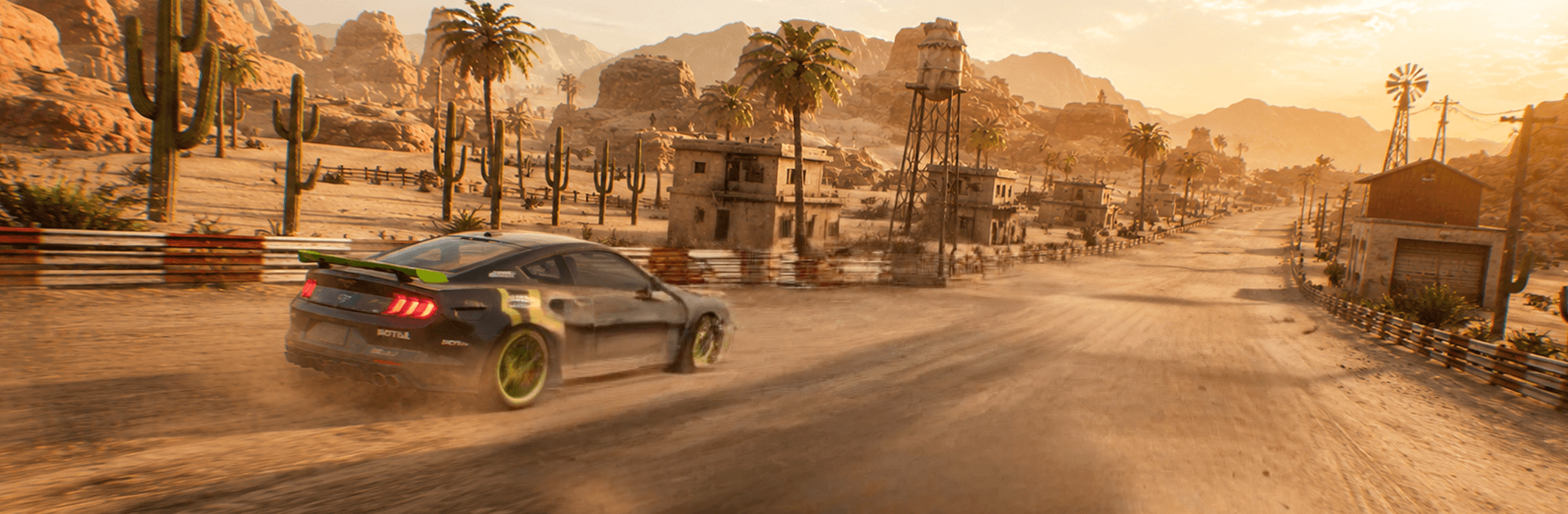
I Am Rally Racer 2026 is a crisp, no-nonsense Racing game where every corner counts and the clock never stops ticking. You’ll fling nimble machines through tight stages, manage grip on changing surfaces, and hunt for cleaner lines run after run. Prefer keyboard input and steady performance? It feels great on BlueStacks too.

Game Features

  • Authentic handling: Cars feel planted yet lively, with grip that shifts as you brake, turn, and slide.
  • Tight time trials: Stages revolve around the clock, rewarding tidy driving and smart risk-taking.
  • Mission objectives: Hit targets, clear challenges, and unlock fresh routes as your consistency improves.
  • Diverse tracks: Twisty roads, narrow passes, and sneaky hazards keep layouts interesting without being unfair.
  • Readable 3D visuals: Clean car models and clear track detail make it easier to spot trouble at speed.
  • Snappy controls: Steering, throttle, and brakes respond quickly, so precise inputs actually matter.
  • Offline friendly: Jump into stages and missions anytime—no connection required.
  • Plenty of levels: A steady stream of handcrafted runs serves up new corners to conquer.
  • Welcoming depth: Easy to pick up, yet mastering hairpins, braking points, and exits takes practice.

Start your journey now. Download the game on BlueStacks, invite your friends, and march on a new adventure.


Game Features

Enhancements

  • Macros
  • Multi Instance
  • Multi Instance Sync
  • Script
  • Enhancements
Macros

Macros

Automate the predictable in I Am Rally Racer 2026 and transform your gameplay with Macros. Get access to inventive Macros in the BlueStacks Macro Community
Multi Instance

Multi Instance

Play I Am Rally Racer 2026 on one window. And chat with your friend on the other. Press CTRL + Shift + 8 to open the Multi-Instance Manager. And start creating fresh instances or clone an existing one.
Multi Instance Sync

Multi Instance Sync

Play I Am Rally Racer 2026 with the power of Multi-Instance Sync. Replicate what you are doing on the main instance on all other instances. Level up faster, play more.
Script

Script

Script your way to gaming glory in I Am Rally Racer 2026 with BlueStacks Script. Write and run a set of commands to automate repeated tasks. Trigger the command by assigning it to any key.
Read More

How to Download and Play I Am Rally Racer 2026 on PC or Mac

  • Download and install BlueStacks on your PC or Mac

  • Complete Google sign-in to access the Play Store, or do it later

  • Look for I Am Rally Racer 2026 in the search bar at the top right corner

  • Click to install I Am Rally Racer 2026 from the search results

  • Complete Google sign-in (if you skipped step 2) to install I Am Rally Racer 2026

  • Click the I Am Rally Racer 2026 icon on the home screen to start playing

video
Watch Video

Minimum System Requirements

With BlueStacks 5, you can get started on a PC that fulfills the following requirements.

  • Operating System

    Microsoft Windows 7 or above, macOS 11 (Big Sur) or above

  • Processor

    Intel, AMD or Apple Silicon Processor

  • RAM

    at least 4GB

  • HDD

    10GB Free Disk Space

Note:

* You must be an Administrator on your PC. Up to date graphics drivers from Microsoft or the chipset vendor.

I Am Rally Racer 2026 - FAQs

  • How to play I Am Rally Racer 2026 on Windows PC & Mac?

    Play I Am Rally Racer 2026 on your PC or Mac by following these simple steps.

    • Click on 'Play I Am Rally Racer 2026 on PC’ to download BlueStacks
    • Install it and log-in to Google Play Store
    • Launch and play the game.
  • Why is BlueStacks the fastest and safest platform to play games on PC?

    BlueStacks respects your privacy and is always safe and secure to use. It does not carry any malware, spyware, or any sort of additional software that could harm your PC.

    It is engineered to optimize speed and performance for a seamless gaming experience.

  • What are I Am Rally Racer 2026 PC requirements?

    Minimum requirement to run I Am Rally Racer 2026 on your PC

    • OS: Microsoft Windows 7 or above MacOS 11 (Big Sur) or above
    • Processor: Intel, AMD or Apple Silicon Processor
    • RAM: Your PC must have at least 4GB of RAM. (Note that having 4GB or more disk space is not a substitute for RAM)
    • HDD: 10GB Free Disk Space.
    • You must be an Administrator on your PC.