I Am Traffic Racer
I Am Traffic Racer

I Am Traffic Racer

Racing

| Epic Bit Studio

Play on PC with BlueStacks or from our cloud

  • Overview
  • Game Features
  • How to Play

Page Modified On: August 24, 2026

Play I Am Traffic Racer on PC or Mac

Step into the World of I Am Traffic Racer, a thrilling Racing game from the house of Epic Bit Studio. Play this Android game on BlueStacks App Player and experience immersive gaming on PC or Mac.

About the Game

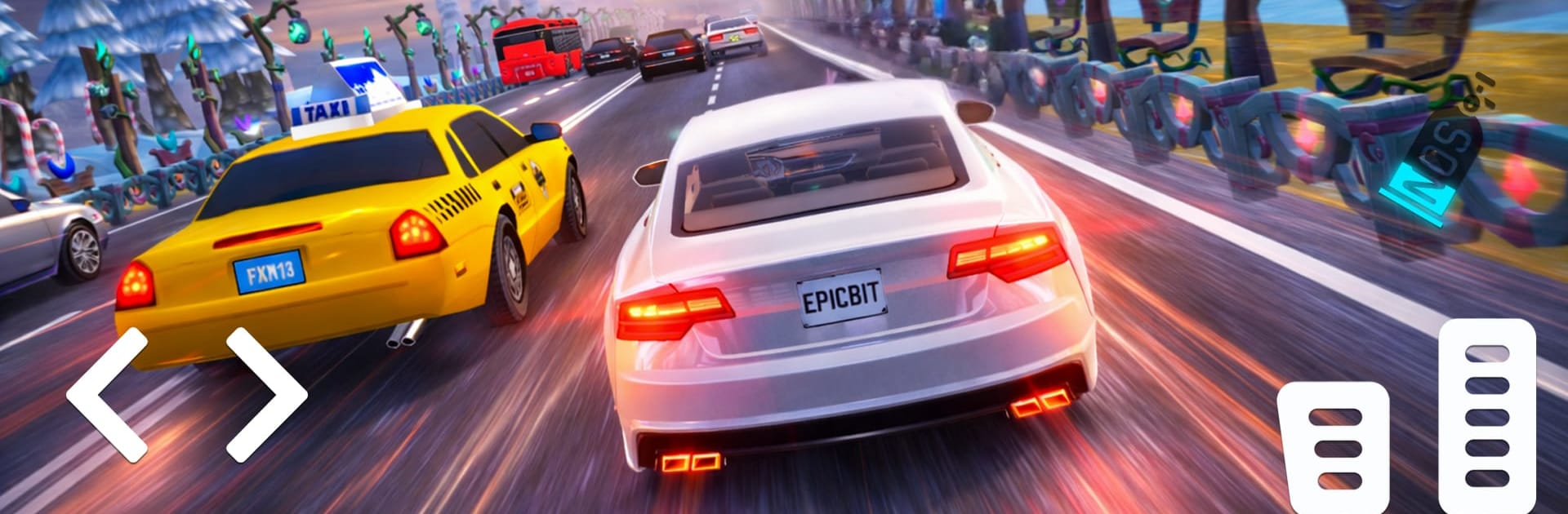
I Am Traffic Racer throws you into fast-moving lanes where every gap is a gamble and every clean pass feels earned. This Racing game blends pick‑up‑and‑play action with a grounded driving feel, letting you cruise for a while or chase long, high‑pressure runs across highways, cities, and off-road stretches. Expect responsive controls, busy traffic that actually makes you think, and a steady stream of cars and challenges to unlock; it also feels right at home on BlueStacks.

Game Features

  • Responsive Handling: Glide through dense traffic with tight steering and confident braking that reward timing and finesse.
  • Smarter Traffic Behavior: AI vehicles change lanes, speed up, and create believable flow, so reading the road matters.
  • Modes for Every Mood: Hit Time Trial for precision, slide into Drift for style points, go the distance in Endless, or climb through Career challenges.
  • Cars Worth Earning: Expand your garage, upgrade performance, and personalize looks to make each ride feel like yours.
  • Varied Locations: Drive across bright city avenues, wide highways, rugged off-road tracks, jungle routes, snowy passes, desert stretches, and quiet villages—day or night.
  • Risk–Reward Overtakes: Thread past buses and fast movers to rack up rewards faster, with clean near-misses paying off big.
  • Satisfying Progress: Daily rewards and in-game achievements keep goals coming and unlocks within reach.
  • Polished Presentation: Crisp visuals, smooth performance, and lively traffic sell the speed and make every run feel intense.

Start your journey now. Download the game on BlueStacks, invite your friends, and march on a new adventure.


Game Features

Enhancements

  • Macros
  • Multi Instance
  • Multi Instance Sync
  • Script
  • Enhancements
Macros

Macros

Automate the predictable in I Am Traffic Racer and transform your gameplay with Macros. Get access to inventive Macros in the BlueStacks Macro Community
Multi Instance

Multi Instance

Play I Am Traffic Racer on one window. And chat with your friend on the other. Press CTRL + Shift + 8 to open the Multi-Instance Manager. And start creating fresh instances or clone an existing one.
Multi Instance Sync

Multi Instance Sync

Play I Am Traffic Racer with the power of Multi-Instance Sync. Replicate what you are doing on the main instance on all other instances. Level up faster, play more.
Script

Script

Script your way to gaming glory in I Am Traffic Racer with BlueStacks Script. Write and run a set of commands to automate repeated tasks. Trigger the command by assigning it to any key.
Read More

How to Download and Play I Am Traffic Racer on PC or Mac

  • Download and install BlueStacks on your PC or Mac

  • Complete Google sign-in to access the Play Store, or do it later

  • Look for I Am Traffic Racer in the search bar at the top right corner

  • Click to install I Am Traffic Racer from the search results

  • Complete Google sign-in (if you skipped step 2) to install I Am Traffic Racer

  • Click the I Am Traffic Racer icon on the home screen to start playing

video
Watch Video

Minimum System Requirements

With BlueStacks 5, you can get started on a PC that fulfills the following requirements.

  • Operating System

    Microsoft Windows 7 or above, macOS 11 (Big Sur) or above

  • Processor

    Intel, AMD or Apple Silicon Processor

  • RAM

    at least 4GB

  • HDD

    10GB Free Disk Space

Note:

* You must be an Administrator on your PC. Up to date graphics drivers from Microsoft or the chipset vendor.

I Am Traffic Racer - FAQs

  • How to play I Am Traffic Racer on Windows PC & Mac?

    Play I Am Traffic Racer on your PC or Mac by following these simple steps.

    • Click on 'Play I Am Traffic Racer on PC’ to download BlueStacks
    • Install it and log-in to Google Play Store
    • Launch and play the game.
  • Why is BlueStacks the fastest and safest platform to play games on PC?

    BlueStacks respects your privacy and is always safe and secure to use. It does not carry any malware, spyware, or any sort of additional software that could harm your PC.

    It is engineered to optimize speed and performance for a seamless gaming experience.

  • What are I Am Traffic Racer PC requirements?

    Minimum requirement to run I Am Traffic Racer on your PC

    • OS: Microsoft Windows 7 or above MacOS 11 (Big Sur) or above
    • Processor: Intel, AMD or Apple Silicon Processor
    • RAM: Your PC must have at least 4GB of RAM. (Note that having 4GB or more disk space is not a substitute for RAM)
    • HDD: 10GB Free Disk Space.
    • You must be an Administrator on your PC.