Ultimate Real Car Racing

Ultimate Real Car Racing

Racing

| MGI CONSTRUCTION ( PRIVATE ) LIMITED

Play on PC with BlueStacks or from our cloud

  • Overview
  • Game Features
  • How to Play

Page Modified On: May 18, 2026

Play Ultimate Real Car Racing on PC or Mac

Bring your A-game to Ultimate Real Car Racing, the Racing game sensation from MGI CONSTRUCTION ( PRIVATE ) LIMITED. Give your gameplay the much-needed boost with precise game controls, high FPS graphics, and top-tier features on your PC or Mac with BlueStacks.

About the Game

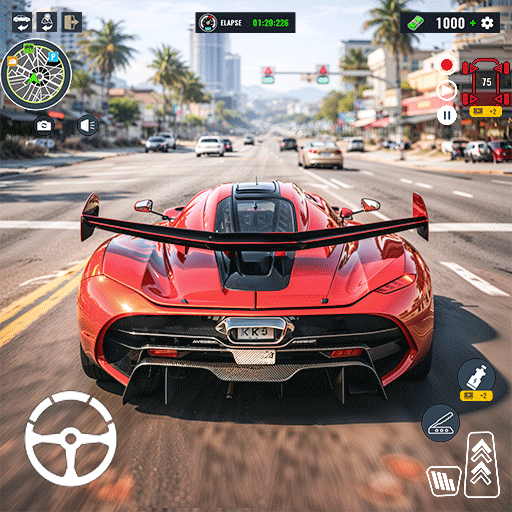
Ultimate Real Car Racing from ASIF ELECTRIC & COOLING POINT is all about precision, speed, and that split‑second decision that makes or breaks a race. It’s a Racing experience where the cars feel weighty, the corners bite back, and every clean lap is its own win. Want a bigger view and crisp input? It also plays great on PC through BlueStacks.

Game Features

  • Authentic handling: Physics-driven grip and throttle response make every brake tap, drift, and apex feel earned, not scripted.
  • Smooth controls: Pick tilt, touch, or an on‑screen wheel, then fine‑tune sensitivity and assists until the car feels like yours.
  • Multiple camera views: Swap between cockpit, hood, bumper, or chase to match your style and the track ahead.
  • Varied tracks: Tackle busy city streets, wide-open highways, and technical circuits packed with hairpins and long straights.
  • Race formats galore: Jump into championships, sprints, time attacks, knockouts, drift challenges, or just free drive to warm up.
  • Career progression: Climb through events, test yourself against AI rivals, and open new tiers as your skills improve.
  • Rewards that matter: Unlock fresh rides and earn goodies through daily challenges and competitive rankings.
  • Satisfying competition: AI opponents push hard, defend lines, and keep you honest from lights to flag.
  • High-fidelity audio: Engine notes, tire squeal, and wind rush sell the speed and help you judge grip mid-corner.
  • Polished 3D visuals: Detailed cars, clean lighting and shadows, and steady performance tuned for modern devices.
  • Quick setup, quick laps: Minimal wait times and snappy menus get you back on track when the itch to race hits.

Ready to top the leaderboard? We bet you do. Let precise controls and sharp visuals optimized on BlueStacks lead you to victory.


Game Features

Enhancements

  • Macros
  • Multi Instance
  • Multi Instance Sync
  • Script
  • Enhancements
Macros

Macros

Automate the predictable in Ultimate Real Car Racing and transform your gameplay with Macros. Get access to inventive Macros in the BlueStacks Macro Community
Multi Instance

Multi Instance

Play Ultimate Real Car Racing on one window. And chat with your friend on the other. Press CTRL + Shift + 8 to open the Multi-Instance Manager. And start creating fresh instances or clone an existing one.
Multi Instance Sync

Multi Instance Sync

Play Ultimate Real Car Racing with the power of Multi-Instance Sync. Replicate what you are doing on the main instance on all other instances. Level up faster, play more.
Script

Script

Script your way to gaming glory in Ultimate Real Car Racing with BlueStacks Script. Write and run a set of commands to automate repeated tasks. Trigger the command by assigning it to any key.
Read More

How to Download and Play Ultimate Real Car Racing on PC or Mac

  • Download and install BlueStacks on your PC or Mac

  • Complete Google sign-in to access the Play Store, or do it later

  • Look for Ultimate Real Car Racing in the search bar at the top right corner

  • Click to install Ultimate Real Car Racing from the search results

  • Complete Google sign-in (if you skipped step 2) to install Ultimate Real Car Racing

  • Click the Ultimate Real Car Racing icon on the home screen to start playing

video
Watch Video

Minimum System Requirements

With BlueStacks 5, you can get started on a PC that fulfills the following requirements.

  • Operating System

    Microsoft Windows 7 or above, macOS 11 (Big Sur) or above

  • Processor

    Intel, AMD or Apple Silicon Processor

  • RAM

    at least 4GB

  • HDD

    10GB Free Disk Space

Note:

* You must be an Administrator on your PC. Up to date graphics drivers from Microsoft or the chipset vendor.

Ultimate Real Car Racing - FAQs

  • How to play Ultimate Real Car Racing on Windows PC & Mac?

    Play Ultimate Real Car Racing on your PC or Mac by following these simple steps.

    • Click on 'Play Ultimate Real Car Racing on PC’ to download BlueStacks
    • Install it and log-in to Google Play Store
    • Launch and play the game.
  • Why is BlueStacks the fastest and safest platform to play games on PC?

    BlueStacks respects your privacy and is always safe and secure to use. It does not carry any malware, spyware, or any sort of additional software that could harm your PC.

    It is engineered to optimize speed and performance for a seamless gaming experience.

  • What are Ultimate Real Car Racing PC requirements?

    Minimum requirement to run Ultimate Real Car Racing on your PC

    • OS: Microsoft Windows 7 or above MacOS 11 (Big Sur) or above
    • Processor: Intel, AMD or Apple Silicon Processor
    • RAM: Your PC must have at least 4GB of RAM. (Note that having 4GB or more disk space is not a substitute for RAM)
    • HDD: 10GB Free Disk Space.
    • You must be an Administrator on your PC.