Adventure of Priestess

Adventure of Priestess

Role Playing

| Superlink

Play on PC with BlueStacks or from our cloud

  • Overview
  • Game Features
  • How to Play

Page Modified On: October 23, 2026

Play Adventure of Priestess on PC or Mac

Adventure of Priestess by Superlink has plenty to keep you busy. BlueStacks lets you play it on PC or Mac with more screen space, better control, and fewer mobile limits.

About the Game

Adventure of Priestess is a Role Playing journey where you become Stella, a steadfast priestess standing between a shattered world and a ruthless Devil. It mixes laid-back 5v5 auto combat with clutch, hands-on skill timing, so you can chill and then swoop in when it counts. Expect warm pixel art, punchy boss fights, and a clear goal: clear every dungeon and end the chaos.

Game Features

  • Pixel charm: Friendly allies and cute monsters pop with crisp dot-style visuals that feel cozy and nostalgic.
  • Five-on-five auto combat: Battles run automatically, but your quick decisions on Stella’s skills swing the tide when danger spikes.
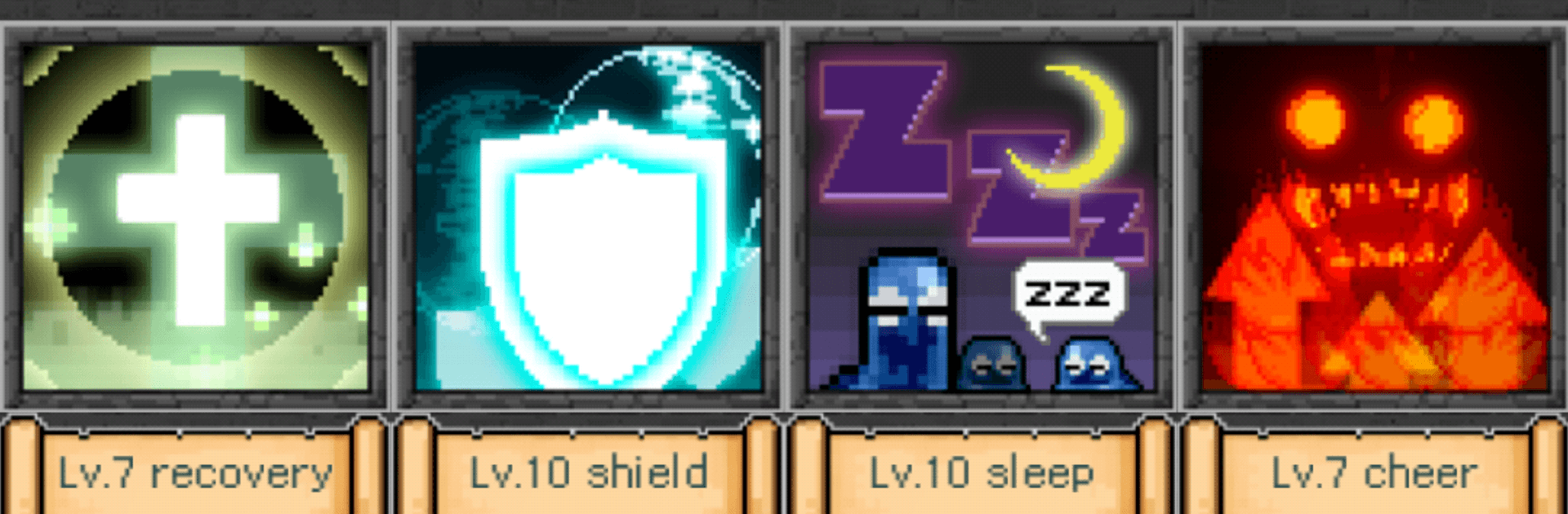
  • Four clutch skills: Use Recovery to heal, Protective Film to shield, Lullaby to stun, and Cheer to boost damage right when your team needs it.
  • Dungeon gauntlet: Face varied enemies and a tough boss in each stage, with a true finale waiting after the tenth dungeon.
  • Smarter progression: Collect soul stones to strengthen characters and upgrade skills, building a party that hits harder every run.
  • Read the cues: Bosses telegraph big attacks with a noticeable cue—throw up a shield to keep your squad standing.
  • Balanced growth pays: Each character scales differently, so spreading your upgrades helps against late-game threats.
  • Race the clock: Chase faster clear times, experiment with routes, and refine strategies to set new personal bests.
  • Progress that sticks: Spirit rocks you’ve earned remain yours even if you exit mid-adventure, so no effort goes to waste.
  • Play your way: Prefer a larger screen and keyboard controls? BlueStacks makes it easy to play comfortably on PC.

BlueStacks gives you more room to focus on the game and less time adjusting around mobile limitations.


Game Features

Enhancements

  • Macros
  • Rerolling
  • Eco Mode
  • Multi Instance Sync
  • Enhancements
Macros

Macros

Focus more on the fun part of the game, skip the tedious aspects. Master Adventure of Priestess with Macros. Record yourself completing the monotonous tasks you wish to automate and replay them later with just one keypress.
Rerolling

Rerolling

Speed up the rerolling process in Adventure of Priestess. Perform multiple summons and keep looking for the best Heroes. Use Multi-Instance sync to replicate the rerolling mechanism in all instances.
Eco Mode

Eco Mode

Farm in-game resources with ease in Adventure of Priestess. Enable the Eco Mode when running the game in multiple instances. And lower your PC's resource consumption.
Multi Instance Sync

Multi Instance Sync

With the Multi-instance Sync, you can do even more in Adventure of Priestess. Sync the action of the main instance and repeat them in real time for all other instances. Sync and sit back, let the game progress unfold.
Read More

How to Download and Play Adventure of Priestess on PC or Mac

  • Download and install BlueStacks on your PC or Mac

  • Complete Google sign-in to access the Play Store, or do it later

  • Look for Adventure of Priestess in the search bar at the top right corner

  • Click to install Adventure of Priestess from the search results

  • Complete Google sign-in (if you skipped step 2) to install Adventure of Priestess

  • Click the Adventure of Priestess icon on the home screen to start playing

video
Watch Video

Minimum System Requirements

With BlueStacks 5, you can get started on a PC that fulfills the following requirements.

  • Operating System

    Microsoft Windows 7 or above, macOS 11 (Big Sur) or above

  • Processor

    Intel, AMD or Apple Silicon Processor

  • RAM

    at least 4GB

  • HDD

    10GB Free Disk Space

Note:

* You must be an Administrator on your PC. Up to date graphics drivers from Microsoft or the chipset vendor.

Adventure of Priestess - FAQs

  • How to play Adventure of Priestess on Windows PC & Mac?

    Play Adventure of Priestess on your PC or Mac by following these simple steps.

    • Click on 'Play Adventure of Priestess on PC’ to download BlueStacks
    • Install it and log-in to Google Play Store
    • Launch and play the game.
  • Why is BlueStacks the fastest and safest platform to play games on PC?

    BlueStacks respects your privacy and is always safe and secure to use. It does not carry any malware, spyware, or any sort of additional software that could harm your PC.

    It is engineered to optimize speed and performance for a seamless gaming experience.

  • What are Adventure of Priestess PC requirements?

    Minimum requirement to run Adventure of Priestess on your PC

    • OS: Microsoft Windows 7 or above MacOS 11 (Big Sur) or above
    • Processor: Intel, AMD or Apple Silicon Processor
    • RAM: Your PC must have at least 4GB of RAM. (Note that having 4GB or more disk space is not a substitute for RAM)
    • HDD: 10GB Free Disk Space.
    • You must be an Administrator on your PC.