Gangster Hero Grand Simulator

Gangster Hero Grand Simulator

Role Playing

| Dream Game Studios

Play on PC with BlueStacks or from our cloud

  • Overview
  • Game Features
  • How to Play

Page Modified On: August 03, 2026

Play Gangster Hero Grand Simulator on PC or Mac

Gangster Hero Grand Simulator by Dream Game Studios has plenty to keep you busy. BlueStacks lets you play it on PC or Mac with more screen space, better control, and fewer mobile limits.

About the Game

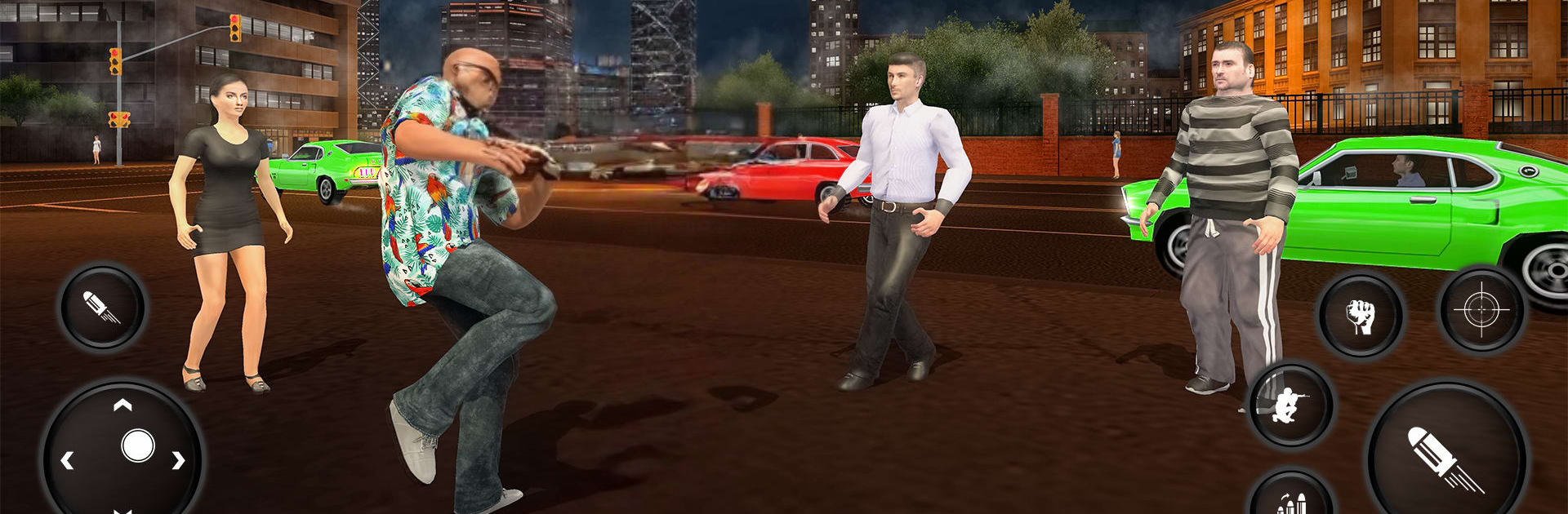
Gangster Hero Grand Simulator drops you into a gritty, New York-style open world where anything can happen and it usually does. It’s an open-ended Role Playing sandbox with fast cars, louder weapons, and choices that swing from pure chaos to unexpected heroics. Want to be the kingpin everyone fears or the troublemaker who accidentally saves the day? Your call. If you’re into playing on a bigger screen, it also runs nicely on BlueStacks.

Game Features

  • Open-world playground: Roam a sprawling city packed with back alleys, downtown blocks, coastal roads, and even off-road paths that climb into the hills.
  • Do what you want: Follow missions that range from heists and gang busts to rescue ops—or ignore them and just free-roam the streets.
  • Vehicles for every mood: Jump on a bike, burn rubber in sports cars, haul in trucks, and, yes, cause mayhem with heavier rides when things get serious.
  • An arsenal with bite: Start simple with pistols and SMGs, then bring the thunder with shotguns, snipers, RPGs, and even a jetpack for bold escapes.
  • Make it your style: Customize your character’s look from head to shoes, switch outfits on the fly, and set a profile name that fits your legend.
  • Tough enemies, real heat: Rival crews push back, cops move in fast, and the mini-map helps you track threats before they corner you.
  • Missions with variety: Robberies, takedowns, extractions—each one plays differently and rewards creative driving, aim, and timing.
  • Smooth feel, clean views: Responsive controls keep car chases tight and firefights crisp, with multiple camera angles to suit how you play.
  • Nightlife and side gigs: Swing by hotspots for hints, quick cash opportunities, and the occasional surprise.
  • Earn and unlock: Stack in-game cash to pick up new weapons, upgrade your loadout, and add more brutal rides to your garage.

BlueStacks gives you more room to focus on the game and less time adjusting around mobile limitations.


Game Features

Enhancements

  • Macros
  • Rerolling
  • Eco Mode
  • Multi Instance Sync
  • Enhancements
Macros

Macros

Focus more on the fun part of the game, skip the tedious aspects. Master Gangster Hero Grand Simulator with Macros. Record yourself completing the monotonous tasks you wish to automate and replay them later with just one keypress.
Rerolling

Rerolling

Speed up the rerolling process in Gangster Hero Grand Simulator. Perform multiple summons and keep looking for the best Heroes. Use Multi-Instance sync to replicate the rerolling mechanism in all instances.
Eco Mode

Eco Mode

Farm in-game resources with ease in Gangster Hero Grand Simulator. Enable the Eco Mode when running the game in multiple instances. And lower your PC's resource consumption.
Multi Instance Sync

Multi Instance Sync

With the Multi-instance Sync, you can do even more in Gangster Hero Grand Simulator. Sync the action of the main instance and repeat them in real time for all other instances. Sync and sit back, let the game progress unfold.
Read More

How to Download and Play Gangster Hero Grand Simulator on PC or Mac

  • Download and install BlueStacks on your PC or Mac

  • Complete Google sign-in to access the Play Store, or do it later

  • Look for Gangster Hero Grand Simulator in the search bar at the top right corner

  • Click to install Gangster Hero Grand Simulator from the search results

  • Complete Google sign-in (if you skipped step 2) to install Gangster Hero Grand Simulator

  • Click the Gangster Hero Grand Simulator icon on the home screen to start playing

video
Watch Video

Minimum System Requirements

With BlueStacks 5, you can get started on a PC that fulfills the following requirements.

  • Operating System

    Microsoft Windows 7 or above, macOS 11 (Big Sur) or above

  • Processor

    Intel, AMD or Apple Silicon Processor

  • RAM

    at least 4GB

  • HDD

    10GB Free Disk Space

Note:

* You must be an Administrator on your PC. Up to date graphics drivers from Microsoft or the chipset vendor.

Gangster Hero Grand Simulator - FAQs

  • How to play Gangster Hero Grand Simulator on Windows PC & Mac?

    Play Gangster Hero Grand Simulator on your PC or Mac by following these simple steps.

    • Click on 'Play Gangster Hero Grand Simulator on PC’ to download BlueStacks
    • Install it and log-in to Google Play Store
    • Launch and play the game.
  • Why is BlueStacks the fastest and safest platform to play games on PC?

    BlueStacks respects your privacy and is always safe and secure to use. It does not carry any malware, spyware, or any sort of additional software that could harm your PC.

    It is engineered to optimize speed and performance for a seamless gaming experience.

  • What are Gangster Hero Grand Simulator PC requirements?

    Minimum requirement to run Gangster Hero Grand Simulator on your PC

    • OS: Microsoft Windows 7 or above MacOS 11 (Big Sur) or above
    • Processor: Intel, AMD or Apple Silicon Processor
    • RAM: Your PC must have at least 4GB of RAM. (Note that having 4GB or more disk space is not a substitute for RAM)
    • HDD: 10GB Free Disk Space.
    • You must be an Administrator on your PC.