Kids Dress Up & Makeover Game

Kids Dress Up & Makeover Game

Role Playing

| Abuzz

Play on PC with BlueStacks or from our cloud

  • Overview
  • Game Features
  • How to Play

Page Modified On: April 13, 2026

Play Kids Dress Up & Makeover Game on PC or Mac

Explore a whole new adventure with Kids Dress Up & Makeover Game, a Role Playing game created by Abuzz. Experience great gameplay with BlueStacks, the most popular gaming platform to play Android games on your PC or Mac.

About the Game

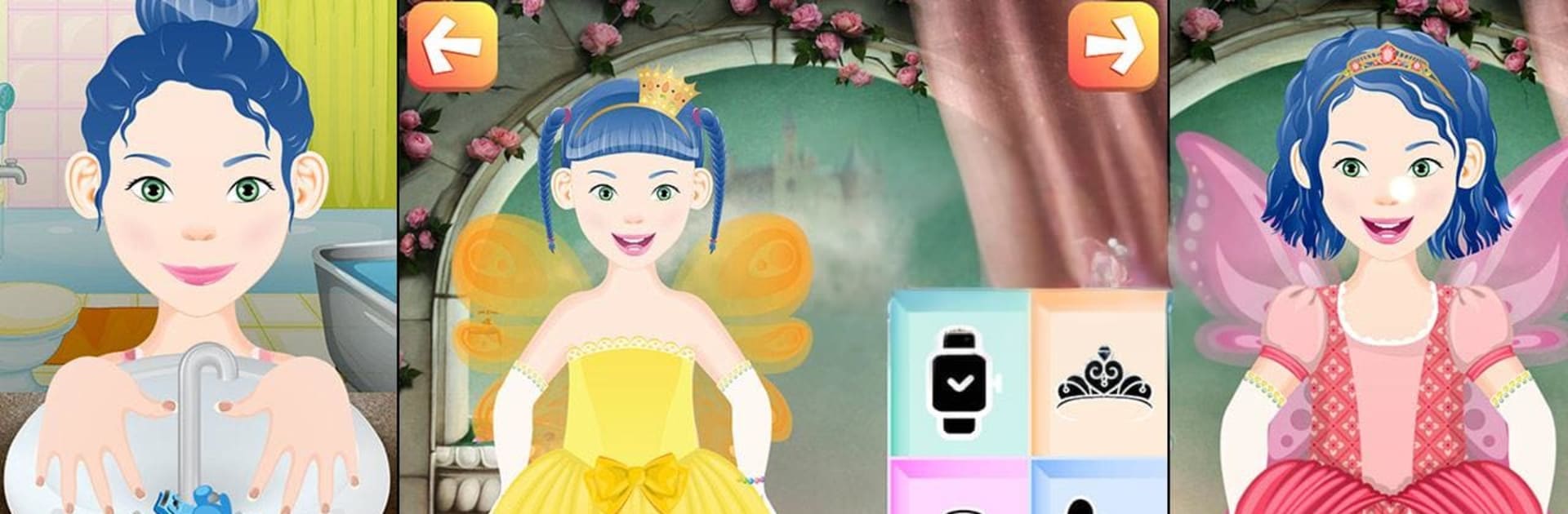
Kids Dress Up & Makeover Game is a cheerful Role Playing sandbox where kids get to style adorable characters and put together outfits for all kinds of moments. It’s playful, open-ended, and packed with outfits, hairstyles, and accessories so little creators can experiment and make looks that feel totally their own. Whether your child loves princess gowns or sporty getups, there’s a scene for that—plus lots of gentle, kid-friendly care tasks. Prefer a bigger screen for tiny hands? It’s also comfy to play on BlueStacks.

Game Features

  • Playful Cast: Meet 6 cute kids—3 boys and 3 girls—ready to be styled, pampered, and photographed in outfits that fit their vibe.
  • Mix-and-Match Wardrobe: Explore 200+ clothing pieces, from tees and jeans to cozy hoodies, sweaters, coats, socks, and shoes. Combine them freely and make something new every time.
  • Accessory Drawer: Top off any look with 150+ extras: sunglasses, watches, funny hats, scarves, mittens, caps, and more.
  • Everyday Care: Start with simple bathroom routines—wash hands, brush teeth, comb hair, and add a little lip balm or face cream—to make dress-up feel like the real deal.
  • Scene-Based Styling: Build outfits for different moments: birthdays, school days, a royal princess salon, winter holidays, sleepy bedtime, sunny beach trips, sporty play, and fancy parties.
  • Hair and Makeup Touches: Try new hairstyles and light cosmetic touches that are gentle and age-appropriate, perfect for imaginative play.
  • Creativity Boost: Great for sparking imagination and encouraging fine motor skills as kids tap, drag, and swap pieces into place.
  • Save the Look: Snap a picture of every masterpiece and keep a growing album of favorite styles right on your device.

Get ready for a buttery smooth, high-performance gaming action only on BlueStacks.

Game Features

Enhancements

  • Macros
  • Rerolling
  • Eco Mode
  • Multi Instance Sync
  • Enhancements
Macros

Macros

Focus more on the fun part of the game, skip the tedious aspects. Master Kids Dress Up & Makeover Game with Macros. Record yourself completing the monotonous tasks you wish to automate and replay them later with just one keypress.
Rerolling

Rerolling

Speed up the rerolling process in Kids Dress Up & Makeover Game. Perform multiple summons and keep looking for the best Heroes. Use Multi-Instance sync to replicate the rerolling mechanism in all instances.
Eco Mode

Eco Mode

Farm in-game resources with ease in Kids Dress Up & Makeover Game. Enable the Eco Mode when running the game in multiple instances. And lower your PC's resource consumption.
Multi Instance Sync

Multi Instance Sync

With the Multi-instance Sync, you can do even more in Kids Dress Up & Makeover Game. Sync the action of the main instance and repeat them in real time for all other instances. Sync and sit back, let the game progress unfold.
Read More

How to Download and Play Kids Dress Up & Makeover Game on PC or Mac

  • Download and install BlueStacks on your PC or Mac

  • Complete Google sign-in to access the Play Store, or do it later

  • Look for Kids Dress Up & Makeover Game in the search bar at the top right corner

  • Click to install Kids Dress Up & Makeover Game from the search results

  • Complete Google sign-in (if you skipped step 2) to install Kids Dress Up & Makeover Game

  • Click the Kids Dress Up & Makeover Game icon on the home screen to start playing

video
Watch Video

Minimum System Requirements

With BlueStacks 5, you can get started on a PC that fulfills the following requirements.

  • Operating System

    Microsoft Windows 7 or above, macOS 11 (Big Sur) or above

  • Processor

    Intel, AMD or Apple Silicon Processor

  • RAM

    at least 4GB

  • HDD

    10GB Free Disk Space

Note:

* You must be an Administrator on your PC. Up to date graphics drivers from Microsoft or the chipset vendor.

Kids Dress Up & Makeover Game - FAQs

  • How to play Kids Dress Up & Makeover Game on Windows PC & Mac?

    Play Kids Dress Up & Makeover Game on your PC or Mac by following these simple steps.

    • Click on 'Play Kids Dress Up & Makeover Game on PC’ to download BlueStacks
    • Install it and log-in to Google Play Store
    • Launch and play the game.
  • Why is BlueStacks the fastest and safest platform to play games on PC?

    BlueStacks respects your privacy and is always safe and secure to use. It does not carry any malware, spyware, or any sort of additional software that could harm your PC.

    It is engineered to optimize speed and performance for a seamless gaming experience.

  • What are Kids Dress Up & Makeover Game PC requirements?

    Minimum requirement to run Kids Dress Up & Makeover Game on your PC

    • OS: Microsoft Windows 7 or above MacOS 11 (Big Sur) or above
    • Processor: Intel, AMD or Apple Silicon Processor
    • RAM: Your PC must have at least 4GB of RAM. (Note that having 4GB or more disk space is not a substitute for RAM)
    • HDD: 10GB Free Disk Space.
    • You must be an Administrator on your PC.