Madness Ran
Madness Ran

Madness Ran

Role Playing

| UA Developments

Play on PC with BlueStacks or from our cloud

  • Overview
  • Game Features
  • How to Play

Page Modified On: October 23, 2026

Play Madness Ran on PC or Mac

Step into the World of Madness Ran, a thrilling Role Playing game from the house of UA Developments. Play this Android game on BlueStacks App Player and experience immersive gaming on PC or Mac.

About the Game

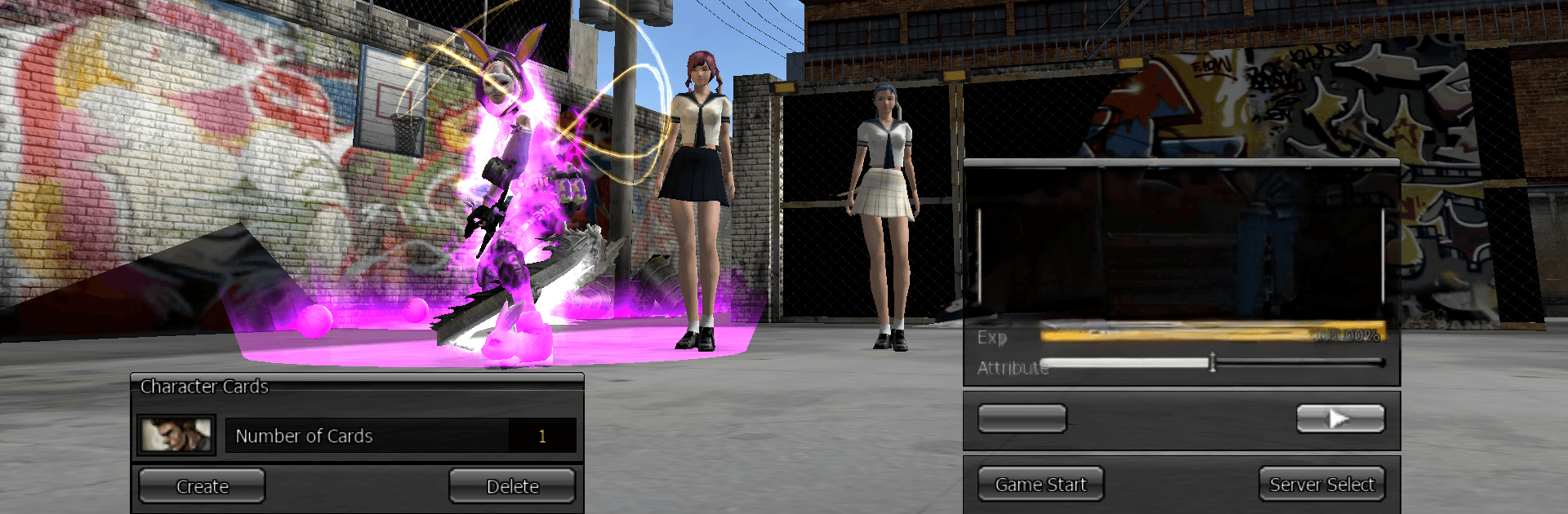
Madness Ran is a campus-themed Role Playing world where you build a custom fighter, learn flashy skills, and scrap with rivals across busy school grounds. It blends chill social hangouts with tense battles and steady character growth—make friends, pick fights, and see your name climb the boards. Prefer a bigger screen and precise controls? It runs smoothly on BlueStacks too.

Game Features

  • Character Creation: Shape your look and playstyle, then grow your student hero through skills, stats, and gear choices that actually matter in a fight.
  • Party Up & Socialize: Chat in real time, form parties, and join clubs to tackle tougher zones together or just hang out between clashes.
  • Competitive Modes & Rankings: Test your mettle in Tyranny, RedVsBlue, and FreePK, with TOP 10 boards and battle info to track who’s owning the arena.
  • Real-Time Combat: Trade blows, time your skills, and outthink enemies—whether you’re clearing out hostile mobs or challenging other players.
  • Gear Building: Craft, enhance, and fine-tune equipment to match your role, from sturdy frontline sets to high-burst damage builds.
  • Battle Tracking: Keep an eye on ongoing skirmishes and recent results so you know when to jump in—or when to regroup.
  • Touch-Friendly Controls: Play comfortably with clean, responsive touch inputs and handy settings, including a Power Saving Mode for longer sessions.
  • Server-Based Events: Events and rankings shift by server, so what you see—and when you can join—depends on where your character lives.
  • Optional Purchases: Grab cosmetic items, in-game currency, or randomized rewards if you want an extra boost, without breaking the core experience.
  • Always Online: An internet connection and a game account are required, and available content scales with your character’s progress and server status.

Start your journey now. Download the game on BlueStacks, invite your friends, and march on a new adventure.


Game Features

Enhancements

  • Macros
  • Rerolling
  • Eco Mode
  • Multi Instance Sync
  • Enhancements
Macros

Macros

Focus more on the fun part of the game, skip the tedious aspects. Master Madness Ran with Macros. Record yourself completing the monotonous tasks you wish to automate and replay them later with just one keypress.
Rerolling

Rerolling

Speed up the rerolling process in Madness Ran. Perform multiple summons and keep looking for the best Heroes. Use Multi-Instance sync to replicate the rerolling mechanism in all instances.
Eco Mode

Eco Mode

Farm in-game resources with ease in Madness Ran. Enable the Eco Mode when running the game in multiple instances. And lower your PC's resource consumption.
Multi Instance Sync

Multi Instance Sync

With the Multi-instance Sync, you can do even more in Madness Ran. Sync the action of the main instance and repeat them in real time for all other instances. Sync and sit back, let the game progress unfold.
Read More

How to Download and Play Madness Ran on PC or Mac

  • Download and install BlueStacks on your PC or Mac

  • Complete Google sign-in to access the Play Store, or do it later

  • Look for Madness Ran in the search bar at the top right corner

  • Click to install Madness Ran from the search results

  • Complete Google sign-in (if you skipped step 2) to install Madness Ran

  • Click the Madness Ran icon on the home screen to start playing

video
Watch Video

Minimum System Requirements

With BlueStacks 5, you can get started on a PC that fulfills the following requirements.

  • Operating System

    Microsoft Windows 7 or above, macOS 11 (Big Sur) or above

  • Processor

    Intel, AMD or Apple Silicon Processor

  • RAM

    at least 4GB

  • HDD

    10GB Free Disk Space

Note:

* You must be an Administrator on your PC. Up to date graphics drivers from Microsoft or the chipset vendor.

Madness Ran - FAQs

  • How to play Madness Ran on Windows PC & Mac?

    Play Madness Ran on your PC or Mac by following these simple steps.

    • Click on 'Play Madness Ran on PC’ to download BlueStacks
    • Install it and log-in to Google Play Store
    • Launch and play the game.
  • Why is BlueStacks the fastest and safest platform to play games on PC?

    BlueStacks respects your privacy and is always safe and secure to use. It does not carry any malware, spyware, or any sort of additional software that could harm your PC.

    It is engineered to optimize speed and performance for a seamless gaming experience.

  • What are Madness Ran PC requirements?

    Minimum requirement to run Madness Ran on your PC

    • OS: Microsoft Windows 7 or above MacOS 11 (Big Sur) or above
    • Processor: Intel, AMD or Apple Silicon Processor
    • RAM: Your PC must have at least 4GB of RAM. (Note that having 4GB or more disk space is not a substitute for RAM)
    • HDD: 10GB Free Disk Space.
    • You must be an Administrator on your PC.