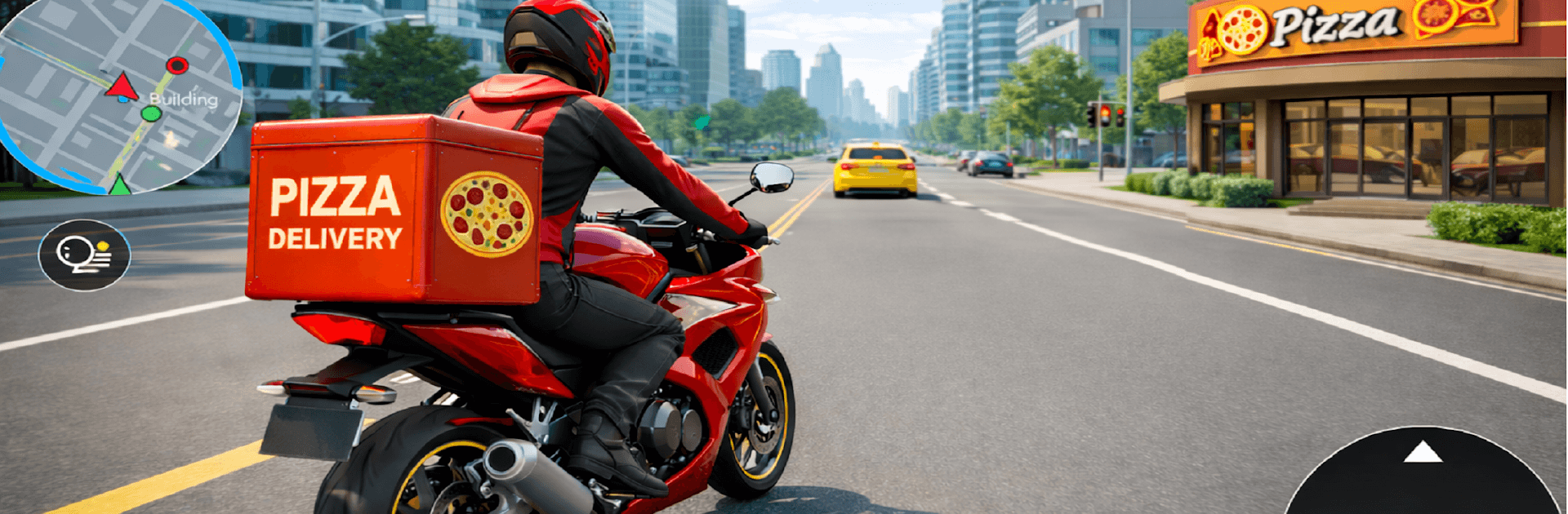
Pizza Delivery Rider Simulator

Pizza Delivery Rider Simulator

Role Playing

| Cover Shoot Studio

Play on PC with BlueStacks or from our cloud

  • Overview
  • Game Features
  • How to Play

Page Modified On: September 25, 2026

Play Pizza Delivery Rider Simulator on PC or Mac

Bring your A-game to Pizza Delivery Rider Simulator, the Role Playing game sensation from Cover Shoot Studio. Give your gameplay the much-needed boost with precise game controls, high FPS graphics, and top-tier features on your PC or Mac with BlueStacks.

About the Game

Pizza Delivery Rider Simulator is a Role Playing game that drops you into the hustle of a city courier’s day. Grab orders, thread through traffic, and beat the clock with bike handling that feels snappy and grounded. Prefer a bigger screen and steady controls? It plays great on PC with BlueStacks.

Game Features

  • Lived-In City Traffic: Signals, lanes, and busy intersections make every ride a small puzzle—push your speed, but respect the rules.
  • Order-to-Door Flow: Accept gigs through the in-game app, swing by the restaurant, and hand over hot pies without scuffs or spills.
  • Easy-to-Learn Riding: Smooth throttle, braking, and leaning make the motorcycle feel responsive right away, yet still rewarding to master.
  • Timers That Count: Manage tight delivery windows, balance risk and caution, and keep delays low to squeeze the most from each shift.
  • Smart Navigation: Follow a clean map tracker to your next stop, spot shortcuts, and steer clear of gridlock when traffic thickens.
  • Daily Shift Goals: Clear a set number of deliveries to wrap your workday and unlock the next stretch of city routes and tasks.
  • Earn, Save, Improve: Turn hard-earned cash into a better home—upgrade interiors piece by piece as your life off the bike levels up.
  • Rising Challenge: Tackle missions that ramp up in difficulty, from straightforward sprints to tricky routes that test timing and control.

Start playing Pizza Delivery Rider Simulator on BlueStacks and get a smoother, more comfortable PC or Mac setup.


Game Features

Enhancements

  • Macros
  • Rerolling
  • Eco Mode
  • Multi Instance Sync
  • Enhancements
Macros

Macros

Focus more on the fun part of the game, skip the tedious aspects. Master Pizza Delivery Rider Simulator with Macros. Record yourself completing the monotonous tasks you wish to automate and replay them later with just one keypress.
Rerolling

Rerolling

Speed up the rerolling process in Pizza Delivery Rider Simulator. Perform multiple summons and keep looking for the best Heroes. Use Multi-Instance sync to replicate the rerolling mechanism in all instances.
Eco Mode

Eco Mode

Farm in-game resources with ease in Pizza Delivery Rider Simulator. Enable the Eco Mode when running the game in multiple instances. And lower your PC's resource consumption.
Multi Instance Sync

Multi Instance Sync

With the Multi-instance Sync, you can do even more in Pizza Delivery Rider Simulator. Sync the action of the main instance and repeat them in real time for all other instances. Sync and sit back, let the game progress unfold.
Read More

How to Download and Play Pizza Delivery Rider Simulator on PC or Mac

  • Download and install BlueStacks on your PC or Mac

  • Complete Google sign-in to access the Play Store, or do it later

  • Look for Pizza Delivery Rider Simulator in the search bar at the top right corner

  • Click to install Pizza Delivery Rider Simulator from the search results

  • Complete Google sign-in (if you skipped step 2) to install Pizza Delivery Rider Simulator

  • Click the Pizza Delivery Rider Simulator icon on the home screen to start playing

video
Watch Video

Minimum System Requirements

With BlueStacks 5, you can get started on a PC that fulfills the following requirements.

  • Operating System

    Microsoft Windows 7 or above, macOS 11 (Big Sur) or above

  • Processor

    Intel, AMD or Apple Silicon Processor

  • RAM

    at least 4GB

  • HDD

    10GB Free Disk Space

Note:

* You must be an Administrator on your PC. Up to date graphics drivers from Microsoft or the chipset vendor.

Pizza Delivery Rider Simulator - FAQs

  • How to play Pizza Delivery Rider Simulator on Windows PC & Mac?

    Play Pizza Delivery Rider Simulator on your PC or Mac by following these simple steps.

    • Click on 'Play Pizza Delivery Rider Simulator on PC’ to download BlueStacks
    • Install it and log-in to Google Play Store
    • Launch and play the game.
  • Why is BlueStacks the fastest and safest platform to play games on PC?

    BlueStacks respects your privacy and is always safe and secure to use. It does not carry any malware, spyware, or any sort of additional software that could harm your PC.

    It is engineered to optimize speed and performance for a seamless gaming experience.

  • What are Pizza Delivery Rider Simulator PC requirements?

    Minimum requirement to run Pizza Delivery Rider Simulator on your PC

    • OS: Microsoft Windows 7 or above MacOS 11 (Big Sur) or above
    • Processor: Intel, AMD or Apple Silicon Processor
    • RAM: Your PC must have at least 4GB of RAM. (Note that having 4GB or more disk space is not a substitute for RAM)
    • HDD: 10GB Free Disk Space.
    • You must be an Administrator on your PC.