Real Car Drift Driving Game 3D

Real Car Drift Driving Game 3D

Role Playing

| ZAN Studio

Play on PC with BlueStacks or from our cloud

  • Overview
  • Game Features
  • How to Play

Page Modified On: January 09, 2026

Play Real Car Drift Driving Game 3D on PC or Mac

Step into the World of Real Car Drift Driving Game 3D, a thrilling Role Playing game from the house of ZAN Studio. Play this Android game on BlueStacks App Player and experience immersive gaming on PC or Mac.

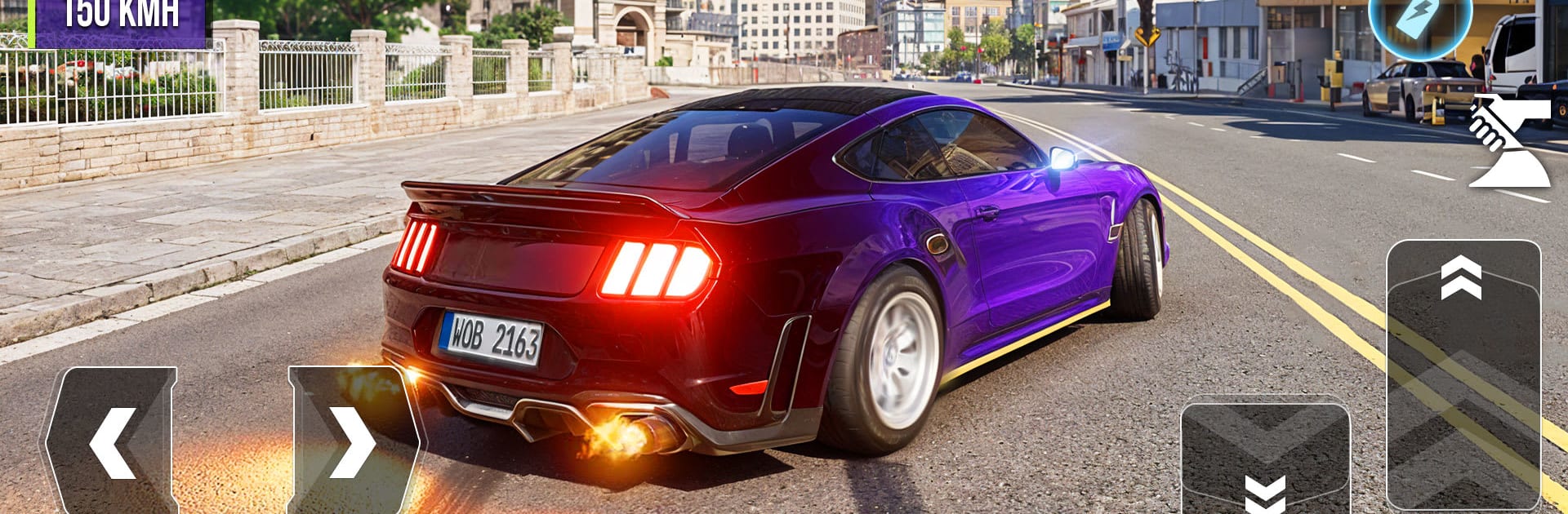
Real Car Drift Driving Game 3D keeps things simple in a good way. It drops the player into a big open city and basically says go drive. The map is wide and roomy, with long streets and open corners that are perfect for sliding. Cars are scattered around like toys on a floor, so the player can just walk up, hop in, and switch to something else whenever the mood changes. If the dream ride is not nearby, there is a little in-game phone that calls one in, which is a neat touch and saves the hunt. Drifting feels forgiving and fun, more arcade than sim, so holding a slide through a roundabout or a stretch of road is not a struggle. The tires squeal, the car swings, and there is enough weight to the handling that a bad angle still sends the tail out too far.

It is very much a free-drive kind of game. No heavy story, no long setup, just spawn, pick a car, and start leaving black lines everywhere. The controls are straightforward and quick to learn, and on PC with BlueStacks the keyboard makes it even snappier to flick between throttle and brake. Swapping vehicles mid-session keeps it fresh, like trying one car for tight corners and another for big, smoky drifts. The whole thing is easy to sink into for a few minutes or an hour, almost like a sandbox for practicing slides and seeing how far the car can be pushed before it spins.

Ready to top the leaderboard? We bet you do. Let precise controls and sharp visuals optimized on BlueStacks lead you to victory.


Game Features

Enhancements

  • Macros
  • Rerolling
  • Eco Mode
  • Multi Instance Sync
  • Enhancements
Macros

Macros

Focus more on the fun part of the game, skip the tedious aspects. Master Real Car Drift Driving Game 3D with Macros. Record yourself completing the monotonous tasks you wish to automate and replay them later with just one keypress.
Rerolling

Rerolling

Speed up the rerolling process in Real Car Drift Driving Game 3D. Perform multiple summons and keep looking for the best Heroes. Use Multi-Instance sync to replicate the rerolling mechanism in all instances.
Eco Mode

Eco Mode

Farm in-game resources with ease in Real Car Drift Driving Game 3D. Enable the Eco Mode when running the game in multiple instances. And lower your PC's resource consumption.
Multi Instance Sync

Multi Instance Sync

With the Multi-instance Sync, you can do even more in Real Car Drift Driving Game 3D. Sync the action of the main instance and repeat them in real time for all other instances. Sync and sit back, let the game progress unfold.
Read More

How to Download and Play Real Car Drift Driving Game 3D on PC or Mac

  • Download and install BlueStacks on your PC or Mac

  • Complete Google sign-in to access the Play Store, or do it later

  • Look for Real Car Drift Driving Game 3D in the search bar at the top right corner

  • Click to install Real Car Drift Driving Game 3D from the search results

  • Complete Google sign-in (if you skipped step 2) to install Real Car Drift Driving Game 3D

  • Click the Real Car Drift Driving Game 3D icon on the home screen to start playing

video
Watch Video

Minimum System Requirements

With BlueStacks 5, you can get started on a PC that fulfills the following requirements.

  • Operating System

    Microsoft Windows 7 or above, macOS 11 (Big Sur) or above

  • Processor

    Intel, AMD or Apple Silicon Processor

  • RAM

    at least 4GB

  • HDD

    10GB Free Disk Space

Note:

* You must be an Administrator on your PC. Up to date graphics drivers from Microsoft or the chipset vendor.

Real Car Drift Driving Game 3D - FAQs

  • How to play Real Car Drift Driving Game 3D on Windows PC & Mac?

    Play Real Car Drift Driving Game 3D on your PC or Mac by following these simple steps.

    • Click on 'Play Real Car Drift Driving Game 3D on PCโ€™ to download BlueStacks
    • Install it and log-in to Google Play Store
    • Launch and play the game.
  • Why is BlueStacks the fastest and safest platform to play games on PC?

    BlueStacks respects your privacy and is always safe and secure to use. It does not carry any malware, spyware, or any sort of additional software that could harm your PC.

    It is engineered to optimize speed and performance for a seamless gaming experience.

  • What are Real Car Drift Driving Game 3D PC requirements?

    Minimum requirement to run Real Car Drift Driving Game 3D on your PC

    • OS: Microsoft Windows 7 or above MacOS 11 (Big Sur) or above
    • Processor: Intel, AMD or Apple Silicon Processor
    • RAM: Your PC must have at least 4GB of RAM. (Note that having 4GB or more disk space is not a substitute for RAM)
    • HDD: 10GB Free Disk Space.
    • You must be an Administrator on your PC.