Skyrealm Tales
Skyrealm Tales

Skyrealm Tales

Role Playing

| RudderSander

Play on PC with BlueStacks or from our cloud

  • Overview
  • Game Features
  • How to Play

Page Modified On: November 02, 2026

Play Skyrealm Tales on PC or Mac

Explore a whole new adventure with Skyrealm Tales, a Role Playing game created by RudderSander. Experience great gameplay with BlueStacks, the most popular gaming platform to play Android games on your PC or Mac.

About the Game

Skyrealm Tales is a Role Playing adventure set across a chain of floating continents where legends still breathe fire. You’re chasing whispers of a radiant dragon said to crown the boldest explorer, and the journey swings from chill moments by a quiet lake to rowdy boss fights with a crew of loyal critters. Prefer a bigger screen and keyboard? It plays smoothly on BlueStacks, too.

Game Features

  • Sky-high exploration: Saddle up on flying mounts and roam the skies above Aerylia, hopping between cloud-wrapped isles, cliffside ruins, and secret nooks only reachable from the air.
  • Hatch-and-bond companions: Collect curious eggs and hatch them into one-of-a-kind pals, each with its own look, quirks, and handy skills for travel and battle.
  • Pet-powered combat: Build a squad from a huge roster of creatures—some adorable, some downright fierce—and tackle bosses, clear dungeons, and rotate lineups to fit the fight.
  • Hands-off progress systems: Set up farms and workshops to mine, harvest, craft, and funnel upgrades while you’re off doing something else, keeping the grind pleasantly light.
  • Play at your pace: Skip the chore lists and scripted pressure; wander, fish, gather, or chase big objectives only when you’re in the mood.
  • Secrets of dragonkind: Track clues, unearth relics, and piece together the old tales that shaped Aerylia, from scorched valleys to treasure-stuffed vaults.
  • Write your title: Chart your own route to glory as the would-be Adventure King, choosing paths that actually reflect how you like to explore and fight.

BlueStacks gives you more room to focus on the game and less time adjusting around mobile limitations.


Game Features

Enhancements

  • Macros
  • Rerolling
  • Eco Mode
  • Multi Instance Sync
  • Enhancements
Macros

Macros

Focus more on the fun part of the game, skip the tedious aspects. Master Skyrealm Tales with Macros. Record yourself completing the monotonous tasks you wish to automate and replay them later with just one keypress.
Rerolling

Rerolling

Speed up the rerolling process in Skyrealm Tales. Perform multiple summons and keep looking for the best Heroes. Use Multi-Instance sync to replicate the rerolling mechanism in all instances.
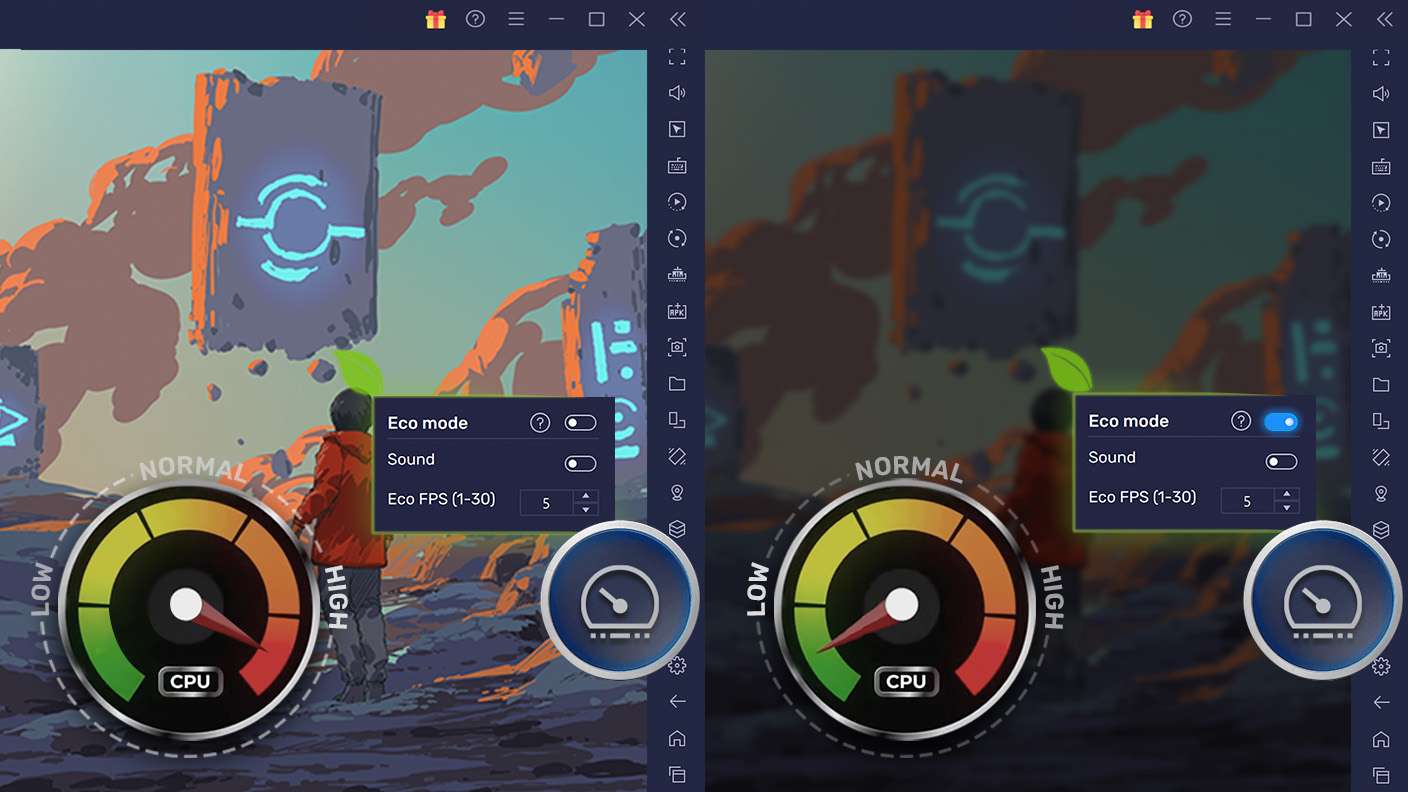
Eco Mode

Eco Mode

Farm in-game resources with ease in Skyrealm Tales. Enable the Eco Mode when running the game in multiple instances. And lower your PC's resource consumption.
Multi Instance Sync

Multi Instance Sync

With the Multi-instance Sync, you can do even more in Skyrealm Tales. Sync the action of the main instance and repeat them in real time for all other instances. Sync and sit back, let the game progress unfold.
Read More

How to Download and Play Skyrealm Tales on PC or Mac

  • Download and install BlueStacks on your PC or Mac

  • Complete Google sign-in to access the Play Store, or do it later

  • Look for Skyrealm Tales in the search bar at the top right corner

  • Click to install Skyrealm Tales from the search results

  • Complete Google sign-in (if you skipped step 2) to install Skyrealm Tales

  • Click the Skyrealm Tales icon on the home screen to start playing

video
Watch Video

Minimum System Requirements

With BlueStacks 5, you can get started on a PC that fulfills the following requirements.

  • Operating System

    Microsoft Windows 7 or above, macOS 11 (Big Sur) or above

  • Processor

    Intel, AMD or Apple Silicon Processor

  • RAM

    at least 4GB

  • HDD

    10GB Free Disk Space

Note:

* You must be an Administrator on your PC. Up to date graphics drivers from Microsoft or the chipset vendor.

Skyrealm Tales - FAQs

  • How to play Skyrealm Tales on Windows PC & Mac?

    Play Skyrealm Tales on your PC or Mac by following these simple steps.

    • Click on 'Play Skyrealm Tales on PC’ to download BlueStacks
    • Install it and log-in to Google Play Store
    • Launch and play the game.
  • Why is BlueStacks the fastest and safest platform to play games on PC?

    BlueStacks respects your privacy and is always safe and secure to use. It does not carry any malware, spyware, or any sort of additional software that could harm your PC.

    It is engineered to optimize speed and performance for a seamless gaming experience.

  • What are Skyrealm Tales PC requirements?

    Minimum requirement to run Skyrealm Tales on your PC

    • OS: Microsoft Windows 7 or above MacOS 11 (Big Sur) or above
    • Processor: Intel, AMD or Apple Silicon Processor
    • RAM: Your PC must have at least 4GB of RAM. (Note that having 4GB or more disk space is not a substitute for RAM)
    • HDD: 10GB Free Disk Space.
    • You must be an Administrator on your PC.