Steal a Brainrot Duel

Steal a Brainrot Duel

Role Playing

| gameVgames

Play on PC with BlueStacks or from our cloud

  • Overview
  • Game Features
  • How to Play

Page Modified On: November 28, 2025

Play Steal a Brainrot Duel on PC or Mac

Steal a Brainrot Duel brings the Role Playing genre to life, and throws up exciting challenges for gamers. Developed by gameVgames, this Android game is best experienced on BlueStacks, the World’s #1 app player for PC and Mac users.

About the Game

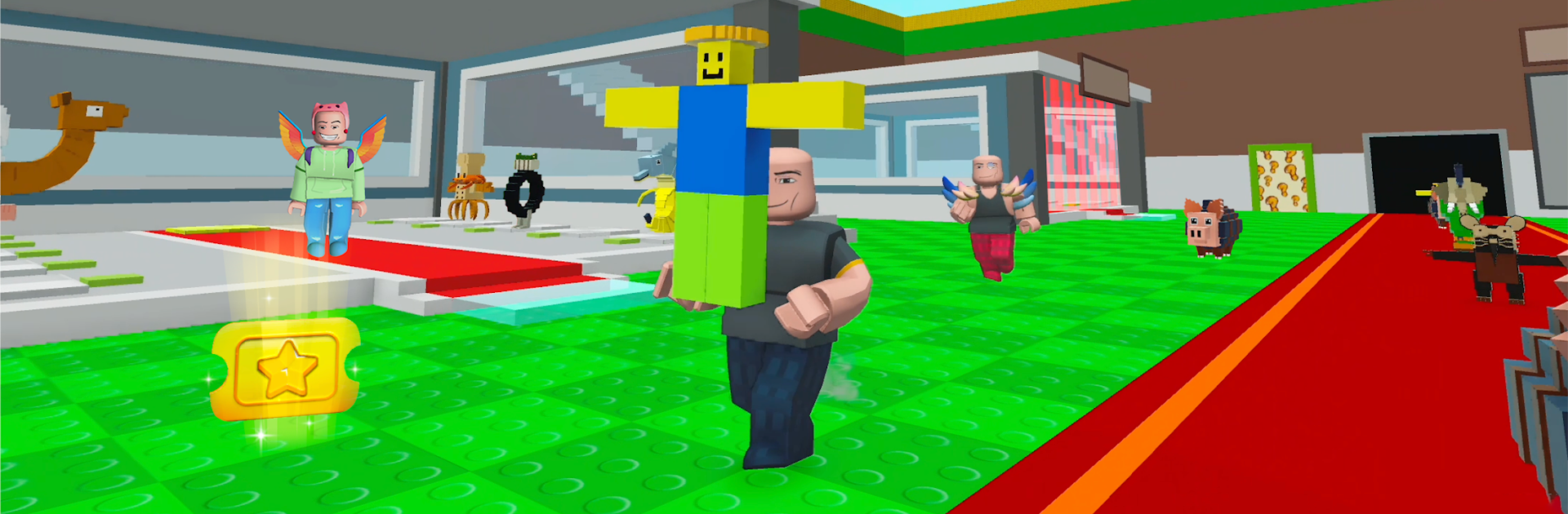
Steal a Brainrot Duel is a cheeky mash-up of quick heists and base defense with a Role Playing twist. Build a scrappy crew—think chaotic favorites like Tung Tung Sahur and Tralalero Tralala—then sprint for loot, stash it, and fend off anyone bold enough to raid you. From gameVgames, it’s fast, a little messy in the best way, and packed with clever choices that turn every round into a tense “do I risk one more trip?” moment.

Game Features

  • Steal-and-Defend Core: Dash for valuables, haul them back to your base, and crash rival runs mid-escape. Short rounds, big swings, and lots of “gotcha” plays.
  • Ridiculous Brainrot Roster: Collect and upgrade a team of meme-soaked heroes, each bringing their own flavor to raids and base protection.
  • Modes for Any Mood: Go solo in Steal Brainrot Offline or jump into the high-pressure Steal It All challenge when you want all-or-nothing action.
  • Powerups with Purpose: Stack boosts for speed, carry capacity, and shields. Smart timing turns a close call into a clean getaway.
  • Build a Tough Base: Drop traps, reinforce choke points, and design defenses that punish greedy intruders without slowing you down.
  • Style Your Obby Avatar: Hats, wings, glasses, backpacks, pets—the drip matters when you’re sprinting past a stunned raider.
  • Smooth, Snappy Controls: Quick moves and responsive handling keep your runs tight on mobile.
  • Play on PC with BlueStacks: Prefer mouse and keyboard? It works great without changing the feel of the game.
  • Events, Rewards, and New Faces: Regular updates bring fresh characters, limited-time challenges, and new loot paths to chase.
  • Quick Tips: Bank often, upgrade speed early, prep defenses before you raid, and chain boosters for slick escapes.

Get ready for a buttery smooth, high-performance gaming action only on BlueStacks.

Game Features

Enhancements

  • Macros
  • Rerolling
  • Eco Mode
  • Multi Instance Sync
  • Enhancements
Macros

Macros

Focus more on the fun part of the game, skip the tedious aspects. Master Steal a Brainrot Duel with Macros. Record yourself completing the monotonous tasks you wish to automate and replay them later with just one keypress.
Rerolling

Rerolling

Speed up the rerolling process in Steal a Brainrot Duel. Perform multiple summons and keep looking for the best Heroes. Use Multi-Instance sync to replicate the rerolling mechanism in all instances.
Eco Mode

Eco Mode

Farm in-game resources with ease in Steal a Brainrot Duel. Enable the Eco Mode when running the game in multiple instances. And lower your PC's resource consumption.
Multi Instance Sync

Multi Instance Sync

With the Multi-instance Sync, you can do even more in Steal a Brainrot Duel. Sync the action of the main instance and repeat them in real time for all other instances. Sync and sit back, let the game progress unfold.
Read More

How to Download and Play Steal a Brainrot Duel on PC or Mac

  • Download and install BlueStacks on your PC or Mac

  • Complete Google sign-in to access the Play Store, or do it later

  • Look for Steal a Brainrot Duel in the search bar at the top right corner

  • Click to install Steal a Brainrot Duel from the search results

  • Complete Google sign-in (if you skipped step 2) to install Steal a Brainrot Duel

  • Click the Steal a Brainrot Duel icon on the home screen to start playing

video
Watch Video

Minimum System Requirements

With BlueStacks 5, you can get started on a PC that fulfills the following requirements.

  • Operating System

    Microsoft Windows 7 or above, macOS 11 (Big Sur) or above

  • Processor

    Intel, AMD or Apple Silicon Processor

  • RAM

    at least 4GB

  • HDD

    10GB Free Disk Space

Note:

* You must be an Administrator on your PC. Up to date graphics drivers from Microsoft or the chipset vendor.

Steal a Brainrot Duel - FAQs

  • How to play Steal a Brainrot Duel on Windows PC & Mac?

    Play Steal a Brainrot Duel on your PC or Mac by following these simple steps.

    • Click on 'Play Steal a Brainrot Duel on PC’ to download BlueStacks
    • Install it and log-in to Google Play Store
    • Launch and play the game.
  • Why is BlueStacks the fastest and safest platform to play games on PC?

    BlueStacks respects your privacy and is always safe and secure to use. It does not carry any malware, spyware, or any sort of additional software that could harm your PC.

    It is engineered to optimize speed and performance for a seamless gaming experience.

  • What are Steal a Brainrot Duel PC requirements?

    Minimum requirement to run Steal a Brainrot Duel on your PC

    • OS: Microsoft Windows 7 or above MacOS 11 (Big Sur) or above
    • Processor: Intel, AMD or Apple Silicon Processor
    • RAM: Your PC must have at least 4GB of RAM. (Note that having 4GB or more disk space is not a substitute for RAM)
    • HDD: 10GB Free Disk Space.
    • You must be an Administrator on your PC.