Valoria Wars - MMORPG 2D

Valoria Wars - MMORPG 2D

Role Playing

| NyroGameDev

Play on PC with BlueStacks or from our cloud

  • Overview
  • Game Features
  • How to Play

Page Modified On: October 21, 2026

Play Valoria Wars - MMORPG 2D on PC or Mac

Bring your A-game to Valoria Wars – MMORPG 2D, the Role Playing game sensation from NyroGameDev. Give your gameplay the much-needed boost with precise game controls, high FPS graphics, and top-tier features on your PC or Mac with BlueStacks.

About the Game

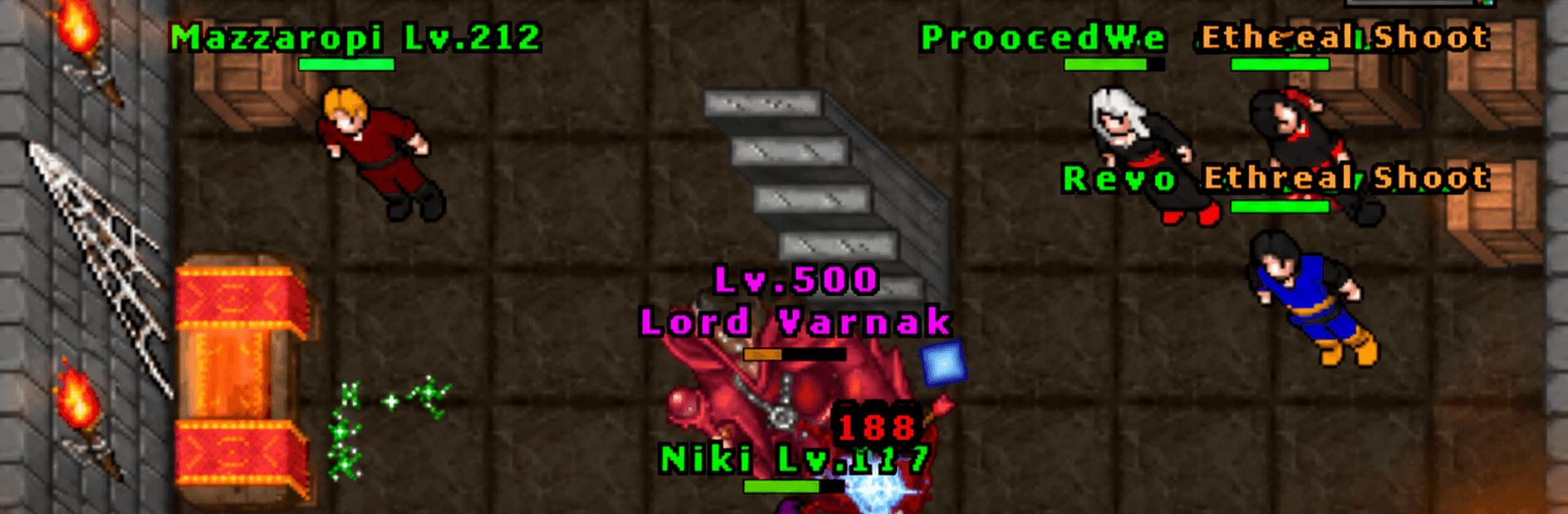
Valoria Wars – MMORPG 2D throws you into a scrappy fantasy battlefield where danger can come from any direction. This Role Playing game leans into fast real-time skirmishes, steady progression, and an old-school 2D look that puts combat front and center. If you like playing on a bigger screen, it also works great on BlueStacks.

Game Features

  • Open PvP everywhere: Anyone you meet could be an opponent, so read the room, choose your moment, and strike when it counts.
  • Four distinct vocations: Pick Knight, Paladin, Sorcerer, or Druid and lean into tanking, hybrid pressure, burst damage, or support-style control.
  • Snappy real-time combat: Quick fights, reactive counters, and clutch spell timing keep every encounter tense and personal.
  • Classic 2D presentation: A clear top-down view highlights positioning, spacing, and awareness without visual clutter.
  • Meaningful progression: Gain experience, grow stronger, and unlock options that genuinely change your approach to battles.
  • Spells, runes, and potions: Craft a loadout that suits your plan—burst combos, sustain tools, escapes, or crowd control.
  • Quests and gear to chase: Take on tasks, find materials, and collect items that support your build and playstyle.
  • Risk-and-reward zones: Wander into tougher areas for better loot, but stay sharp—ambushes are common.
  • Easy-to-learn controls: Simple, responsive inputs make moving, aiming, and unleashing abilities feel natural right away.
  • Instant-action skirmishes: Get into fights fast, whether you’re warming up or pushing for your next big win.
  • Solo or with a crew: Roam alone for high-risk thrills, or team up for coordinated pressure and safer farming.
  • Ongoing updates: Regular balance tweaks and improvements keep the meta fresh and the experience evolving.

Get ready for a buttery smooth, high-performance gaming action only on BlueStacks.

Game Features

Enhancements

  • Macros
  • Rerolling
  • Eco Mode
  • Multi Instance Sync
  • Enhancements
Macros

Macros

Focus more on the fun part of the game, skip the tedious aspects. Master Valoria Wars - MMORPG 2D with Macros. Record yourself completing the monotonous tasks you wish to automate and replay them later with just one keypress.
Rerolling

Rerolling

Speed up the rerolling process in Valoria Wars - MMORPG 2D. Perform multiple summons and keep looking for the best Heroes. Use Multi-Instance sync to replicate the rerolling mechanism in all instances.
Eco Mode

Eco Mode

Farm in-game resources with ease in Valoria Wars - MMORPG 2D. Enable the Eco Mode when running the game in multiple instances. And lower your PC's resource consumption.
Multi Instance Sync

Multi Instance Sync

With the Multi-instance Sync, you can do even more in Valoria Wars - MMORPG 2D. Sync the action of the main instance and repeat them in real time for all other instances. Sync and sit back, let the game progress unfold.
Read More

How to Download and Play Valoria Wars - MMORPG 2D on PC or Mac

  • Download and install BlueStacks on your PC or Mac

  • Complete Google sign-in to access the Play Store, or do it later

  • Look for Valoria Wars - MMORPG 2D in the search bar at the top right corner

  • Click to install Valoria Wars - MMORPG 2D from the search results

  • Complete Google sign-in (if you skipped step 2) to install Valoria Wars - MMORPG 2D

  • Click the Valoria Wars - MMORPG 2D icon on the home screen to start playing

video
Watch Video

Minimum System Requirements

With BlueStacks 5, you can get started on a PC that fulfills the following requirements.

  • Operating System

    Microsoft Windows 7 or above, macOS 11 (Big Sur) or above

  • Processor

    Intel, AMD or Apple Silicon Processor

  • RAM

    at least 4GB

  • HDD

    10GB Free Disk Space

Note:

* You must be an Administrator on your PC. Up to date graphics drivers from Microsoft or the chipset vendor.

Valoria Wars - MMORPG 2D - FAQs

  • How to play Valoria Wars - MMORPG 2D on Windows PC & Mac?

    Play Valoria Wars - MMORPG 2D on your PC or Mac by following these simple steps.

    • Click on 'Play Valoria Wars - MMORPG 2D on PC’ to download BlueStacks
    • Install it and log-in to Google Play Store
    • Launch and play the game.
  • Why is BlueStacks the fastest and safest platform to play games on PC?

    BlueStacks respects your privacy and is always safe and secure to use. It does not carry any malware, spyware, or any sort of additional software that could harm your PC.

    It is engineered to optimize speed and performance for a seamless gaming experience.

  • What are Valoria Wars - MMORPG 2D PC requirements?

    Minimum requirement to run Valoria Wars - MMORPG 2D on your PC

    • OS: Microsoft Windows 7 or above MacOS 11 (Big Sur) or above
    • Processor: Intel, AMD or Apple Silicon Processor
    • RAM: Your PC must have at least 4GB of RAM. (Note that having 4GB or more disk space is not a substitute for RAM)
    • HDD: 10GB Free Disk Space.
    • You must be an Administrator on your PC.