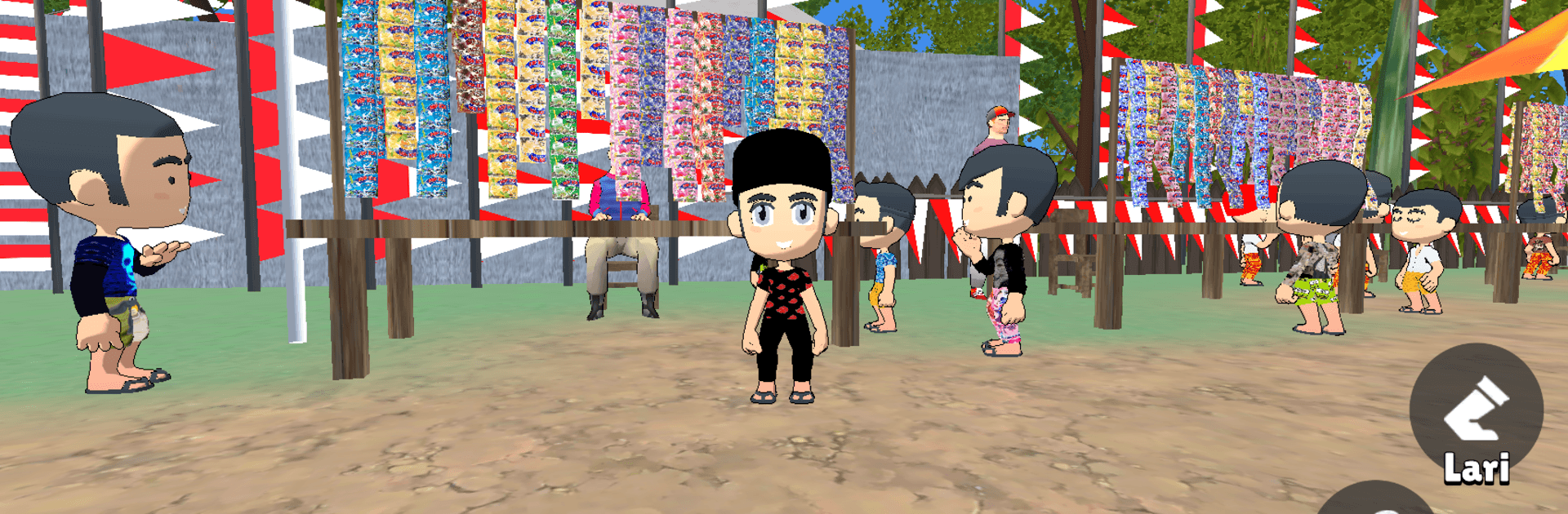
Simulator 17 Agustusan 3D

Simulator 17 Agustusan 3D

Simulation

| LemauDev

Play on PC with BlueStacks or from our cloud

  • Overview
  • Game Features
  • How to Play

Page Modified On: August 31, 2026

Play Simulator 17 Agustusan 3D on PC or Mac

Step into the World of Simulator 17 Agustusan 3D, a thrilling Simulation game from the house of LemauDev. Play this Android game on BlueStacks App Player and experience immersive gaming on PC or Mac.

About the Game

Simulator 17 Agustusan 3D turns Indonesia’s August 17 neighborhood contests into a playful Simulation you can jump into anytime. It captures the cheerful chaos of Independence Day games with a bundle of bite-size 3D challenges you can replay for bragging rights or just for a good laugh. Whether you miss the village crowd or you’re curious about these traditions, it brings that festive energy right to you.

Game Features

  • Village Fest Vibes: Colorful bunting, friendly cheers, and a relaxed setting that feels like a real community celebration.
  • Variety of Mini-Games: Swap between classics like tug of war, sack races, pinang pole climbing, hanging-cracker munching, and the nail-into-the-bottle challenge.
  • Tug of War Tension: Time your pulls, keep the rhythm, and outmuscle the rival team without burning out.
  • Pinang Pole Climb: Scramble up a slick pole, find your footing, and stick that wobbly final reach.
  • Sack Race Chaos: Hop, jostle, and balance your way to the finish while the lane gets lively.
  • Cracker-Eating Challenge: A hands-off snack attack where timing is everything as the treat swings and sways.
  • Bottle-and-Nail Precision: Steady your aim and guide the nail home with small, careful movements.
  • Quick Sessions: Short, punchy rounds that fit a spare minute or a longer streak of rematches.
  • Simple, Friendly Controls: Easy-to-learn actions keep the focus on timing, coordination, and a dash of luck.
  • Festive 3D Look: Bright visuals and playful animations that match the lighthearted spirit of the day.
  • Growing Party Pack: The collection is still growing, leaving room for more neighborhood favorites down the line.
  • Plays Great on BlueStacks: Prefer a bigger screen and comfy controls? It runs smoothly on BlueStacks without fuss.

BlueStacks gives you more room to focus on the game and less time adjusting around mobile limitations.


Game Features

Enhancements

  • Macros
  • Multi Instance
  • Multi Instance Sync
  • Script
  • Enhancements
Macros

Macros

Automate the predictable in Simulator 17 Agustusan 3D and transform your gameplay with Macros. Get access to inventive Macros in the BlueStacks Macro Community
Multi Instance

Multi Instance

Play Simulator 17 Agustusan 3D on one window. And chat with your friend on the other. Press CTRL + Shift + 8 to open the Multi-Instance Manager. And start creating fresh instances or clone an existing one.
Multi Instance Sync

Multi Instance Sync

Play Simulator 17 Agustusan 3D with the power of Multi-Instance Sync. Replicate what you are doing on the main instance on all other instances. Level up faster, play more.
Script

Script

Script your way to gaming glory in Simulator 17 Agustusan 3D with BlueStacks Script. Write and run a set of commands to automate repeated tasks. Trigger the command by assigning it to any key.
Read More

How to Download and Play Simulator 17 Agustusan 3D on PC or Mac

  • Download and install BlueStacks on your PC or Mac

  • Complete Google sign-in to access the Play Store, or do it later

  • Look for Simulator 17 Agustusan 3D in the search bar at the top right corner

  • Click to install Simulator 17 Agustusan 3D from the search results

  • Complete Google sign-in (if you skipped step 2) to install Simulator 17 Agustusan 3D

  • Click the Simulator 17 Agustusan 3D icon on the home screen to start playing

video
Watch Video

Minimum System Requirements

With BlueStacks 5, you can get started on a PC that fulfills the following requirements.

  • Operating System

    Microsoft Windows 7 or above, macOS 11 (Big Sur) or above

  • Processor

    Intel, AMD or Apple Silicon Processor

  • RAM

    at least 4GB

  • HDD

    10GB Free Disk Space

Note:

* You must be an Administrator on your PC. Up to date graphics drivers from Microsoft or the chipset vendor.

Simulator 17 Agustusan 3D - FAQs

  • How to play Simulator 17 Agustusan 3D on Windows PC & Mac?

    Play Simulator 17 Agustusan 3D on your PC or Mac by following these simple steps.

    • Click on 'Play Simulator 17 Agustusan 3D on PC’ to download BlueStacks
    • Install it and log-in to Google Play Store
    • Launch and play the game.
  • Why is BlueStacks the fastest and safest platform to play games on PC?

    BlueStacks respects your privacy and is always safe and secure to use. It does not carry any malware, spyware, or any sort of additional software that could harm your PC.

    It is engineered to optimize speed and performance for a seamless gaming experience.

  • What are Simulator 17 Agustusan 3D PC requirements?

    Minimum requirement to run Simulator 17 Agustusan 3D on your PC

    • OS: Microsoft Windows 7 or above MacOS 11 (Big Sur) or above
    • Processor: Intel, AMD or Apple Silicon Processor
    • RAM: Your PC must have at least 4GB of RAM. (Note that having 4GB or more disk space is not a substitute for RAM)
    • HDD: 10GB Free Disk Space.
    • You must be an Administrator on your PC.