Build Block 3D: Battle World

Build Block 3D: Battle World

Simulation

| Tappy Game

Play on PC with BlueStacks or from our cloud

  • Overview
  • Game Features
  • How to Play

Page Modified On: October 30, 2026

Play Build Block 3D: Battle World on PC or Mac

Build Block 3D: Battle World by Tappy Game has plenty to keep you busy. BlueStacks lets you play it on PC or Mac with more screen space, better control, and fewer mobile limits.

About the Game

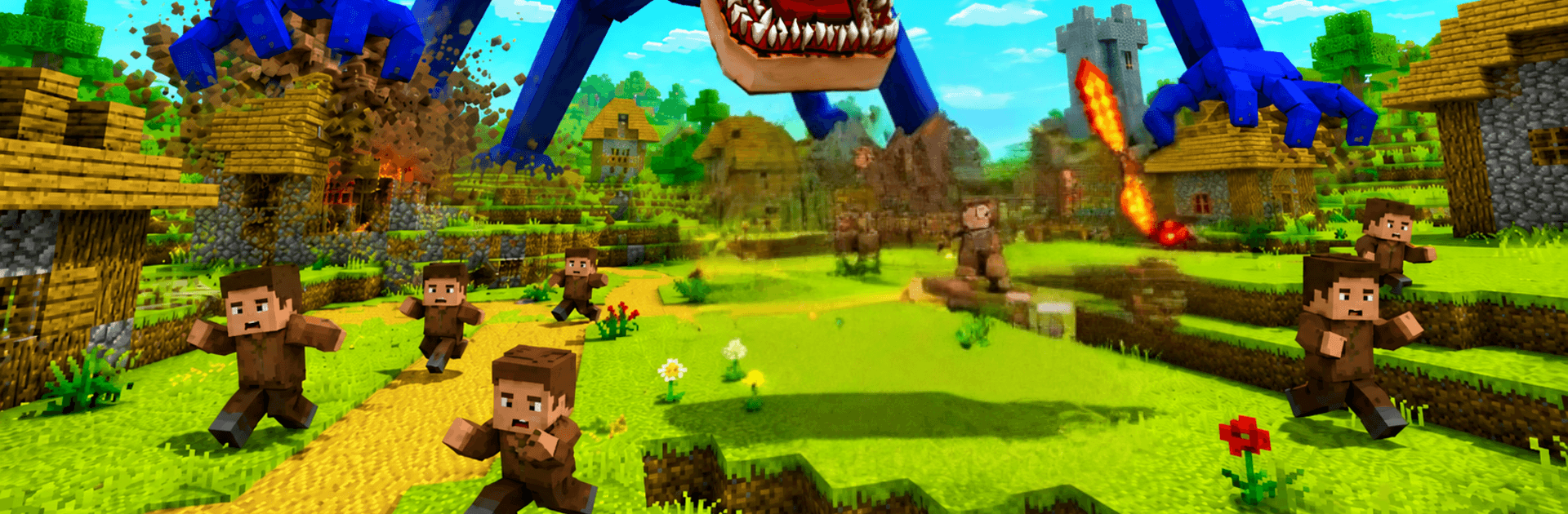
Build Block 3D: Battle World drops you into a chunky 3D playground where chaos and creativity happily collide. This Simulation adventure lets you roam a sprawling voxel world, call in hulking mutant companions, and throw yourself into scrappy, satisfying fights to earn better gear and brag-worthy loot. Prefer a bigger screen and comfy controls? It also plays great on BlueStacks without any fuss.

Game Features

  • Mutant Squad, Your Way: Recruit towering companions—from iron-clad tanks to mystical oddities—and mix lineups that suit each encounter, complete with distinct health bars and punchy abilities.
  • Hands-On Combat: Swing swords, equip fresh gear, and unleash heavy hitters as you decide when to jump in, kite enemies, or let your squad do the bruising.
  • Big, Blocky Biomes: Wander sunlit plains, dusty deserts, and crumbling ruins, each hiding creatures to battle and surprises worth poking around for.
  • Mount Up and Move: Hop on a trusty horse to cover long stretches fast, scout threats ahead, and reach the next chest before anyone else.
  • Treasure Chests That Matter: Hunt down different chest tiers to stockpile coins and materials, then funnel that haul into stronger loadouts.
  • Hold the Hotspot: Some stashes make you earn it—secure the area, weather the heat, and crack open the good stuff when it’s safe.
  • Look the Part: Swap between a wide range of skins and stylized characters so your hero and your crew actually feel like yours.
  • Smooth, Snappy Controls: Easy movement, quick commands, and responsive aiming keep battles feeling lively whether you’re steering the brawl or calling shots from the back line.

Start playing Build Block 3D: Battle World on BlueStacks and get a smoother, more comfortable PC or Mac setup.


Game Features

Enhancements

  • Macros
  • Multi Instance
  • Multi Instance Sync
  • Script
  • Enhancements
Macros

Macros

Automate the predictable in Build Block 3D: Battle World and transform your gameplay with Macros. Get access to inventive Macros in the BlueStacks Macro Community
Multi Instance

Multi Instance

Play Build Block 3D: Battle World on one window. And chat with your friend on the other. Press CTRL + Shift + 8 to open the Multi-Instance Manager. And start creating fresh instances or clone an existing one.
Multi Instance Sync

Multi Instance Sync

Play Build Block 3D: Battle World with the power of Multi-Instance Sync. Replicate what you are doing on the main instance on all other instances. Level up faster, play more.
Script

Script

Script your way to gaming glory in Build Block 3D: Battle World with BlueStacks Script. Write and run a set of commands to automate repeated tasks. Trigger the command by assigning it to any key.
Read More

How to Download and Play Build Block 3D: Battle World on PC or Mac

  • Download and install BlueStacks on your PC or Mac

  • Complete Google sign-in to access the Play Store, or do it later

  • Look for Build Block 3D: Battle World in the search bar at the top right corner

  • Click to install Build Block 3D: Battle World from the search results

  • Complete Google sign-in (if you skipped step 2) to install Build Block 3D: Battle World

  • Click the Build Block 3D: Battle World icon on the home screen to start playing

video
Watch Video

Minimum System Requirements

With BlueStacks 5, you can get started on a PC that fulfills the following requirements.

  • Operating System

    Microsoft Windows 7 or above, macOS 11 (Big Sur) or above

  • Processor

    Intel, AMD or Apple Silicon Processor

  • RAM

    at least 4GB

  • HDD

    10GB Free Disk Space

Note:

* You must be an Administrator on your PC. Up to date graphics drivers from Microsoft or the chipset vendor.

Build Block 3D: Battle World - FAQs

  • How to play Build Block 3D: Battle World on Windows PC & Mac?

    Play Build Block 3D: Battle World on your PC or Mac by following these simple steps.

    • Click on 'Play Build Block 3D: Battle World on PC’ to download BlueStacks
    • Install it and log-in to Google Play Store
    • Launch and play the game.
  • Why is BlueStacks the fastest and safest platform to play games on PC?

    BlueStacks respects your privacy and is always safe and secure to use. It does not carry any malware, spyware, or any sort of additional software that could harm your PC.

    It is engineered to optimize speed and performance for a seamless gaming experience.

  • What are Build Block 3D: Battle World PC requirements?

    Minimum requirement to run Build Block 3D: Battle World on your PC

    • OS: Microsoft Windows 7 or above MacOS 11 (Big Sur) or above
    • Processor: Intel, AMD or Apple Silicon Processor
    • RAM: Your PC must have at least 4GB of RAM. (Note that having 4GB or more disk space is not a substitute for RAM)
    • HDD: 10GB Free Disk Space.
    • You must be an Administrator on your PC.