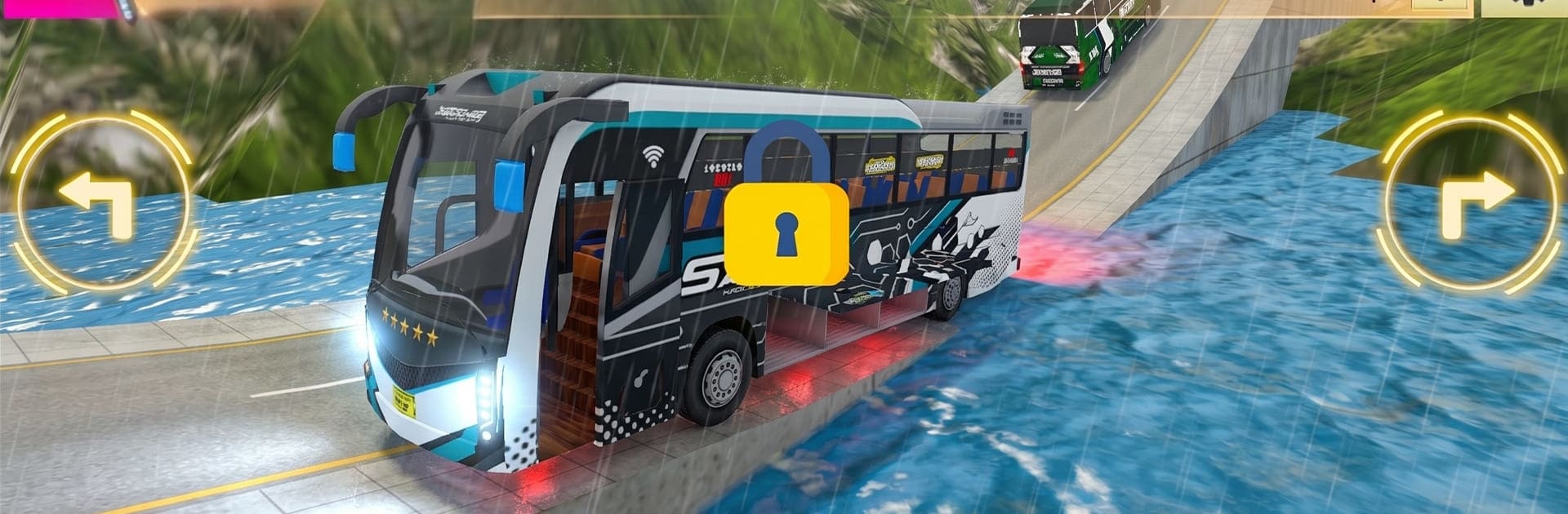
Bus Simulator 3D: Narrow Roads

Bus Simulator 3D: Narrow Roads

Simulation

| Master Of Logix

Play on PC with BlueStacks or from our cloud

  • Overview
  • Game Features
  • How to Play

Page Modified On: August 11, 2026

Play Bus Simulator 3D: Narrow Roads on PC or Mac

Bus Simulator 3D: Narrow Roads by Master Of Logix has plenty to keep you busy. BlueStacks lets you play it on PC or Mac with more screen space, better control, and fewer mobile limits.

About the Game

Bus Simulator 3D: Narrow Roads is a Simulation challenge built around precision, patience, and nerve. You’re driving full-size buses along skinny lanes and cliffside paths where every inch counts. It’s a quiet kind of thrill—steady hands, careful timing, and the satisfaction of threading a giant vehicle through spaces that barely fit. Want a bigger screen and tighter control? It also runs nicely on BlueStacks.

Game Features

  • Low-speed counter-steer: Below 20 km/h, the rear wheels subtly turn opposite the fronts, tightening your turning radius so you can sneak through brutal hairpins without scraping the edge.
  • Water-hugging routes: Many roads trace along lakes and channels. The views are gorgeous—if you dare glance away from that razor-thin asphalt.
  • Simple two-button steering: Left and Right arrows keep things clean and responsive. No overcomplicated wheels or sliders, just tap and correct.
  • Turn signals you’ll actually use: Blinkers aren’t just for show here. Signaling before a bend adds a nice touch of realism to each run.
  • Tightrope tracks: Expect one-lane ledges, narrow bridges, and S-curves that punish oversteer. Staying on the road is the whole game.
  • Smooth, efficient visuals: Crisp graphics that look good and keep frame rates steady on a wide range of devices.
  • Lively traffic and pedestrians: Cars, ambulances, and folks on the roadside make every stretch feel active—and a bit unpredictable.
  • Comfortable anywhere: Great on mobile, and just as playable on BlueStacks if you prefer a larger display and more precise inputs.

Start playing Bus Simulator 3D: Narrow Roads on BlueStacks and get a smoother, more comfortable PC or Mac setup.


Game Features

Enhancements

  • Macros
  • Multi Instance
  • Multi Instance Sync
  • Script
  • Enhancements
Macros

Macros

Automate the predictable in Bus Simulator 3D: Narrow Roads and transform your gameplay with Macros. Get access to inventive Macros in the BlueStacks Macro Community
Multi Instance

Multi Instance

Play Bus Simulator 3D: Narrow Roads on one window. And chat with your friend on the other. Press CTRL + Shift + 8 to open the Multi-Instance Manager. And start creating fresh instances or clone an existing one.
Multi Instance Sync

Multi Instance Sync

Play Bus Simulator 3D: Narrow Roads with the power of Multi-Instance Sync. Replicate what you are doing on the main instance on all other instances. Level up faster, play more.
Script

Script

Script your way to gaming glory in Bus Simulator 3D: Narrow Roads with BlueStacks Script. Write and run a set of commands to automate repeated tasks. Trigger the command by assigning it to any key.
Read More

How to Download and Play Bus Simulator 3D: Narrow Roads on PC or Mac

  • Download and install BlueStacks on your PC or Mac

  • Complete Google sign-in to access the Play Store, or do it later

  • Look for Bus Simulator 3D: Narrow Roads in the search bar at the top right corner

  • Click to install Bus Simulator 3D: Narrow Roads from the search results

  • Complete Google sign-in (if you skipped step 2) to install Bus Simulator 3D: Narrow Roads

  • Click the Bus Simulator 3D: Narrow Roads icon on the home screen to start playing

video
Watch Video

Minimum System Requirements

With BlueStacks 5, you can get started on a PC that fulfills the following requirements.

  • Operating System

    Microsoft Windows 7 or above, macOS 11 (Big Sur) or above

  • Processor

    Intel, AMD or Apple Silicon Processor

  • RAM

    at least 4GB

  • HDD

    10GB Free Disk Space

Note:

* You must be an Administrator on your PC. Up to date graphics drivers from Microsoft or the chipset vendor.

Bus Simulator 3D: Narrow Roads - FAQs

  • How to play Bus Simulator 3D: Narrow Roads on Windows PC & Mac?

    Play Bus Simulator 3D: Narrow Roads on your PC or Mac by following these simple steps.

    • Click on 'Play Bus Simulator 3D: Narrow Roads on PC’ to download BlueStacks
    • Install it and log-in to Google Play Store
    • Launch and play the game.
  • Why is BlueStacks the fastest and safest platform to play games on PC?

    BlueStacks respects your privacy and is always safe and secure to use. It does not carry any malware, spyware, or any sort of additional software that could harm your PC.

    It is engineered to optimize speed and performance for a seamless gaming experience.

  • What are Bus Simulator 3D: Narrow Roads PC requirements?

    Minimum requirement to run Bus Simulator 3D: Narrow Roads on your PC

    • OS: Microsoft Windows 7 or above MacOS 11 (Big Sur) or above
    • Processor: Intel, AMD or Apple Silicon Processor
    • RAM: Your PC must have at least 4GB of RAM. (Note that having 4GB or more disk space is not a substitute for RAM)
    • HDD: 10GB Free Disk Space.
    • You must be an Administrator on your PC.