Car Drift Racing Game 3D Drift

Car Drift Racing Game 3D Drift

Simulation

| Gamix Fusion

Play on PC with BlueStacks or from our cloud

  • Overview
  • Game Features
  • How to Play

Page Modified On: October 12, 2026

Play Car Drift Racing Game 3D Drift on PC or Mac

Car Drift Racing Game 3D Drift by Gamix Fusion has plenty to keep you busy. BlueStacks lets you play it on PC or Mac with more screen space, better control, and fewer mobile limits.

About the Game

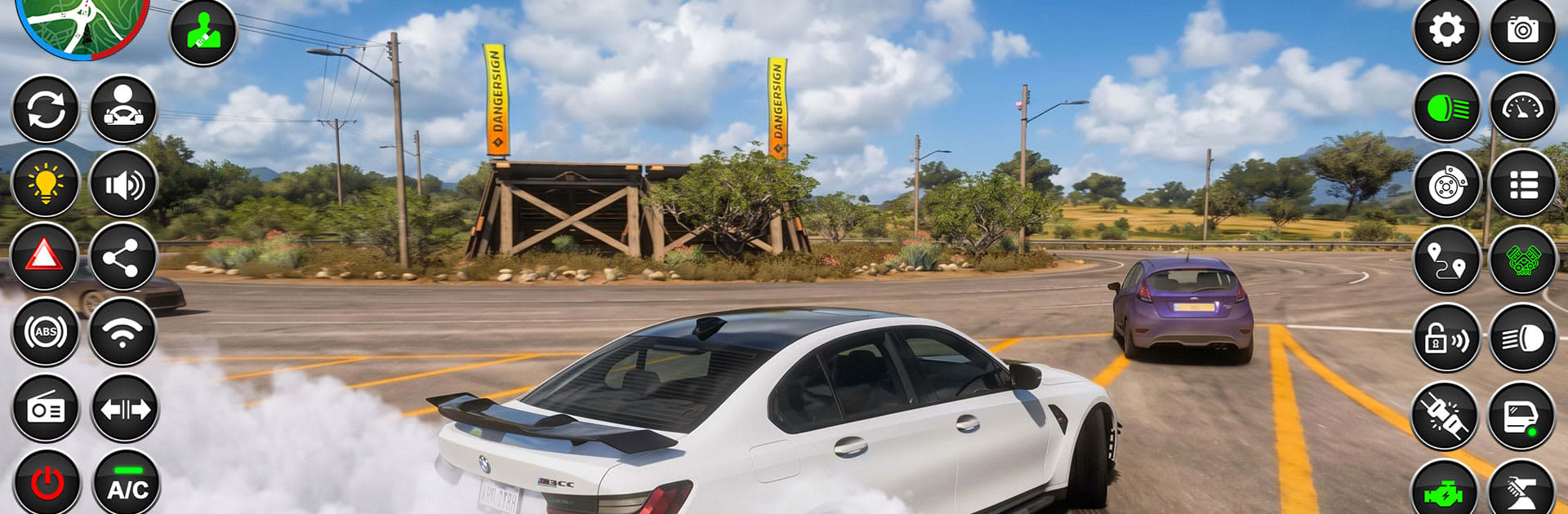
Car Drift Racing Game 3D Drift is a Simulation built for drivers who live for clean lines, long slides, and tight control. You’ll swing modern cars through city streets and highways, nail clutch drifts, and chase that perfect exit with a quick hit of nitro. Prefer a steadier setup? It also plays smoothly on BlueStacks without getting in your way.

Game Features

  • Realistic Drift Physics: Feel the car’s weight shift, break traction predictably, and hold countersteer as you link corners.
  • Smooth, Responsive Controls: Steering, throttle, and handbrake react instantly so you can correct, feather, and commit with confidence.
  • Nitro Boost on Tap: Kick in extra speed to power out of bends or close the gap on long straights.
  • 12 Handcrafted Challenges: Tackle a set of distinct stages with unique goals that test timing, precision, and control.
  • City Streets and Highways: Move from tight downtown hairpins to fast ramps and open routes that keep runs fresh.
  • Modern Performance Cars: Choose from contemporary drift-ready machines that slide easily yet stay manageable.
  • Dynamic Camera Views: Swap angles to judge distance, angle, and proximity for cleaner entries and exits.
  • HD Visuals and Effects: Crisp environments, vivid smoke, and slick reflections make every slide look sharp.
  • Authentic Audio: Grunty engines, turbo whoosh, and tire squeal sell every flick, dab of brake, and throttle stab.
  • Offline-Friendly Play: Jump in for a quick session anytime, no connection required.
  • Learnable Yet Demanding: New players get a gentle ramp-up, while veterans can chase perfect angles and long link-ups.

BlueStacks gives you more room to focus on the game and less time adjusting around mobile limitations.


Game Features

Enhancements

  • Macros
  • Multi Instance
  • Multi Instance Sync
  • Script
  • Enhancements
Macros

Macros

Automate the predictable in Car Drift Racing Game 3D Drift and transform your gameplay with Macros. Get access to inventive Macros in the BlueStacks Macro Community
Multi Instance

Multi Instance

Play Car Drift Racing Game 3D Drift on one window. And chat with your friend on the other. Press CTRL + Shift + 8 to open the Multi-Instance Manager. And start creating fresh instances or clone an existing one.
Multi Instance Sync

Multi Instance Sync

Play Car Drift Racing Game 3D Drift with the power of Multi-Instance Sync. Replicate what you are doing on the main instance on all other instances. Level up faster, play more.
Script

Script

Script your way to gaming glory in Car Drift Racing Game 3D Drift with BlueStacks Script. Write and run a set of commands to automate repeated tasks. Trigger the command by assigning it to any key.
Read More

How to Download and Play Car Drift Racing Game 3D Drift on PC or Mac

  • Download and install BlueStacks on your PC or Mac

  • Complete Google sign-in to access the Play Store, or do it later

  • Look for Car Drift Racing Game 3D Drift in the search bar at the top right corner

  • Click to install Car Drift Racing Game 3D Drift from the search results

  • Complete Google sign-in (if you skipped step 2) to install Car Drift Racing Game 3D Drift

  • Click the Car Drift Racing Game 3D Drift icon on the home screen to start playing

video
Watch Video

Minimum System Requirements

With BlueStacks 5, you can get started on a PC that fulfills the following requirements.

  • Operating System

    Microsoft Windows 7 or above, macOS 11 (Big Sur) or above

  • Processor

    Intel, AMD or Apple Silicon Processor

  • RAM

    at least 4GB

  • HDD

    10GB Free Disk Space

Note:

* You must be an Administrator on your PC. Up to date graphics drivers from Microsoft or the chipset vendor.

Car Drift Racing Game 3D Drift - FAQs

  • How to play Car Drift Racing Game 3D Drift on Windows PC & Mac?

    Play Car Drift Racing Game 3D Drift on your PC or Mac by following these simple steps.

    • Click on 'Play Car Drift Racing Game 3D Drift on PC’ to download BlueStacks
    • Install it and log-in to Google Play Store
    • Launch and play the game.
  • Why is BlueStacks the fastest and safest platform to play games on PC?

    BlueStacks respects your privacy and is always safe and secure to use. It does not carry any malware, spyware, or any sort of additional software that could harm your PC.

    It is engineered to optimize speed and performance for a seamless gaming experience.

  • What are Car Drift Racing Game 3D Drift PC requirements?

    Minimum requirement to run Car Drift Racing Game 3D Drift on your PC

    • OS: Microsoft Windows 7 or above MacOS 11 (Big Sur) or above
    • Processor: Intel, AMD or Apple Silicon Processor
    • RAM: Your PC must have at least 4GB of RAM. (Note that having 4GB or more disk space is not a substitute for RAM)
    • HDD: 10GB Free Disk Space.
    • You must be an Administrator on your PC.