Car Simulator: Driving Game

Car Simulator: Driving Game

Simulation

| Uchiha Global

Play on PC with BlueStacks or from our cloud

  • Overview
  • Game Features
  • How to Play

Page Modified On: December 05, 2025

Play Car Simulator: Driving Game on PC or Mac

Step into the World of Car Simulator: Driving Game, a thrilling Simulation game from the house of Uchiha Global. Play this Android game on BlueStacks App Player and experience immersive gaming on PC or Mac.

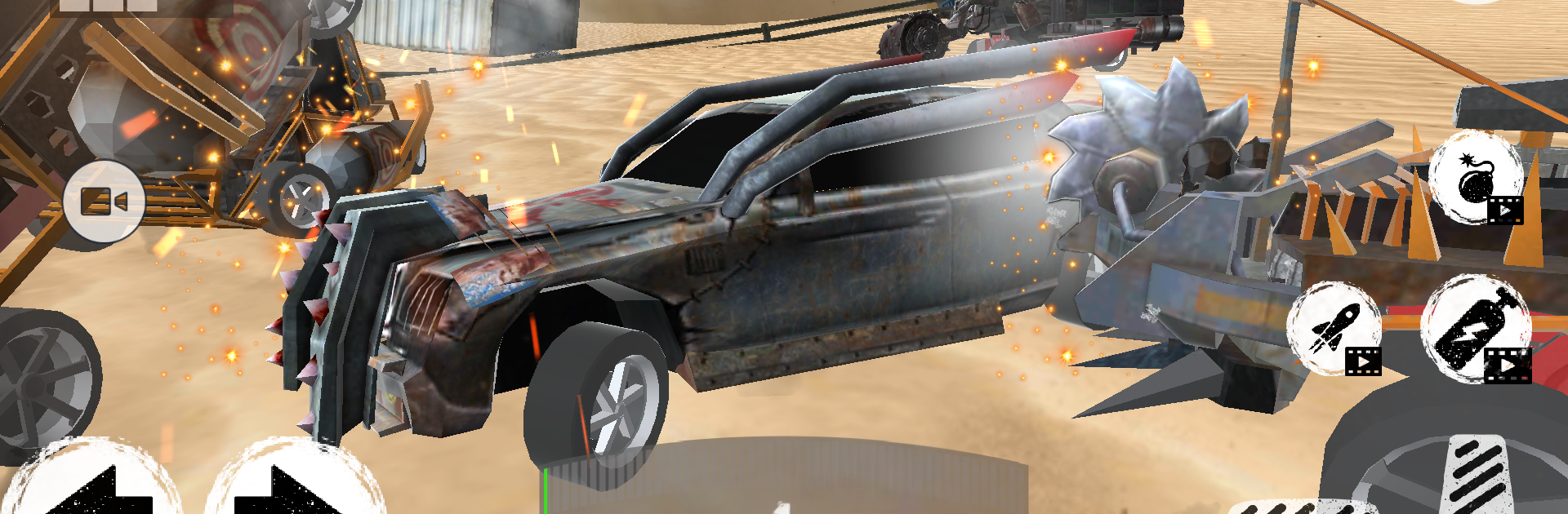
Car Simulator: Driving Game looks like a straight driving sim at first, but it leans hard into demolition and arena battles. It throws the player into compact maps where the whole point is to slam into other cars, spin them out, and survive the mess. The physics sell it. Hits feel weighty, bodies crunch, tires skid, and a beat up car starts to pull to one side or cough smoke, so every impact matters. There is a racing side in some modes, but the real fun sits in those smash up rounds where being the last car moving feels like a win that was earned.

The garage is big, over forty vehicles, with the obvious muscle cars and a few silly tanks like monster trucks. Progression is simple but satisfying. Earn parts, tune armor, bump engine power, and tweak speed so the chosen ride suits a wild derby or a faster lap focused match. The game keeps tossing new arenas and unlocks, plus a leaderboard that pushes players to go one more run. On PC with BlueStacks, the controls feel steadier with a keyboard or a pad, and the camera is easier to keep in check, which helps in those pileups when vision gets messy. It is great for short sessions, loud crashes, and anyone who enjoys car chaos without a big learning curve. Players wanting deep sim handling or a huge open world may not find that here, but wreck fans will get a lot to chew on. Regular updates bring more cars and modes, so the loop keeps fresh without needing a ton of grind.

Start your journey now. Download the game on BlueStacks, invite your friends, and march on a new adventure.


Game Features

Enhancements

  • Macros
  • Multi Instance
  • Multi Instance Sync
  • Script
  • Enhancements
Macros

Macros

Automate the predictable in Car Simulator: Driving Game and transform your gameplay with Macros. Get access to inventive Macros in the BlueStacks Macro Community
Multi Instance

Multi Instance

Play Car Simulator: Driving Game on one window. And chat with your friend on the other. Press CTRL + Shift + 8 to open the Multi-Instance Manager. And start creating fresh instances or clone an existing one.
Multi Instance Sync

Multi Instance Sync

Play Car Simulator: Driving Game with the power of Multi-Instance Sync. Replicate what you are doing on the main instance on all other instances. Level up faster, play more.
Script

Script

Script your way to gaming glory in Car Simulator: Driving Game with BlueStacks Script. Write and run a set of commands to automate repeated tasks. Trigger the command by assigning it to any key.
Read More

How to Download and Play Car Simulator: Driving Game on PC or Mac

  • Download and install BlueStacks on your PC or Mac

  • Complete Google sign-in to access the Play Store, or do it later

  • Look for Car Simulator: Driving Game in the search bar at the top right corner

  • Click to install Car Simulator: Driving Game from the search results

  • Complete Google sign-in (if you skipped step 2) to install Car Simulator: Driving Game

  • Click the Car Simulator: Driving Game icon on the home screen to start playing

video
Watch Video

Minimum System Requirements

With BlueStacks 5, you can get started on a PC that fulfills the following requirements.

  • Operating System

    Microsoft Windows 7 or above, macOS 11 (Big Sur) or above

  • Processor

    Intel, AMD or Apple Silicon Processor

  • RAM

    at least 4GB

  • HDD

    10GB Free Disk Space

Note:

* You must be an Administrator on your PC. Up to date graphics drivers from Microsoft or the chipset vendor.

Car Simulator: Driving Game - FAQs

  • How to play Car Simulator: Driving Game on Windows PC & Mac?

    Play Car Simulator: Driving Game on your PC or Mac by following these simple steps.

    • Click on 'Play Car Simulator: Driving Game on PC’ to download BlueStacks
    • Install it and log-in to Google Play Store
    • Launch and play the game.
  • Why is BlueStacks the fastest and safest platform to play games on PC?

    BlueStacks respects your privacy and is always safe and secure to use. It does not carry any malware, spyware, or any sort of additional software that could harm your PC.

    It is engineered to optimize speed and performance for a seamless gaming experience.

  • What are Car Simulator: Driving Game PC requirements?

    Minimum requirement to run Car Simulator: Driving Game on your PC

    • OS: Microsoft Windows 7 or above MacOS 11 (Big Sur) or above
    • Processor: Intel, AMD or Apple Silicon Processor
    • RAM: Your PC must have at least 4GB of RAM. (Note that having 4GB or more disk space is not a substitute for RAM)
    • HDD: 10GB Free Disk Space.
    • You must be an Administrator on your PC.