Desi Farming Indian Tractor 3D

Desi Farming Indian Tractor 3D

Simulation

| Crazy Crew Studio

Play on PC with BlueStacks or from our cloud

  • Overview
  • Game Features
  • How to Play

Page Modified On: May 05, 2026

Play Desi Farming Indian Tractor 3D on PC or Mac

Explore a whole new adventure with Desi Farming Indian Tractor 3D, a Simulation game created by Crazy Crew Studio. Experience great gameplay with BlueStacks, the most popular gaming platform to play Android games on your PC or Mac.

About the Game

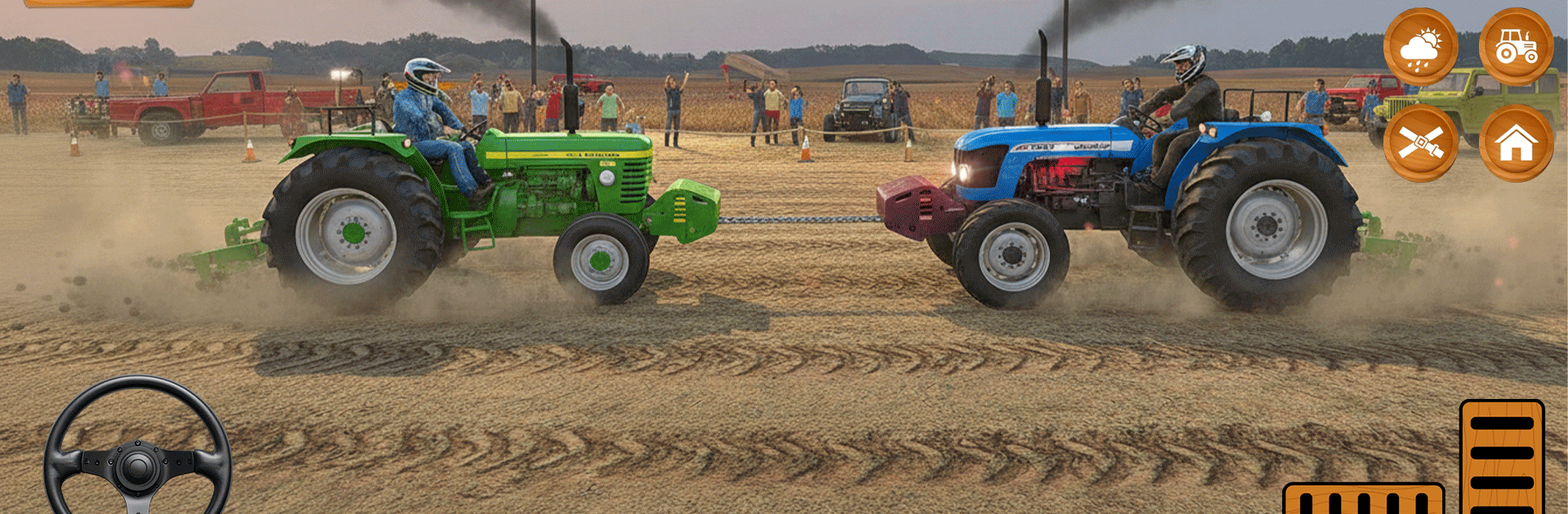
Desi Farming Indian Tractor 3D puts you in the driver’s seat of a hard-working tractor and hands you the keys to a peaceful rural life. It’s a hands-on Simulation from Crazy Crew Studio where you’ll prep fields, grow crops, and haul your harvest across roomy village roads. Want a bigger screen and comfy controls? You can also play on PC with BlueStacks.

Game Features

  • Authentic village setting: Wander through lush fields, quiet dirt lanes, and detailed rural hubs that feel straight out of the Indian countryside.
  • True-to-life tractor handling: Feel the weight, traction, and pull of your machine with responsive steering, smooth controls, and believable physics.
  • The full farming cycle: Plow the soil, plant your seeds, irrigate properly, and bring in the harvest—step by step, like a real farm routine.
  • Iconic machines to drive: Work with the 575 Mahindra tractor and check out models inspired by the 5911 lineup, each built for different jobs around the farm.
  • Trolley hauling missions: Hook up your trolley to move grain, tools, and produce; plan your routes and keep your cargo steady over bumps and turns.
  • Mission-based progression: Tackle a steady flow of objectives that test driving precision, timing, and farm management skills without feeling grindy.
  • Upgrades and unlocks: Earn better tractors and useful add-ons to speed up fieldwork and handle tougher assignments.
  • Realistic soundscape: Engine rumbles, mechanical clanks, and field ambience come together to sell the farming vibe.
  • Offline play anytime: No connection? No problem. Keep your farm running and your deliveries rolling even when you’re offline.

Slay your opponents with your epic moves. Play it your way on BlueStacks and dominate the battlefield.


Game Features

Enhancements

  • Macros
  • Multi Instance
  • Multi Instance Sync
  • Script
  • Enhancements
Macros

Macros

Automate the predictable in Desi Farming Indian Tractor 3D and transform your gameplay with Macros. Get access to inventive Macros in the BlueStacks Macro Community
Multi Instance

Multi Instance

Play Desi Farming Indian Tractor 3D on one window. And chat with your friend on the other. Press CTRL + Shift + 8 to open the Multi-Instance Manager. And start creating fresh instances or clone an existing one.
Multi Instance Sync

Multi Instance Sync

Play Desi Farming Indian Tractor 3D with the power of Multi-Instance Sync. Replicate what you are doing on the main instance on all other instances. Level up faster, play more.
Script

Script

Script your way to gaming glory in Desi Farming Indian Tractor 3D with BlueStacks Script. Write and run a set of commands to automate repeated tasks. Trigger the command by assigning it to any key.
Read More

How to Download and Play Desi Farming Indian Tractor 3D on PC or Mac

  • Download and install BlueStacks on your PC or Mac

  • Complete Google sign-in to access the Play Store, or do it later

  • Look for Desi Farming Indian Tractor 3D in the search bar at the top right corner

  • Click to install Desi Farming Indian Tractor 3D from the search results

  • Complete Google sign-in (if you skipped step 2) to install Desi Farming Indian Tractor 3D

  • Click the Desi Farming Indian Tractor 3D icon on the home screen to start playing

video
Watch Video

Minimum System Requirements

With BlueStacks 5, you can get started on a PC that fulfills the following requirements.

  • Operating System

    Microsoft Windows 7 or above, macOS 11 (Big Sur) or above

  • Processor

    Intel, AMD or Apple Silicon Processor

  • RAM

    at least 4GB

  • HDD

    10GB Free Disk Space

Note:

* You must be an Administrator on your PC. Up to date graphics drivers from Microsoft or the chipset vendor.

Desi Farming Indian Tractor 3D - FAQs

  • How to play Desi Farming Indian Tractor 3D on Windows PC & Mac?

    Play Desi Farming Indian Tractor 3D on your PC or Mac by following these simple steps.

    • Click on 'Play Desi Farming Indian Tractor 3D on PC’ to download BlueStacks
    • Install it and log-in to Google Play Store
    • Launch and play the game.
  • Why is BlueStacks the fastest and safest platform to play games on PC?

    BlueStacks respects your privacy and is always safe and secure to use. It does not carry any malware, spyware, or any sort of additional software that could harm your PC.

    It is engineered to optimize speed and performance for a seamless gaming experience.

  • What are Desi Farming Indian Tractor 3D PC requirements?

    Minimum requirement to run Desi Farming Indian Tractor 3D on your PC

    • OS: Microsoft Windows 7 or above MacOS 11 (Big Sur) or above
    • Processor: Intel, AMD or Apple Silicon Processor
    • RAM: Your PC must have at least 4GB of RAM. (Note that having 4GB or more disk space is not a substitute for RAM)
    • HDD: 10GB Free Disk Space.
    • You must be an Administrator on your PC.