FIFA Panini Collection

FIFA Panini Collection

Simulation

| Developr

Play on PC with BlueStacks or from our cloud

  • Overview
  • Tips & Tricks
  • Game Features
  • How to Play

Page Modified On: June 26, 2026

Play FIFA Panini Collection on PC or Mac

FIFA Panini Collection brings the Simulation genre to life, and throws up exciting challenges for gamers. Developed by Developr, this Android game is best experienced on BlueStacks, the World’s #1 app player for PC and Mac users.

About the Game

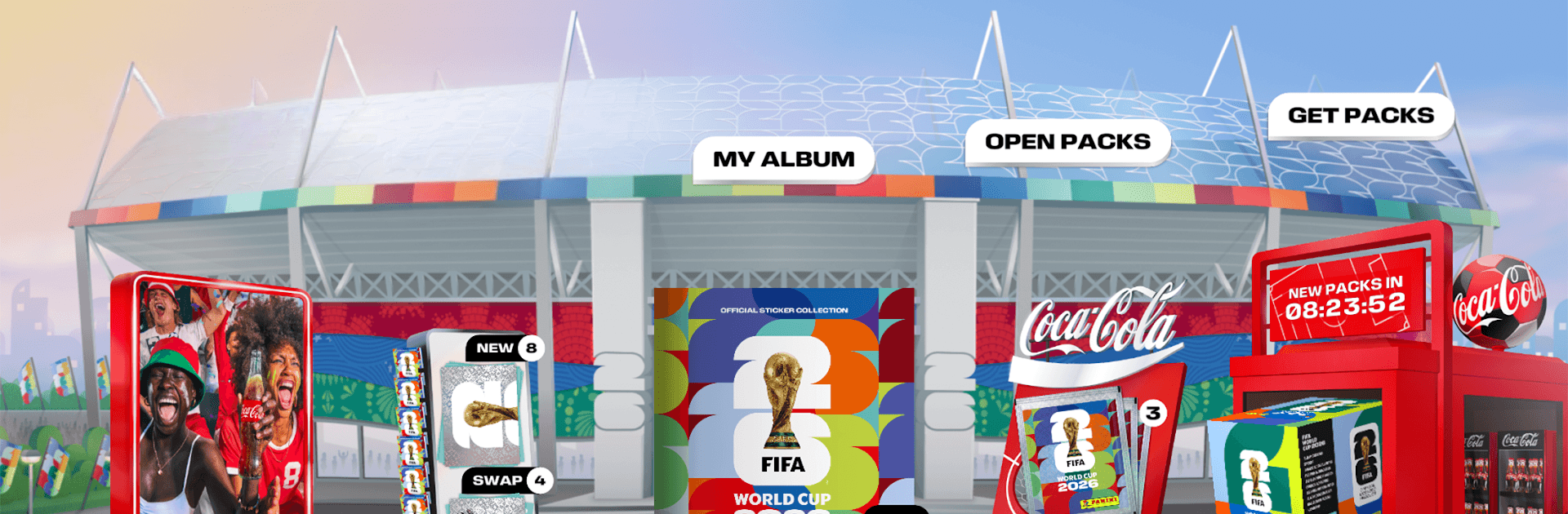
FIFA Panini Collection brings the classic thrill of collecting football stickers to your screen, without losing any of the charm. This Simulation recreates the ritual—rip open a pack, find a star, place it in your album, trade the extras—only now it’s interactive and always with you. You’ll build a full national-team album, chase special stickers, and watch your collection grow piece by piece.

Game Features

  • Digital packs, real nostalgia: Tear into satisfying digital packs packed with players, team logos, mascots, trophies, and eye-catching special stickers.
  • Interactive album: Slot each sticker into a dynamic album with sections for every national team, including all 48 squads and hundreds of players.
  • Smart progress tracking: See what you’ve got, what you’re missing, and how close you are to a full page or set with clean, at-a-glance stats.
  • Global swapping: Got duplicates? Trade with collectors around the world using intuitive tools that make fair swaps quick and painless.
  • Build your Dream Team: Pick your favorites and assemble a custom lineup from your collection—show it off or tweak it as new stars arrive.
  • Challenges and badges: Tackle themed objectives and grab badges that spotlight your collecting style and milestones.
  • Team up with friends: Create or join a group to coordinate trades, compare progress, and keep each other motivated to complete the album.
  • Code redemption: Boost your stash by redeeming codes from physical packs and official promotions—scan on mobile or enter them on desktop.
  • Deluxe packs option: Want bigger hauls? Deluxe bundles offer larger pack sizes, exclusive effect stickers, and unique poster pieces.
  • Play your way: Enjoy the collection on your phone, or go bigger on PC with BlueStacks for smooth controls and a wider view.

Get ready for a buttery smooth, high-performance gaming action only on BlueStacks.

Game Features

Enhancements

  • Macros
  • Multi Instance
  • Multi Instance Sync
  • Script
  • Enhancements
Macros

Macros

Automate the predictable in FIFA Panini Collection and transform your gameplay with Macros. Get access to inventive Macros in the BlueStacks Macro Community
Multi Instance

Multi Instance

Play FIFA Panini Collection on one window. And chat with your friend on the other. Press CTRL + Shift + 8 to open the Multi-Instance Manager. And start creating fresh instances or clone an existing one.
Multi Instance Sync

Multi Instance Sync

Play FIFA Panini Collection with the power of Multi-Instance Sync. Replicate what you are doing on the main instance on all other instances. Level up faster, play more.
Script

Script

Script your way to gaming glory in FIFA Panini Collection with BlueStacks Script. Write and run a set of commands to automate repeated tasks. Trigger the command by assigning it to any key.
Read More

How to Download and Play FIFA Panini Collection on PC or Mac

  • Download and install BlueStacks on your PC or Mac

  • Complete Google sign-in to access the Play Store, or do it later

  • Look for FIFA Panini Collection in the search bar at the top right corner

  • Click to install FIFA Panini Collection from the search results

  • Complete Google sign-in (if you skipped step 2) to install FIFA Panini Collection

  • Click the FIFA Panini Collection icon on the home screen to start playing

video
Watch Video

Minimum System Requirements

With BlueStacks 5, you can get started on a PC that fulfills the following requirements.

  • Operating System

    Microsoft Windows 7 or above, macOS 11 (Big Sur) or above

  • Processor

    Intel, AMD or Apple Silicon Processor

  • RAM

    at least 4GB

  • HDD

    10GB Free Disk Space

Note:

* You must be an Administrator on your PC. Up to date graphics drivers from Microsoft or the chipset vendor.

FIFA Panini Collection - FAQs

  • How to play FIFA Panini Collection on Windows PC & Mac?

    Play FIFA Panini Collection on your PC or Mac by following these simple steps.

    • Click on 'Play FIFA Panini Collection on PC’ to download BlueStacks
    • Install it and log-in to Google Play Store
    • Launch and play the game.
  • Why is BlueStacks the fastest and safest platform to play games on PC?

    BlueStacks respects your privacy and is always safe and secure to use. It does not carry any malware, spyware, or any sort of additional software that could harm your PC.

    It is engineered to optimize speed and performance for a seamless gaming experience.

  • What are FIFA Panini Collection PC requirements?

    Minimum requirement to run FIFA Panini Collection on your PC

    • OS: Microsoft Windows 7 or above MacOS 11 (Big Sur) or above
    • Processor: Intel, AMD or Apple Silicon Processor
    • RAM: Your PC must have at least 4GB of RAM. (Note that having 4GB or more disk space is not a substitute for RAM)
    • HDD: 10GB Free Disk Space.
    • You must be an Administrator on your PC.