Flight Simulator 2017 FlyWings Free

Flight Simulator 2017 FlyWings Free

Simulation

| Thetis Games and Flight Simulators

Play on PC with BlueStacks or from our cloud

  • Overview
  • Game Features
  • How to Play

Page Modified On: November 10, 2025

Play Flight Simulator 2017 FlyWings Free on PC or Mac

Step into the World of Flight Simulator 2017 FlyWings Free, a thrilling Simulation game from the house of Thetis Games and Flight Simulators. Play this Android game on BlueStacks App Player and experience immersive gaming on PC or Mac.

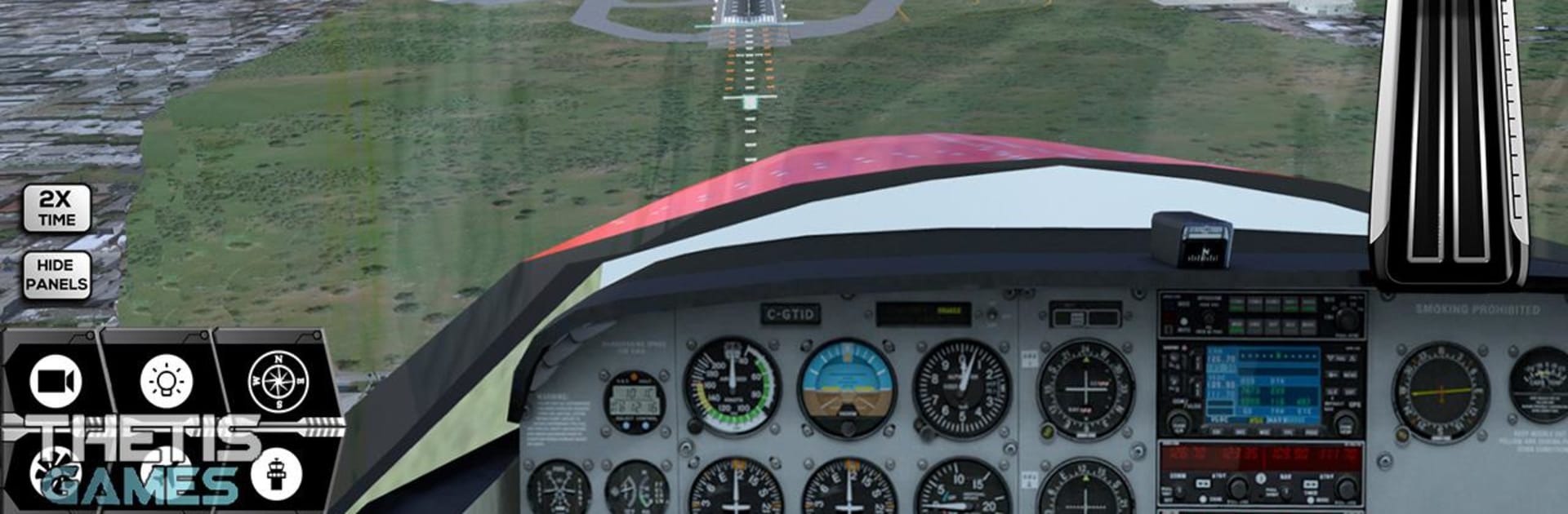
Flight Simulator 2017 FlyWings feels like a giant sandbox for plane nerds and curious newcomers. It throws a ridiculous number of aircraft at the player, from small props and aerobatic toys to helicopters and jet fighters, and most of them come with airline-style paint so flights look legit on the runway. There are piles of missions and a ton of airports spread across well known cities like New York, Los Angeles, Chicago, Seattle, and even Saint Martin. Cities are not empty backdrops either, there are buildings, terminals, taxi lines, gates, the whole airport look, plus runway lights and PAPI guides so landings do not feel like guesswork. The sim lets the player fiddle with nearly everything that matters to a flight: visibility, wind direction, turbulence, temperature, time of day, storms with lightning and heavy rain. A quick GPS tool lets someone sketch a route, or just fly free. There is air and ground traffic buzzing around, nine cameras to swap through, and an autopilot that handles speed, altitude, vertical speed, and heading when the hands need a break.

What stands out is the amount of control. Engines can be started or shut down, flaps and trim have real effects, spoilers and gear matter, fuel and weight change how the plane feels, and the cockpit switches for lights like strobe or landing are there to tap. It plays more sim than arcade, though not so hardcore that it locks people out. On PC with BlueStacks, mapping keys for flaps, gear, and camera switches makes the busy cockpit way easier to manage, and the mouse helps with those tiny buttons that phones make a pain. Graphics show their age in spots, but the aircraft models hold up and the sense of lining up a runway in rough weather is solid. If someone likes shorter hops between nearby airports or wants to test crosswind landings for an hour, it supports both, and that flexibility is really the hook here.

Start your journey now. Download the game on BlueStacks, invite your friends, and march on a new adventure.


Game Features

Enhancements

  • Macros
  • Multi Instance
  • Multi Instance Sync
  • Script
  • Enhancements
Macros

Macros

Automate the predictable in Flight Simulator 2017 FlyWings Free and transform your gameplay with Macros. Get access to inventive Macros in the BlueStacks Macro Community
Multi Instance

Multi Instance

Play Flight Simulator 2017 FlyWings Free on one window. And chat with your friend on the other. Press CTRL + Shift + 8 to open the Multi-Instance Manager. And start creating fresh instances or clone an existing one.
Multi Instance Sync

Multi Instance Sync

Play Flight Simulator 2017 FlyWings Free with the power of Multi-Instance Sync. Replicate what you are doing on the main instance on all other instances. Level up faster, play more.
Script

Script

Script your way to gaming glory in Flight Simulator 2017 FlyWings Free with BlueStacks Script. Write and run a set of commands to automate repeated tasks. Trigger the command by assigning it to any key.
Read More

How to Download and Play Flight Simulator 2017 FlyWings Free on PC or Mac

  • Download and install BlueStacks on your PC or Mac

  • Complete Google sign-in to access the Play Store, or do it later

  • Look for Flight Simulator 2017 FlyWings Free in the search bar at the top right corner

  • Click to install Flight Simulator 2017 FlyWings Free from the search results

  • Complete Google sign-in (if you skipped step 2) to install Flight Simulator 2017 FlyWings Free

  • Click the Flight Simulator 2017 FlyWings Free icon on the home screen to start playing

video
Watch Video

Minimum System Requirements

With BlueStacks 5, you can get started on a PC that fulfills the following requirements.

  • Operating System

    Microsoft Windows 7 or above, macOS 11 (Big Sur) or above

  • Processor

    Intel, AMD or Apple Silicon Processor

  • RAM

    at least 4GB

  • HDD

    10GB Free Disk Space

Note:

* You must be an Administrator on your PC. Up to date graphics drivers from Microsoft or the chipset vendor.

Flight Simulator 2017 FlyWings Free - FAQs

  • How to play Flight Simulator 2017 FlyWings Free on Windows PC & Mac?

    Play Flight Simulator 2017 FlyWings Free on your PC or Mac by following these simple steps.

    • Click on 'Play Flight Simulator 2017 FlyWings Free on PC’ to download BlueStacks
    • Install it and log-in to Google Play Store
    • Launch and play the game.
  • Why is BlueStacks the fastest and safest platform to play games on PC?

    BlueStacks respects your privacy and is always safe and secure to use. It does not carry any malware, spyware, or any sort of additional software that could harm your PC.

    It is engineered to optimize speed and performance for a seamless gaming experience.

  • What are Flight Simulator 2017 FlyWings Free PC requirements?

    Minimum requirement to run Flight Simulator 2017 FlyWings Free on your PC

    • OS: Microsoft Windows 7 or above MacOS 11 (Big Sur) or above
    • Processor: Intel, AMD or Apple Silicon Processor
    • RAM: Your PC must have at least 4GB of RAM. (Note that having 4GB or more disk space is not a substitute for RAM)
    • HDD: 10GB Free Disk Space.
    • You must be an Administrator on your PC.